Electronics / Monitors
User Manual for Victor 1212-3A Printing Calculator
Quick guide for the Victor 1212-3A printing calculator. Learn how to load paper, replace the ink roller, set the date and time, and use advanced calculation functions like tax and memory.
Table of contents
Manual images
Click an image to enlargeQuick guide from the manual
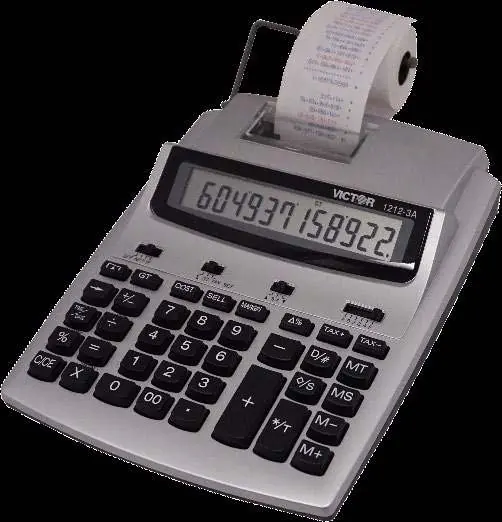
The Victor 1212-3A is a 12-digit printing calculator. It can be powered by an AC adapter or four AA batteries. Important: Do not press any keys when the printer is on and there is no paper loaded, as this can damage the print head. Always ensure the paper holder is in position and paper is loaded before operating the printer.
Device description
The calculator features a large LCD display, a 2-color printing system (black for positive, red for negative), and various calculation modes including tax, cost/sell/margin, and memory functions. It also includes a calendar and clock feature.
Preparation and setup
Power Source: The unit operates on an AC adapter (6V DC, 300mA or 400mA) or four AA manganese dry batteries (UM-3).


Loading Paper:
- Place the paper holder into position.
- Install the paper roll onto the holders.
- Insert the paper end into the printer slot.
- Press the paper feed key to feed the paper to an adequate length.
Replacing the ink roller
If printing becomes faint, replace the ink roller (model IR-40T):
- Turn the power off.
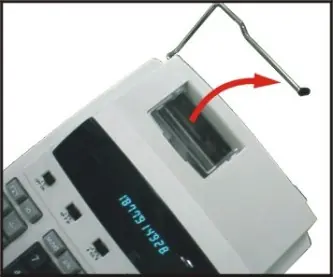
- Open the printer cover.
- Remove the old ink roller by pulling it up.
- Insert the new IR-40T ink roller into the compartment and press it down gently until it snaps into place.
Key identification and switches
The calculator includes several slide switches to control operation:
- OFF/NP/P/IP: Controls power and printer modes (Printer OFF, Printer ON, or Printer item count mode).
- ∑/GT/TAX SET: Controls the Grand Total memory and tax rate setting.
- ▲5/4▼: Sets rounding mode (Round up, Round off, Round down).
- A 0 2 3 4 F: Sets decimal point mode (Accountant, Fixed 0, 2, 3, 4, or Floating).
Date and time functions
To set the date and time:
- Press TIME/DATE and then SET.
- Enter the month, date, and year using the number keys.
- Press SET to confirm.
- Press TIME/DATE and then SET again to enter the time.
- Use the 12/24 key to toggle between 12-hour and 24-hour formats.
- Press AM/PM to toggle morning/afternoon, then press SET to confirm.
Troubleshooting
If the display malfunctions or memory contents are lost due to electromagnetic interference or electrostatic discharge, use a sharp object (like a ballpoint pen) to press the RESET button located on the bottom of the calculator. After resetting, you must re-set the tax rate, time, and date.
Technical specifications
- Display: 12 digits, large LCD
- Printing Speed: 2.4 lines/sec
- Printing Paper: 58mm width
- Ink Roller: IR-40T
- Dimensions: 260mm x 198mm x 65mm
- Weight: 660g
Contact information
Corporate Office and National Service Center: Victor Technology, 100 E. Crossroads Parkway, Suite C, Bolingbrook, IL 60440. Phone: 630-754-4400. Website: www.victortech.com
Official resources from the manual
Manufacturer information
Victor Technology, LLC
Practical help
Common problems
Printing is faint
Replace the ink roller with a new IR-40T.
Display malfunction or memory loss
Press the [RESET] button on the bottom of the calculator with a sharp object.
Memory lost
Occurs if the power cord is disconnected from the AC source; date/time must be re-set.
Before use
- Ensure paper holder is in position.
- Install paper roll on holders.
- Insert paper end into printer slot.
- Feed paper using the paper feed key.
- Check power source (AC adapter or 4x AA batteries).
Specs in practice
- Printing Speed
- 2.4 lines per second.
- Ambient Temperature
- Operating range is 0°C to 40°C.
Images and diagrams
- Fig I: Placing the paper holder into position.
- Fig II: Inserting the paper end into the printer slot.
- Fig III: Opening the printer cover.
- Fig IV: Removing and replacing the ink roller.
Model compatibility
- Compatible with IR-40T ink rollers.
- Uses standard 58mm width printing paper.

Manual page author
David Miller
Documentation analyst
Organizes user manual content into clear summaries, with attention to model details, product context, and everyday usability.