Home / Pest Control
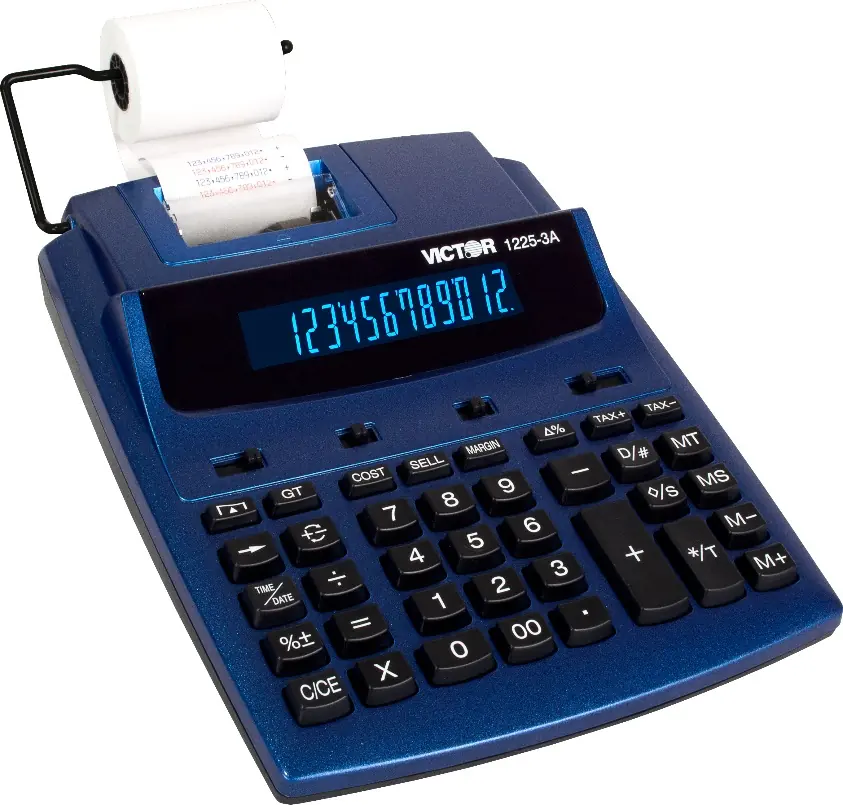
Victor 1225-3A Printing Calculator
Quick guide for the Victor 1225-3A printing calculator. Learn how to load paper, replace the ink roller, set the date and time, and use advanced calculation functions.
Table of contents
Manual images
Click an image to enlargeQuick Guide
The Victor 1225-3A is a 12-digit printing calculator designed for commercial use. It features a 2-color printing system, tax calculation, memory functions, and a built-in calendar and clock. The device enters sleep mode after 5 minutes of inactivity; press the C/CE key for 5 seconds to wake it.
Preparation
Power Source: The unit operates on AC power. Ensure the power is in the ON position to print.
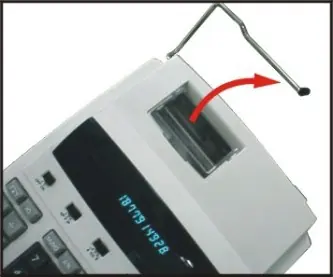
Loading Paper:
- Place the paper holders into position.
- Install the paper roll onto the holders.
- Insert the paper end into the printer slot.
- Press the paper feed key to advance the paper to the desired length.
Replacing the Ink Roller
If printing becomes faint, replace the ink roller (Model MS37901):
- Turn the power off.
- Open the printer cover.
- Pull the old ink roller up to remove it.
- Insert the new MS37901 ink roller into the compartment and press down until it snaps into place.
Key Identification and Settings
Switches:
- OFF NP P IP: Controls printer status (OFF, Printer ON, or Printer Item Count mode).
- Decimal Switch (A 0 2 3 4 F): Sets the decimal point mode (Accountant, Fixed 0-4, or Floating).
- Rounding Switch (▲ 5/4 ▼): Selects rounding method (Up, Off/Standard, or Down).
Tax Functions: Use [TAX+] to add tax based on a stored rate, and [TAX-] to deduct tax.
Date and Time Settings
- Press [TIME/DATE] and then [SET]. The month will flash.
- Enter the month (MM) using number keys.
- Enter the date (DD) using number keys.
- Enter the year (YYYY) using number keys.
- Press [SET] to confirm.
- To set time, press [TIME/DATE] then [SET], enter the time, and use [12/24] to toggle clock modes. Use [AM/PM] to set morning/afternoon.
Maintenance and Troubleshooting
Reset: If the display malfunctions or memory is corrupted due to electromagnetic interference, use a sharp object to press the [RESET] button on the bottom of the calculator. You will need to re-set the tax rate, time, and date.
Battery Replacement: The unit uses a CR 2032 lithium battery for memory backup. Remove the three screws on the back cover, separate the halves, and replace the battery with the positive (+) side facing up.
Manufacturer information
Victor Technology, LLC
Practical help
Common problems
Printing is faint
Replace the ink roller (Model MS37901).
Display malfunctions or memory lost
Press the [RESET] button on the bottom of the unit using a sharp object.
Calculator does not respond
If it has been inactive for 5 minutes, it is in sleep mode. Press the C/CE key for 5 seconds to wake it.
Before use
- Ensure the paper roll is correctly installed.
- Set the printer switch (NP/P/IP) to the desired mode.
- Set the decimal switch (A/0/2/3/4/F) according to your needs.
- Set the rounding switch (▲/5/4/▼) as required.
- Ensure the unit is connected to an AC power source.
Specs in practice
- Printing Speed
- 2.03 lines per second.
- Power Consumption
- 4.5W.
Images and diagrams
- Fig I: Installing paper holders.
- Fig II: Inserting paper into the printer slot.
- Fig III: Opening the printer cover for ink roller access.
- Fig IV: Removing and installing the ink roller.
Model compatibility
- Ink Roller: MS37901.
- Backup Battery: CR 2032.

Manual page author
Michael Turner
Technical manual editor
Reviews PDF manuals for structure, safety notes, and practical product details so readers can find the right information quickly.