Hvac / Heat Pumps
Operating Instructions for Viessmann Vitodens 050-W Gas Boiler
Quick guide for the Viessmann Vitodens 050-W wall-mounted gas boiler. Learn how to operate the control unit, adjust heating and hot water settings, manage WiFi, and troubleshoot common faults.
Table of contents
Manual images
Jump to the sectionQuick guide from the manual
This document provides operating instructions for the Viessmann Vitodens 050-W wall-mounted gas boiler. The system is designed for domestic heating and domestic hot water (DHW) production. Key operations include adjusting heating temperatures, managing DHW settings, and monitoring system status via the integrated control unit. Always ensure the system pressure is maintained and contact an authorized contractor for any installation, maintenance, or repair work.
Safety instructions
Danger: Incorrectly executed work on the heating system can lead to life-threatening accidents. Work on gas or electrical installations must only be carried out by qualified professionals.
- If you smell gas: Do not smoke, do not switch lights or electrical appliances on or off. Close the gas shut-off valve, open windows and doors, evacuate the area, and notify your gas utility and heating contractor from outside the building.
- If you smell flue gas: Shut down the heating system, ventilate the room, and close all doors in the living space.
- If there is a fire: Shut down the heating system, close fuel supply valves, and use a class ABC fire extinguisher.
- Water leakage: If water escapes, switch off the heating system at the external isolator and notify your heating contractor.
- Installation room: Never cover or close ventilation vents. Ensure ambient temperatures are between 0 °C and 35 °C.
Operation and control unit
The control unit features a black/white screen with touch buttons. The display is divided into a function area (A) and a navigation area (B).
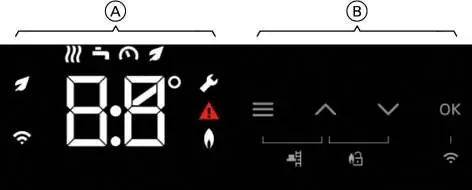
- Navigation area (B): Use the menu button to access the main menu, arrows to scroll or adjust values, and OK to confirm.
- Home screen: Tap any button to wake the display. Tap repeatedly to return to the home screen.
- Standby: The display backlighting switches off after approximately 2 minutes.
Central heating
You can adjust the central heating settings directly on the control unit.
- Switching on/off: Navigate to the default display showing the heating circuit symbol. Hold the arrow button for 4 seconds to switch on or off.
- Adjusting temperature: Navigate to the heating circuit display, select the temperature, and adjust using the arrow buttons. Confirm with OK.
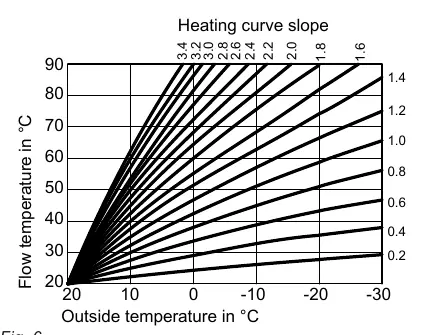
- Heating curve: This can be adjusted in weather-compensated mode to influence the flow temperature.
DHW heating
Domestic Hot Water (DHW) settings can be managed separately.
- Switching on/off: Navigate to the default display showing the DHW symbol. Hold the arrow button for 4 seconds to switch on or off.
- Adjusting temperature: Navigate to the DHW display, adjust the temperature, and confirm with OK. For hygiene reasons, it is recommended not to set the temperature below 50 °C.
- Eco function: Available for combi boilers, this can be set via the default display.
Further settings
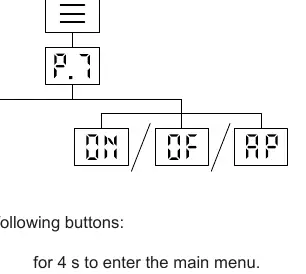
- Display: You can adjust brightness and standby mode in the main menu.
- WiFi: Use the ViCare app to establish an internet connection. WiFi can be switched on or off in the main menu (P.7).
- Low power radio: Can be switched on or off in the main menu (P.8) for wireless remote control connection.
Checks and troubleshooting
If a fault occurs, a warning symbol and a fault code will appear on the display.
- Checking fault messages: Access the main menu and navigate to the fault message section to view details.
- Burner reset: If the burner is locked out, follow the on-screen instructions to reset it. Do not reset the burner multiple times in quick succession.
- Operating data: You can check system data like temperatures, pump speed, and burner hours in the information menu (P.2).
Maintenance
Regular maintenance is essential for safe and efficient operation. The system should be serviced by an authorized contractor at least every 2 years.
- Cleaning: Use a commercially available, non-scouring domestic cleaning agent. Clean the programming unit surface with a microfibre cloth.
- Safety valve: The function of the safety valve on the DHW cylinder should be checked every six months.
- Potable water filter: If installed, replace the filter element every six months or back-flush every two months.
Manufacturer information
Viessmann Climate Solutions
Practical help
Common problems
Rooms are too cold
Check if the heating system is switched on. Ensure the ON/OFF switch is on and the mains isolator is active. If using a room temperature controller, set a higher temperature.
No hot water
Check if the heating system is switched on. Verify the DHW temperature setting on the control unit.
Fault code flashing on display
Note the fault code. If the burner is locked out, attempt a reset as described in the manual. If the fault persists, contact your heating contractor.
Rooms are too hot
Check and correct the room temperature or flow temperature settings on the control unit or room temperature controller.
Before use
- Ensure the gas shut-off valve is open.
- Check that the power supply to the system is switched on (e.g., at the fuse box).
- Verify that the system pressure is above 1.0 bar.
- Ensure the installation room has adequate ventilation.
- Check the appliance for any visible external damage.
Specs in practice
- Heating curve
- Defines the relationship between outside temperature and flow temperature. Higher slope means higher flow temperature for a given outside temperature.
- Flow temperature
- The temperature of the heating water as it leaves the boiler and enters the heating circuit.
Images and diagrams
- The control panel consists of a Function area (A) for status icons and a Navigation area (B) for buttons (Menu, Arrows, OK).
- Heating curve diagrams illustrate how flow temperature changes based on outside temperature and slope settings.
Model compatibility
- Requires an authorized contractor for initial commissioning and installation.
- Remote control via internet requires the ViCare app.
- Some settings for room temperature-dependent operation are limited when using an OpenTherm controller.

Manual page author
Emily Carter
User documentation editor
Prepares concise manual descriptions and highlights the most useful setup, operation, and maintenance information for readers.