Automotive / Towing Accessories
Warrior 12V Lithium Battery with Charger
Quick guide for the Warrior 12V Lithium Battery with Charger. Includes charging instructions, safety warnings, maintenance tips, and technical specifications.
Table of contents
Quick Guide
This manual provides essential safety and operating instructions for the Warrior 12V Lithium Battery and Charger. Always inspect the equipment before use and ensure the charging area is clean, well-lit, and fireproof. Do not use extension cords with this charger.
Safety Information
Charger Safety: The charger generates heat during use. Place it on a stable, non-flammable surface (like a metal workbench or concrete floor) at least 1 foot away from flammable objects. Do not cover the ventilation ducts. Keep the charger away from rain, wet conditions, and explosive atmospheres.
Battery Safety: Lithium batteries store a large amount of energy. Do not open, drop, short-circuit, puncture, incinerate, or expose the battery pack to temperatures above 140°F. If the battery pack is damaged, do not charge or use it.
Operating Instructions
1. Ensure the room temperature is between 50–104°F. If the battery is newly spent, allow it to cool completely before charging.
2. Examine the battery pack for damage. Do not charge if cracked, open, or leaking.
3. Plug the charger into a grounded 120VAC, 60Hz receptacle.
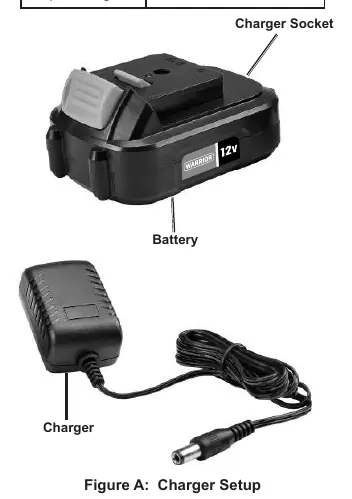
4. Connect the charger to the battery pack.
5. LED Indicators: The red LED will light continuously while charging. The light will turn green when the battery is fully charged.
6. Once charging is complete, unplug the charger and disconnect it from the battery pack to prevent overcharging.
Maintenance and Servicing
Before each use, inspect the charger for loose hardware, misalignment, cracked parts, or damaged wiring. After use, wipe external surfaces with a clean cloth. Do not attempt to open the charger or service internal parts; repairs must be performed by a qualified technician. Store the battery and charger in a dry, indoor area out of reach of children and away from metal objects like paper clips or coins to prevent shorting.
Specifications
- Battery Rating: 12VDC / 1.5Ah Li-ion
- Charger Input: 120-240V / 50/60Hz
- Charger Output: 15V / .4A
Practical help
Common problems
Charger becomes warm during use
This is normal and does not indicate a problem, provided the charger is in a well-ventilated area.
Battery not charging
Ensure the charger is plugged into a grounded 120VAC outlet and the battery is not damaged.
LED status confusion
Red LED indicates charging is in progress; Green LED indicates the battery is fully charged.
Before use
- Inspect charger for loose hardware or damaged wiring.
- Ensure the charging area is clean, well-lit, and fireproof.
- Verify the battery pack is not cracked, open, or leaking.
- Check that the outlet is properly grounded.
- Ensure the ambient temperature is between 50–104°F.
Specs in practice
- 120-240V Input
- The charger is compatible with standard household electrical outlets.
- 15V / .4A Output
- The electrical output provided by the charger to the battery.
Images and diagrams
- Figure A illustrates the physical connection between the charger and the battery pack.
Model compatibility
- Use only with designated battery packs.
- Do not use extension cords with this charger.

Manual page author
Michael Turner
Technical manual editor
Reviews PDF manuals for structure, safety notes, and practical product details so readers can find the right information quickly.