Mobile / Smartphones
User Manual for Redmi 10A Smartphone
Quick guide for the Redmi 10A smartphone. Learn how to set up your device, install SIM cards, and follow important safety and regulatory guidelines.
Table of contents
Manual images
Click an image to enlargeQuick guide from the manual
To turn on your Redmi 10A, press and hold the power button. Follow the on-screen instructions to complete the initial setup. For additional information and support, visit the official website at www.mi.com/ru/service/support/userguide.
Device Overview
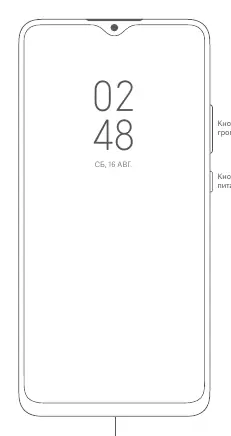
The device features volume buttons and a power button located on the side. The USB port is located at the bottom of the device.
SIM Card Installation
The device uses a SIM tray that accommodates two Nano-SIM cards and a Micro SD card. Ensure you do not use non-standard SIM cards, as they may damage the slot. The system supports dual 4G SIM cards, depending on local operator standards.

Safety and Handling
- Temperature: Operate the device within the 0°C to 40°C range.
- Battery: Do not attempt to replace the battery yourself. Use only authorized chargers and cables. Do not charge for more than 12 hours.
- Usage: Do not disassemble the device. Avoid using the phone in high-humidity environments or while charging.
- Hearing: Avoid listening at high volumes for extended periods to prevent hearing damage.
Regulatory Compliance
This device complies with SAR limits. For safe usage, keep the device at least 5mm away from the body. You can view electronic certification labels by navigating to Settings > About phone > Certification.
Official resources from the manual
Manufacturer information
Xiaomi Corporation
Practical help
Common problems
Device does not turn on
Ensure the device is charged using the provided cable and adapter. Do not charge for more than 12 hours.
SIM card not recognized
Ensure you are using standard Nano-SIM cards. Do not use non-standard cards as they may damage the slot.
Device overheating
Ensure the device is used within the 0°C to 40°C temperature range. Avoid using the device while charging.
Before use
- Charge the device using the provided cable and adapter.
- Insert Nano-SIM cards into the tray.
- Ensure the device is within the operating temperature range (0°C to 40°C).
- Follow on-screen instructions for initial setup.
Specs in practice
- SAR (Specific Absorption Rate)
- Measures radio frequency energy absorption. The limit for head and body is 2.0 W/kg.
Images and diagrams
- The device features volume buttons and a power button on the side, and a USB port at the bottom.
- The SIM tray supports two Nano-SIM cards and a Micro SD card.
Model compatibility
- Supports 4G dual SIM depending on local operator standards.
- VoLTE support depends on the carrier and region.

Manual page author
Emily Carter
User documentation editor
Prepares concise manual descriptions and highlights the most useful setup, operation, and maintenance information for readers.