Mobile / Smartphones
Quick Start Guide for Xiaomi 13T
Get started with your Xiaomi 13T. This guide covers device setup, SIM card installation, safety precautions, and regulatory information.
Table of contents
Quick Start Guide
To get started with your Xiaomi 13T, follow these basic steps:
- Powering On: Long press the power button to turn on the device.
- Configuration: Follow the on-screen instructions to set up your device.
- SIM Card: Insert a Nano-SIM card into the SIM card slot. Do not use non-standard SIM cards as they may damage the slot.
Device Overview
The device features the following physical controls and ports:
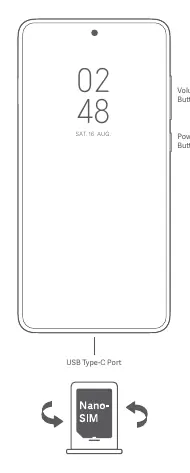
- Volume Buttons: Located on the right side of the device.
- Power Button: Located on the right side of the device, below the volume buttons.
- USB Type-C Port: Located at the bottom of the device for charging and data transfer.
Safety Information
Please read and follow these safety precautions to ensure proper use of your device:
- Operating Temperature: The device operates best between 0°C and 40°C. Using it outside this range may cause damage.
- Battery Safety: Do not attempt to replace the battery yourself. Use only authorized cables and power adapters. Do not charge the device for more than 12 hours.
- Handling: Do not disassemble, hit, crush, or burn the battery. If the battery appears deformed or damaged, stop using it immediately.
- Unauthorized Accessories: Use of unauthorized cables, power adapters, or batteries can cause fire, explosion, electric shock, or other risks.
- Hearing Protection: To prevent possible hearing damage, do not listen at high volume levels for long periods.
Regulatory Information
This device complies with various international and regional safety standards. Specific Absorption Rate (SAR) limits are in place to protect against radio frequency exposure. The device should be kept at a minimum distance of 5 mm from the body during operation to ensure compliance.
E-label Access
To view certification information on your device, go to Settings > About phone > Certification, or open Settings and type "Certification" into the search bar.
Manufacturer information
Xiaomi Corporation
Practical help
Common problems
Device will not turn on or charge
Ensure you are using the included or authorized cable and power adapter. Do not charge the device for more than 12 hours.
Battery appears damaged or deformed
Stop using the device immediately and contact an authorized repair center. Do not attempt to disassemble or repair the battery yourself.
Before use
- Ensure you have a Nano-SIM card.
- Verify that your power adapter and cable are authorized and compatible.
- Check that the operating environment is within the 0°C to 40°C temperature range.
- Ensure the device is kept dry.
Specs in practice
- Operating Temperature
- The safe ambient temperature range for using the device is 0°C to 40°C.
- SAR (Specific Absorption Rate)
- A measure of the rate at which energy is absorbed by the human body when exposed to a radio frequency (RF) electromagnetic field.
Images and diagrams
- The device layout diagram identifies the Volume buttons and Power button on the right edge.
- The diagram shows the USB Type-C port located at the bottom center of the device.
- The diagram illustrates the correct orientation for inserting a Nano-SIM card.
Model compatibility
- Use only authorized accessories compatible with your device.
- Do not connect incompatible devices to this phone.
- For AC/DC adapters, the socket-outlet should be installed near the equipment and be easily accessible.

Manual page author
Emily Carter
User documentation editor
Prepares concise manual descriptions and highlights the most useful setup, operation, and maintenance information for readers.