Mobile / Smartphones
User Manual for Redmi 13C Smartphone
Quick guide for the Redmi 13C smartphone. Includes safety precautions, charging instructions, factory reset procedures, and regulatory information.
Table of contents
Manual images
Click an image to enlargeQuick guide from the manual
The Redmi 13C is a digital mobile phone. This guide provides essential safety information, charging instructions, and device management tips. For detailed user instructions, scan the QR code provided on the device packaging or in the initial setup screen.
Charging and Battery
To ensure safety and optimal performance, follow these charging guidelines:
- Use the USB cable included in the gift box.
- Use a Mi brand charger with a maximum output of less than 18W.
- You may use third-party chargers that comply with USB 2.0 or higher protocol standards and meet the requirements of the International Information Technology Equipment Safety Standard (IEC 60950) or the Audio/video, Information and Communication Technology Equipment Standard (IEC 62368-1).
- The maximum voltage must not exceed 9V and the maximum current must not exceed 2A.
- Do not make calls while the phone is charging.
Safety Precautions
Please observe the following safety measures to prevent injury or damage:
- Explosive Environments: Turn off your phone at petrol stations, fuel storage facilities, or areas with potentially explosive atmospheres (e.g., chemical transfer areas, grain/dust/metal powder in the air).
- Medical Devices: Maintain a minimum distance of 15 cm between the phone and pacemakers. Do not carry the phone in a breast pocket. Consult your doctor if you use medical equipment like hearing aids or cochlear implants.
- Driving and Aviation: Follow all local traffic laws when driving. Turn off the phone on board aircraft when required.
- Environmental Conditions: Do not use the phone outdoors during thunderstorms to avoid lightning strikes. Avoid high-humidity areas like bathrooms to prevent electric shock, fire, or charger damage.
Device Management
Factory Reset
To erase all local data on your device, including accounts, contacts, photos, videos, apps, backups, and SD card data, follow these steps:
- Go to Settings.
- Select About phone.
- Tap Factory reset.
E-label Access
To view certification information electronically:
- Go to Settings.
- Select About phone.
- Tap Certification, or search for "Certification" in the Settings search bar.
Regulatory Information
This device complies with SAR (Specific Absorption Rate) limits for general population/uncontrolled exposure. For body-worn operation, maintain a separation distance of at least 5 mm. When using a belt clip or holster, ensure it does not contain metallic components.
The device is restricted to indoor use only when operating in the 5250 to 5350 MHz frequency range in EU member states.
Manufacturer information
Xiaomi Corporation
Practical help
Common problems
Device not charging or charging slowly
Ensure you are using the original USB cable and a Mi brand charger with a maximum output of 18W. Third-party chargers must comply with USB 2.0 or higher and IEC 60950/62368-1 standards.
Potential interference with medical devices
Maintain a minimum distance of 15 cm between the phone and pacemakers. Avoid carrying the phone in a breast pocket.
Need to erase all data from the phone
Use the Factory reset feature located in Settings > About phone > Factory reset.
Before use
- Check for local regulations regarding mobile phone use in specific environments.
- Ensure the power adapter is compliant with local safety standards.
- Keep the device at least 5 mm away from the body for SAR compliance.
- Turn off the device in areas where wireless equipment is prohibited.
Specs in practice
- SAR (Specific Absorption Rate)
- Measures the rate at which energy is absorbed by the human body when exposed to a radio frequency electromagnetic field.
Images and diagrams
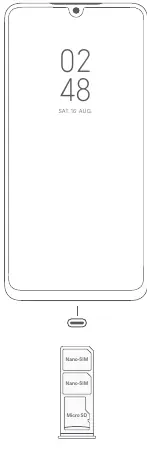
- The diagram on page 1 illustrates the physical layout of the device, including the volume buttons, power button, and the SIM/MicroSD card tray.
Model compatibility
- Compatible with chargers complying with USB 2.0 or higher and IEC 60950/62368-1 standards.
- Restricted to indoor use in the 5250-5350 MHz frequency range in EU countries.

Manual page author
David Miller
Documentation analyst
Organizes user manual content into clear summaries, with attention to model details, product context, and everyday usability.