Documents / Warranty Safety
User Manual for Xiaomi Smart Double Stack Air Fryer 12L
Quick guide for the Xiaomi Smart Double Stack Air Fryer 12L (Model: MAF-DS1201). Includes setup, Wi-Fi connection, cooking modes, cleaning, and troubleshooting.
Table of contents
Manual images
Click an image to enlargeQuick guide from the manual
This guide provides essential information for operating the Xiaomi Smart Double Stack Air Fryer 12L. Always place the appliance on a level, heat-resistant surface and ensure proper ventilation with at least 30 cm of space around the air outlet. Before first use, it is recommended to run the air fryer empty at 230°C for 5 minutes to eliminate any initial odor.
Product Overview
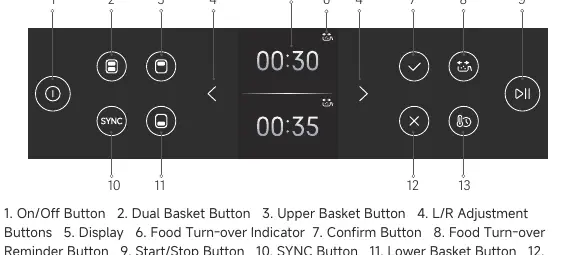
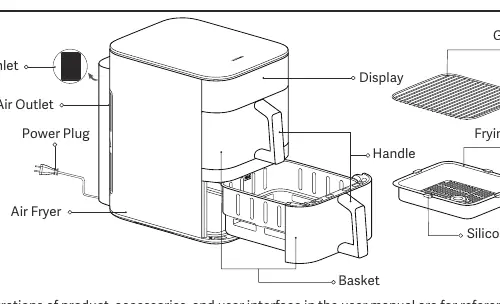
The air fryer consists of the main unit, baskets, frying plates, and grills. The control panel features buttons for power, basket selection (Dual/Upper/Lower), SYNC function, start/stop, and time/temperature adjustments. The display provides status updates and cooking information.
Setup and Wi-Fi Connection
Plug in the power cord and press the on/off button. Follow the on-screen prompts to select your language. To connect to the Xiaomi Home app, ensure your Wi-Fi is enabled. You can reset Wi-Fi by pressing the confirm button on the Wi-Fi screen or by holding the dual basket button for 7 seconds when the device is idle.
Cooking Operations
Single-basket cooking: Select the desired basket, choose a recipe, adjust time/temperature if needed, and press start. Dual-basket cooking: Use the dual basket button to set parameters for both baskets. SYNC function: Press the SYNC button after setting parameters for both baskets to ensure they finish cooking at the same time. The device will automatically pause if a basket is removed during operation.
Keep-Warm and Cloud Recipes
The keep-warm function is enabled by default and maintains food at 80°C for 30 minutes after cooking. Cloud recipes can be accessed via the Xiaomi Home app, allowing for scheduled cooking.
Cleaning and Maintenance
Always unplug the device and allow it to cool before cleaning. The frying plates, grills, and baskets are dishwasher safe. Do not immerse the main air fryer unit in water. Use a soft cloth with neutral detergent for the surface and cavity. Avoid abrasive materials that could damage the non-stick coating.
Troubleshooting
If the air fryer does not function, check the power connection and ensure the basket is fully inserted. If white smoke appears, it is normal when cooking fatty foods; ensure the unit is cleaned after every use. For connectivity issues, ensure the Xiaomi Home app is updated and the Wi-Fi signal is strong.
Manufacturer information
Xiaomi Corporation
Practical help
Common problems
White smoke is coming out
This is normal when frying fatty ingredients. Ensure the air fryer is cleaned after every cooking program to remove grease residue.
Wi-Fi cannot be connected
Ensure the Xiaomi Home app is the latest version, move the device to a location with a stronger signal, or reset the Wi-Fi.
Can't insert the basket smoothly
Ensure the ingredients do not exceed the maximum mark and that the basket is inserted properly.
Air fryer doesn't function
Check if the power cord is plugged into a grounded outlet and ensure the basket is pushed completely into place.
Before use
- Place the air fryer on a level, heat-resistant surface.
- Ensure at least 30 cm of space around the air outlet for ventilation.
- Run the air fryer empty at 230°C for 5 minutes to remove initial odor.
- Ensure the electrical outlet is grounded and rated for 16 A.
- Do not block the air inlet or outlet during use.
Specs in practice
- Temperature Range
- 40°C to 230°C.
- Connectivity
- Wi-Fi IEEE 802.11 b/g/n 2.4 GHz, Bluetooth 4.2.
Images and diagrams
- The Product Overview diagram identifies the air inlet, air outlet, power plug, display, handle, basket, frying plate, and grill.
- The Control Panel diagram illustrates the layout of the 13 buttons, including On/Off, Dual/Upper/Lower Basket, SYNC, Start/Stop, and Time/Temp adjustment buttons.
Model compatibility
- Works with the Xiaomi Home app for remote control and cloud recipes.
- Operating altitude range: 0–2000 meters.
- Not compatible with external timers or separate remote controls.

Manual page author
Michael Turner
Technical manual editor
Reviews PDF manuals for structure, safety notes, and practical product details so readers can find the right information quickly.