Furniture / Storage Cabinets
Installation and User Guide for TAVA TYP 12R Wardrobe
Comprehensive installation and user guide for the TAVA TYP 12R wardrobe. Includes assembly instructions, mandatory wall mounting safety, optional LED lighting setup, load limits, and maintenance tips.
Table of contents
Manual images
Click an image to enlargeImportant Information
The TAVA TYP 12R is a wardrobe designed for indoor use in residential areas such as living rooms, dining rooms, and hallways. It is not suitable for outdoor use or rooms with high humidity (e.g., bathrooms, laundry rooms). The furniture includes optional LED lighting (TYP 12RA). Warning: To prevent the furniture from tipping over, it must be securely mounted to the wall using the provided hardware. This is critical for safety, especially in households with children.
Assembly and Installation
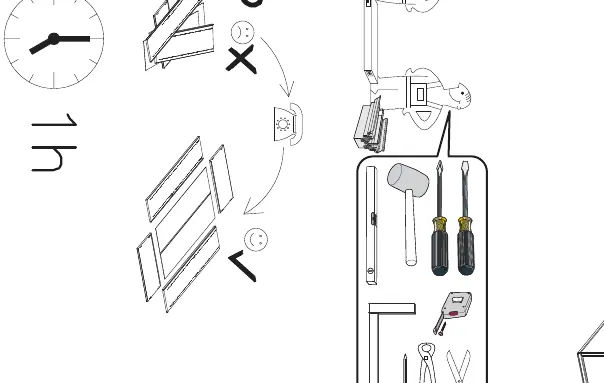
Before starting, ensure you have the necessary tools: a hammer, screwdriver, measuring tape, and level. Follow the assembly drawings provided in the manual carefully. Incorrect assembly can lead to instability.
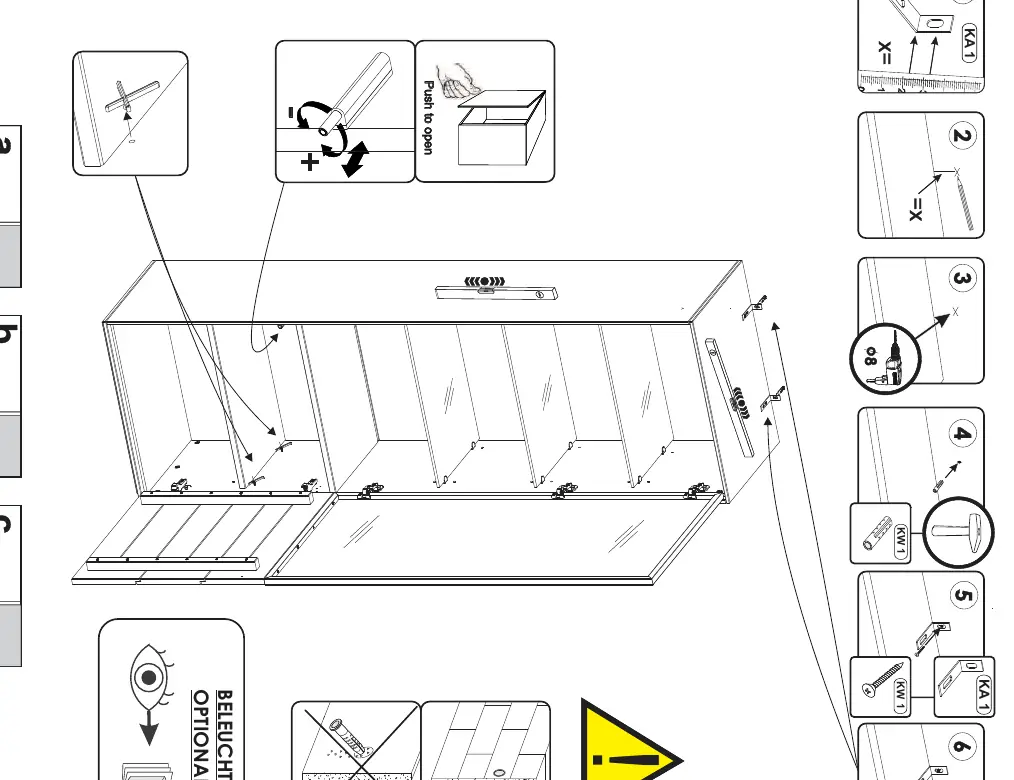

- Wall Mounting: The included mounting hardware is designed for concrete or solid brick walls. If your wall is made of a different material, consult a specialist regarding the appropriate installation method.
- Hinge Adjustment: The manual provides diagrams for adjusting the door hinges to ensure proper alignment.
Optional LED Lighting Installation
If your unit includes the optional LED lighting (TYP 12RA), follow these steps:
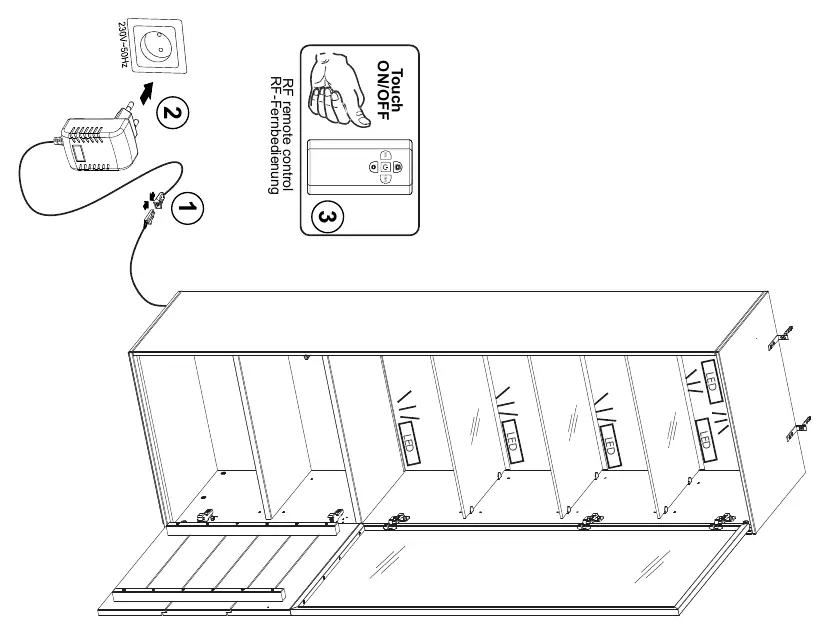
- Connect the LED components as shown in the diagram.
- Ensure the power supply is connected to a 230V AC 50Hz outlet.
- The system can be operated via the touch ON/OFF control or the RF remote control.
- Ensure cables are not pinched or damaged during installation.
Usage and Maintenance
To ensure the longevity of your furniture, observe the following guidelines:
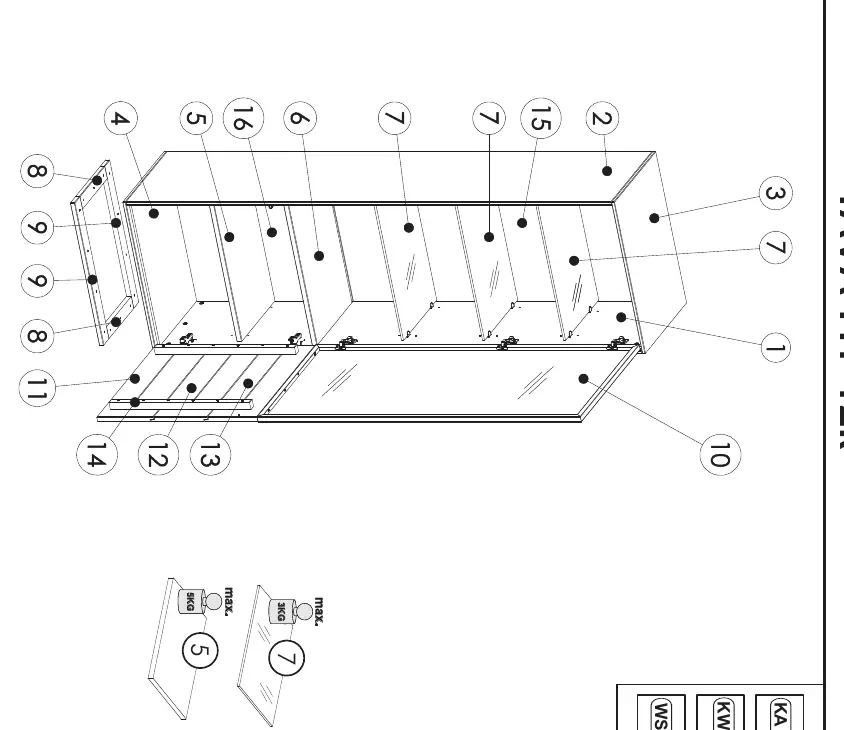
- Load Limits: Do not exceed the maximum weight indicated on the assembly drawings (e.g., 5kg for shelves, 3kg for specific components). Overloading can cause deformation or breakage.
- Cleaning: Use a soft, slightly damp cloth. Do not use corrosive or alcohol-based cleaning agents, as they may damage the finish.
- Maintenance: Periodically tighten all screws and check the stability of connections.
- Glass Surfaces: Clean with gentle glass cleaners and dry immediately to prevent water stains. Avoid strong impacts on glass doors and shelves.
Technical Specifications
- Voltage: 230V AC, 50Hz
- Protection Class: IP20
- Safety Class: Class II
- Power Consumption (TYP 12RA): 26.3W
- Operating Temperature: 15–25°C
- Relative Humidity: 40–60%
Safety Warnings
Improper use may pose health and safety risks. Always ensure the furniture is on a level surface. Do not allow children to climb on the furniture or open multiple drawers/doors simultaneously. Disconnect the power supply before performing any maintenance or electrical work. All electrical work must be carried out by qualified personnel in accordance with applicable regulations.
Manufacturer information
XXXLutz
Practical help
Common problems
Furniture instability or tipping
Ensure the unit is securely mounted to the wall using the provided mounting device. Do not place on uneven floors.
LED lighting not functioning
Check the power connection (230V AC). Ensure cables are not pinched. Verify the touch control or remote is active.
Glass damage
Avoid strong impacts. If glass breaks, replace with original or equivalent parts to maintain safety.
Before use
- Verify the wall is made of concrete or solid brick for mounting.
- Ensure all parts are present according to the assembly drawings.
- Have a hammer, screwdriver, and measuring tape ready.
- Check that the power supply is 230V AC 50Hz if installing LED lighting.
- Ensure the assembly area is clear and level.
Specs in practice
- 230V AC 50Hz
- Standard European mains voltage; do not connect to other voltages.
Images and diagrams
- Wall mounting diagram illustrates the requirement for drilling into solid walls.
- Hinge adjustment diagram shows how to align doors using the adjustment screws.
Model compatibility
- LED lighting is optional (TYP 12RA).
- Wall mounting hardware is only suitable for concrete/solid brick walls.

Manual page author
David Miller
Documentation analyst
Organizes user manual content into clear summaries, with attention to model details, product context, and everyday usability.