Computers / Mobile Computers
Release Notes for Zebra Android Oreo 01-21-18.00-OG-U00-STD
Quick guide to the Zebra Android Oreo 01-21-18.00-OG-U00-STD release. Includes new features, installation upgrade paths, known constraints, and device compatibility for Zebra mobile computers.
Table of contents
Quick Guide to this Release
This document provides release notes for the Android GMS Oreo 01-21-18.00-OG-U00-STD software build. It covers new features, software update packages, known constraints, and device compatibility for a wide range of Zebra mobile computers.
Software Packages
The update is available in two formats:
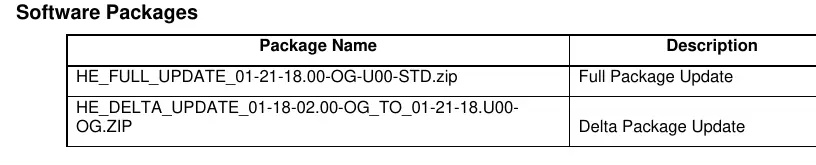
- Full Package Update: HE_FULL_UPDATE_01-21-18.00-OG-U00-STD.zip
- Delta Package Update: HE_DELTA_UPDATE_01-18-02.00-OG_TO_01-21-18.U00-OG.ZIP
New Features
Key additions in this release include:
- Support for new products: EC30 and L10A.
- Support for various TC8300 and MC9300 SKUs.
- Soft PTT buttons for PTT-Express on devices without physical keys.
- Single Barcode Staging with SUW Bypass.
- Interface for configuring hardware vs. software wake-up sources.
- Keyboard audible feedback, NFC, vibrator, and camera support for MC9300.
- EC30 Locking Cradle support.
- Support for new Bluetooth scanners: DS2278, DS8178.
- Voice trigger support for DataWedge.
Upgrade Options
The shortest path to upgrade depends on the current software version on your device:
- From 01-12-01.00-OG-Uxx: Apply Full Package Update.
- From 01-13-20.00-OG-Uxx: Apply Full Package Update.
- From 01-18-02.00-OG-Uxx: Apply Delta Package Update (Recommended) or Full Package Update.
Known Constraints
- WiFi sleep policy is set to Always (Android O limitation).
- GMS Restricted Mode is introduced; functionality from Enable/Disable GMS apps has moved to GMS Manager.
- Get Status for all Wake-Up sources returns Enabled even when all sources are disabled.
- Staging error message may appear after enabling wake-up source via StageNow, even if the operation succeeds.
- Some applications may not render properly in portrait or landscape; use the bundled Display Settings APK to adjust display size and font size.
Device Compatibility
This release is approved for the following device families:
- TC52, TC57, TC72, TC77, TC52HC
- PS20x
- TC8300, VC8300
- MC9300
- L10A
- CC600, CC6000
Official resources from the manual
Manufacturer information
Zebra Technologies
Practical help
Common problems
WiFi sleep policy set to Always
This is an Android O limitation.
Get Status for all Wake-Up sources returns Enabled
This occurs even when all wake-up sources are disabled.
Staging error message after enabling wake-up source
The error message appears even though the operation is successful.
Application layout issues in portrait/landscape
Use the bundled Display Settings APK or the settings menu to change display size and font size.
Before use
- Verify the current software version on your device.
- Identify the correct update package (Full or Delta) based on your current version.
- Ensure your device model is listed in the Device Compatibility section.
- Consult Zebra Tech Docs for settings related to GMS Restricted Mode.
- Ensure the device is charged and ready for the update process.
Specs in practice
- Android Version
- 8.1.0
- Linux Kernel
- 4.4.78
- Security Patch Level
- July 1, 2019
Model compatibility
- Compatible with TC52, TC57, TC72, TC77, TC52HC, PS20x, TC8300, VC8300, MC9300, L10A, CC600, and CC6000.

Manual page author
Emily Carter
User documentation editor
Prepares concise manual descriptions and highlights the most useful setup, operation, and maintenance information for readers.