Electronics / PA Systems
User Manual for SAL RRT 11B Retro Cassette Recorder
Quick guide for the SAL RRT 11B Retro Cassette Recorder. Learn how to use the radio, cassette player, USB/SD playback, recording functions, and troubleshooting steps.
Table of contents
Quick guide from the manual
The SAL RRT 11B is a versatile retro-style cassette recorder with radio and digital playback capabilities. Before first use, ensure the device is not damaged and read all safety instructions. The device can be powered via mains, batteries, or an external 6V adapter. Always disconnect the device from the power network when not in use.
Product Description
The device features an AM/FM/SW radio, a cassette player with auto-stop, a built-in microphone, and USB/SD slots for MP3/WMA playback and recording. It includes a headphone output for private listening.
Installation and Power Supply
The device offers three power options:
- Mains: Connect the supplied power cable to the rear socket and then to a 230V~/50Hz wall outlet.
- Batteries: Use 4 x D (LR20 / 1.5V) batteries. Ensure correct polarity. Remove batteries when using mains power.
- External Adapter: Use a 6V solar panel, accumulator, or adapter connected to the rear DC IN socket.
Note: Batteries do not charge when the device is connected to mains or external power.
Using the Radio
Set the function switch to RADIO and select the desired band (AM/FM/SW). For FM and SW, extend the telescopic antenna and adjust for best reception. Use the TUNING dual knob to find stations; the inner part of the knob allows for fine-tuning. For AM, use the built-in antenna by rotating the entire device.
MP3/WMA Playback (USB/SD)
Insert a USB device or SD card into the appropriate slot. Playback starts automatically. Use the playback controls (Play/Pause, Stepping) to navigate tracks. The device supports FAT32 file systems (max 32GB). Do not use NTFS formatted devices.
Using the Cassette Recorder
Insert a cassette with the opening facing down and the full spindle on the left. Use the buttons below the compartment to control playback, recording, and winding. To record, insert a blank cassette and press the record and play buttons simultaneously. Always use the STOP button before changing modes or using fast-winding functions.
Multiple Recording
You can record from the built-in microphone or the radio onto a cassette or USB/SD device. You can also digitize old cassettes to MP3 format on USB/SD media. To record from the microphone, select the desired mode (TAPE or USB/SD) and start recording.
Cleaning and Maintenance
Switch off and unplug the device before cleaning. Use a dry, soft cloth for the plastic housing. Do not use aggressive cleaners. For regular cassette use, have a professional clean the tapes, rollers, and heads monthly using special cleaning liquid.
Troubleshooting
If the device malfunctions, switch it off and unplug it. Check the following:
- Device doesn't work/no sound: Check volume, ensure the correct source (RADIO/USB-SD/TAPE) is selected, verify power cable connection, or if playing a cassette, ensure the tape is not at the end.
- USB/SD playback not working: Ensure the storage device is properly connected, check file content/format, and verify power supply.
Technical Specifications
- Power: 230V~ 50Hz / 5W
- Batteries: 4 x D/LR20 (1.5V)
- Speaker: 100 mm / 4 Ohm
- Frequency Range: 100 - 20,000 Hz
- Supported File System: FAT32 (max 32GB)
Safety Warnings
Do not disassemble or modify the unit. Keep away from water, heat, and magnetic fields. Do not use different types of batteries simultaneously. If the power cord is damaged, it must be replaced by the manufacturer or a qualified service provider.
Practical help
Common problems
Device doesn't work or no sound
Check the volume knob position, ensure the correct source (RADIO/USB-SD/TAPE) is selected, verify the power cable is connected properly, or if playing a cassette, ensure the tape is not at the end.
USB/SD playback not working
Ensure the storage device is properly connected, check the file content and format (FAT32 recommended), and verify the power supply.
Before use
- Check for transport damage.
- Ensure batteries are inserted with correct polarity if using battery power.
- Remove batteries if using mains power.
- Ensure the device is placed on a stable surface with adequate ventilation.
- Check that the power cable is not damaged.
Specs in practice
- Power Supply
- 230V~ 50Hz mains, 4x D/LR20 (1.5V) batteries, or 6V external adapter.
- Frequency Range
- 100 - 20,000 Hz.
- Supported File System
- FAT32 (max 32GB).
Images and diagrams
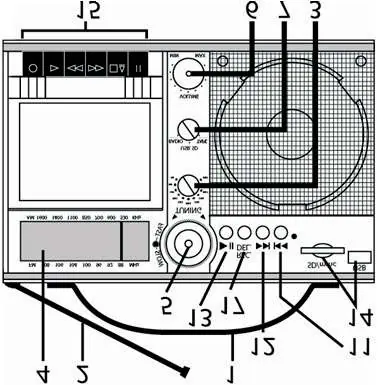
- 5: Play/Pause
- 9: USB/SD Slot
- 10: Cassette Unit
- 18: Power Cable
Model compatibility
- Recommended cassette type: C-60 (C-90) TYPE-I.
- Do not use NTFS formatted memory devices.

Manual page author
Emily Carter
User documentation editor
Prepares concise manual descriptions and highlights the most useful setup, operation, and maintenance information for readers.