Power / Batteries Chargers
10000mAh Power Bank Quick Start Guide
Comprehensive guide for the D-Link 10000mAh Power Bank, covering setup, charging, and technical specifications for efficient mobile device power management.
Table of contents
Product Overview
The D-Link 10000mAh Power Bank is a portable energy solution designed to keep your mobile devices charged while on the go. This compact device features a high-capacity battery, ensuring you have enough power to recharge smartphones, tablets, and other USB-powered electronics multiple times. The unit is equipped with both USB-A and USB-C ports, providing versatile connectivity options for various charging cables.
Getting Started
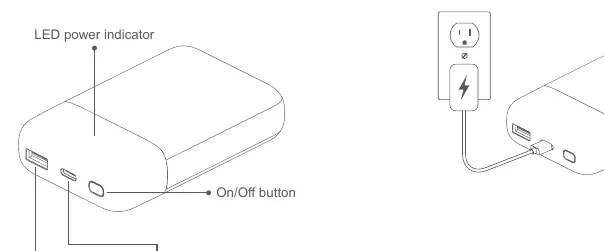
Before using your power bank for the first time, it is recommended to fully charge the device. To charge the power bank, connect a compatible USB-C cable to the Type-C port on the power bank and plug the other end into a wall adapter or a powered USB port. The LED power indicator will provide visual feedback regarding the charging status and remaining battery capacity.
Charging Your Devices
To charge your mobile device, simply connect your device's charging cable to either the USB-A or USB-C output port on the power bank. Once connected, press the On/Off button to initiate the charging process. The power bank is designed to deliver efficient power output, supporting fast charging for compatible devices. When using both ports simultaneously, the power bank intelligently manages the power distribution to ensure safe and effective charging for both connected devices.
Safety and Maintenance
To ensure the longevity and safety of your power bank, please adhere to the following guidelines. Keep the device away from extreme temperatures, moisture, and direct sunlight. Do not attempt to disassemble or modify the power bank, as this may cause damage or pose a safety risk. Regularly inspect the ports for any debris or dust that might interfere with the connection. If the device is not in use for an extended period, it is advisable to charge it periodically to maintain battery health. Always use high-quality, certified charging cables to prevent potential damage to both the power bank and your mobile devices. If you notice any unusual heat or swelling during operation, discontinue use immediately and contact support.
Practical help
Common problems
Device not charging
Ensure the cable is securely connected to both the power bank and the device, then press the On/Off button.
Power bank not charging
Check the wall adapter and USB-C cable for functionality; try a different power source.
Before use
- Unpack the power bank and verify all components are present.
- Inspect the device for any physical damage.
- Charge the power bank fully using the USB-C port before the first use.
- Ensure you have the correct cables for your mobile devices.
Specs in practice
- Battery Capacity
- 10,000mAh total energy storage for multiple device charges.
- Output Single Port
- Both USB-C and USB-A ports provide up to 18W for fast device charging.
- Output Dual Ports
- Total output is 15W when charging two devices simultaneously.
Images and diagrams
- The LED indicator shows the current battery status.
- The On/Off button activates the power output.
- The USB-A port is used for standard device charging.
- The Type-C port serves as both an input for charging the bank and an output for devices.
Model compatibility
- Compatible with most USB-powered mobile devices including smartphones and tablets.
- Supports fast charging protocols via USB-C and USB-A ports.

Manual page author
David Miller
Documentation analyst
Organizes user manual content into clear summaries, with attention to model details, product context, and everyday usability.