Hvac / Air Conditioners
ACiQ 18W-WM Wall-Mounted Ducted Air Handler Remote Controller User Manual
Quick guide for the ACiQ 18W-WM series remote controller, covering battery installation, basic operation modes, timer settings, advanced functions like ECO/GEAR, and troubleshooting tips.
Table of contents
Quick guide from the manual
This manual provides instructions for operating the remote controller for ACiQ wall-mounted ducted air handlers (models ACiQ-18W-WM, 24W-WM, 30W-WM, 36W-WM). Ensure the unit is plugged in and powered before use. The remote has an effective range of 8 meters. Note that button layouts may vary slightly by specific model, and if a feature is not supported by your indoor unit, the corresponding button will have no effect.
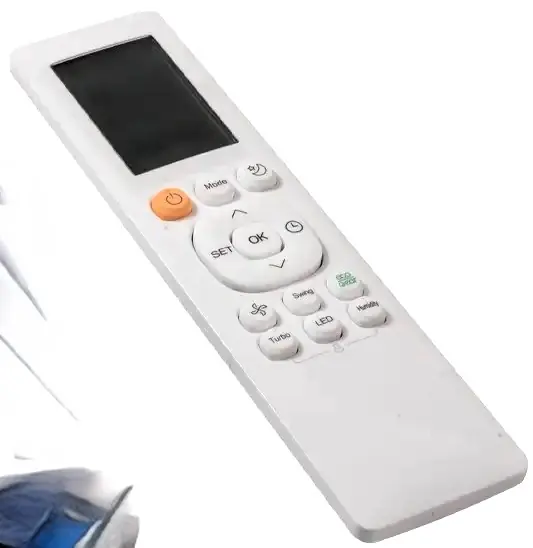
Handling the remote controller
To install or replace batteries, slide the back cover downward, insert two R03/LR03 3.0V dry batteries matching the (+) and (-) symbols, and slide the cover back into place. Do not mix old and new batteries or different types. Remove batteries if the remote will not be used for more than 2 months.
Basic operation
To operate the unit, point the remote toward the indoor unit. Use the MODE button to cycle through AUTO, COOL, DRY, HEAT, and FAN modes. Use the TEMP up/down buttons to adjust the temperature (16-30°C). Use the FAN SPEED button to select fan intensity. In AUTO mode, the unit selects the function automatically based on the set temperature.
Timer settings
The timer allows you to schedule the unit to turn on or off automatically. Press the TIMER button to initiate the sequence, then use the TEMP buttons to set the desired time. The time increases in 30-minute increments up to 10 hours, and 1-hour increments thereafter up to 24 hours. Point the remote at the unit and wait 1 second to activate.
Advanced functions
- Swing: Press the SWING button for horizontal louver movement. Hold for 2 seconds for vertical louver auto-swing (model dependent).
- ECO/GEAR: Press to enter energy-efficient modes. ECO adjusts temperature automatically; GEAR limits electrical energy consumption (75% or 50%).
- Turbo: Enables the unit to reach the preset temperature in the shortest possible time.
- Clean: Activates Self Clean or Active Clean technology to remove dust, mold, and grease from the heat exchanger.
- LED: Turns the indoor unit's display and buzzer on or off.
- Lock: Press Clean and Turbo simultaneously for 5 seconds to lock the remote buttons.
Troubleshooting and tips
If the remote signal is not received, ensure there are no obstructions like curtains or direct sunlight. If the unit does not respond, check the batteries. For specific model limitations, such as cooling-only units not supporting HEAT mode, refer to the notes provided in the manual.
Manufacturer information
ACiQ
Practical help
Common problems
Remote signal not received
Ensure you are within 8 meters of the unit and there are no obstructions like curtains or direct sunlight blocking the infrared receiver.
Unit does not respond to a button press
The indoor unit may not support that specific function. Also, check if the remote is locked (press Clean and Turbo for 2 seconds to unlock).
Insufficient cooling/heating
Ensure the set temperature is appropriate. In ECO or Silence mode, the unit may limit capacity to save energy or reduce noise.
Before use
- Ensure the air conditioner is plugged in and power is available.
- Install two R03/LR03 3.0V batteries in the remote controller.
- Verify the remote is pointed toward the indoor unit.
- Check if your model supports the desired function (e.g., HEAT mode is not available on cooling-only models).
Specs in practice
- Signal Receiving Range
- The maximum distance (8m) from which the remote can effectively control the indoor unit.
- Temperature Range
- The adjustable range is 16-30°C (60-86°F).
- Rated Voltage
- Requires 3.0V provided by two R03/LR03 batteries.
Images and diagrams
- The remote display shows active modes (AUTO, COOL, DRY, HEAT, FAN), fan speed, and timer status.
- The transmission indicator lights up when a signal is sent to the indoor unit.
- The display shows the set temperature by default, or timer/fan settings when adjusted.
Model compatibility
- HEAT mode is not supported by cooling-only appliances.
- Some features like Breeze Away, Fresh, or Sleep may not be available on all models.
- If there is a discrepancy between this manual and the unit's User Manual, the User Manual prevails.

Manual page author
David Miller
Documentation analyst
Organizes user manual content into clear summaries, with attention to model details, product context, and everyday usability.