Home Appliances / Hair Dryers
User Manual for Camry CR 7935 Insect Killer Lamp
Quick guide for the Camry CR 7935 insect killer lamp. Learn how to charge, operate the insect-killing and camping light modes, and perform maintenance.
Quick answers from the manual
Quick answer
- The Camry CR 7935 is a rechargeable insect killer lamp with a camping light function. It is charged via USB and offers 10-16 hours of operation. p. 4
Key actions
- Charging the device p. 4
- Operating modes p. 4
First start
- Charge the battery fully before first use. p. 4
Show 4 more answers Show less
Problems and fixes
Device not working
Check battery charge level and ensure the switch is in the correct position.
p. 4Maintenance and reset
- Clean the bottom of the lamp (4) regularly by tilting it to remove dead insects. p. 4
Technical specifications
| Parameter | Value | Meaning | Pages |
|---|---|---|---|
| High voltage | 1000V | Grid voltage for insect killing | p. 4 |
| Battery | 2000mAh | Internal battery capacity | p. 4 |
Where to find it in the PDF
- Device Diagram p. 2
- Safety Instructions p. 3
- Operating Instructions p. 4
Table of contents
Manual images
Click an image to enlargeQuick guide from the manual
The Camry CR 7935 is a rechargeable insect killer lamp that also functions as a camping light. Before first use, charge the device for 4 hours using the USB Type B port. The LED indicator (7) turns from red to green when fully charged. The device is IPX4 splash-proof but should not be submerged in water.
Description of the device
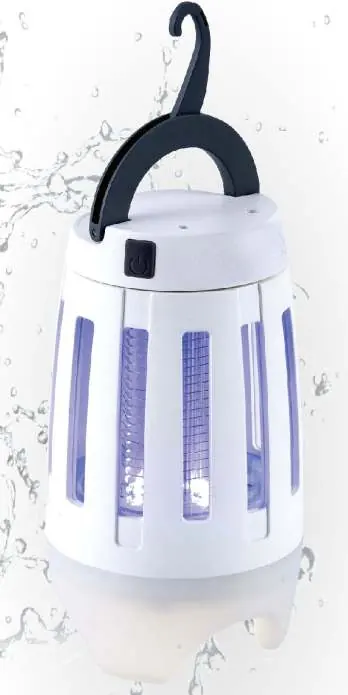
- 1. Handle
- 2. Hook
- 3. Top ring
- 4. Bottom of insecticide lamp
- 5. High voltage grid
- 6. Lower lampshade
- 7. LED diode for charging process control
- 8. Ultra UV LED 595nm lamps for insect killing
- 9. LED lamps 360-395 nm for lighting
- 10. USB type B socket
- 11. Switch
Operating modes
Use the switch (11) to cycle through modes:
- First press: Activates both UV insect killer (8) and camping light (9).
- Second press: Turns off the camping light (9).
- Third press: Turns off the UV insect killer (8).
Cleaning and maintenance
Always switch off the device before cleaning. Do not use chemical agents. Clean the high voltage grid (5) with a brush. Empty the bottom of the lamp (4) regularly by tilting it to remove dead insects. Ensure the device is completely dry before reuse.
Technical data
- High voltage on grid: 1000V
- Battery capacity: 2000mAh
- Charging time: 4 hours
- Working time: 10-16 hours
- Power: 2W
- IPX4: Housing resistant to rain and moisture
Manufacturer information
Adler Europe Group
Practical help
Common problems
Device does not turn on
Ensure the battery is charged via the USB port.
Insects are not being attracted
Place the device in a darker area. Strong ambient light weakens the effectiveness of UV diodes.
Before use
- Charge the built-in battery for 4 hours using a USB charger, laptop, or power bank.
- Check that the LED indicator (7) has turned green.
- Ensure the device is dry before use.
- Select a suitable location (tabletop or hanging via hook).
Show more Show less
Specs in practice
- High voltage grid
- 1000V grid used to electrocute insects upon contact.
- Working time
- 10-16 hours depending on usage intensity and number of insect discharges.
Images and diagrams
- The device features a top hook (2) for hanging.
- The switch (11) is located on the side for mode selection.
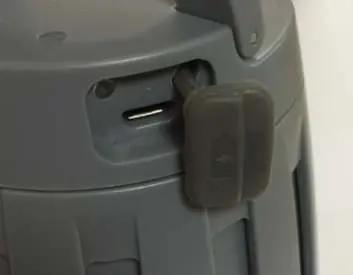
- The USB charging port (10) is protected by a cover.
Model compatibility
- Suitable for indoor and outdoor use.
- Not suitable for barns, stables, or similar outbuildings.
- Do not use near flammable vapors or explosives.

Manual page author
Emily Carter
User documentation editor