Home Appliances / Small Kitchen Appliances
Adler AD 3036 Waffle Maker User Manual
Quick guide and operating instructions for the Adler AD 3036 Waffle Maker. Learn how to safely use, clean, and maintain your appliance.
Table of contents
Quick guide from the manual
The Adler AD 3036 is a waffle maker designed for domestic use. Before using the device, ensure it is connected to a grounded 220-240V outlet. Always supervise children when the device is in use. The device features a non-stick coating on the heating plates, which should be handled with care to avoid damage.
Device Description
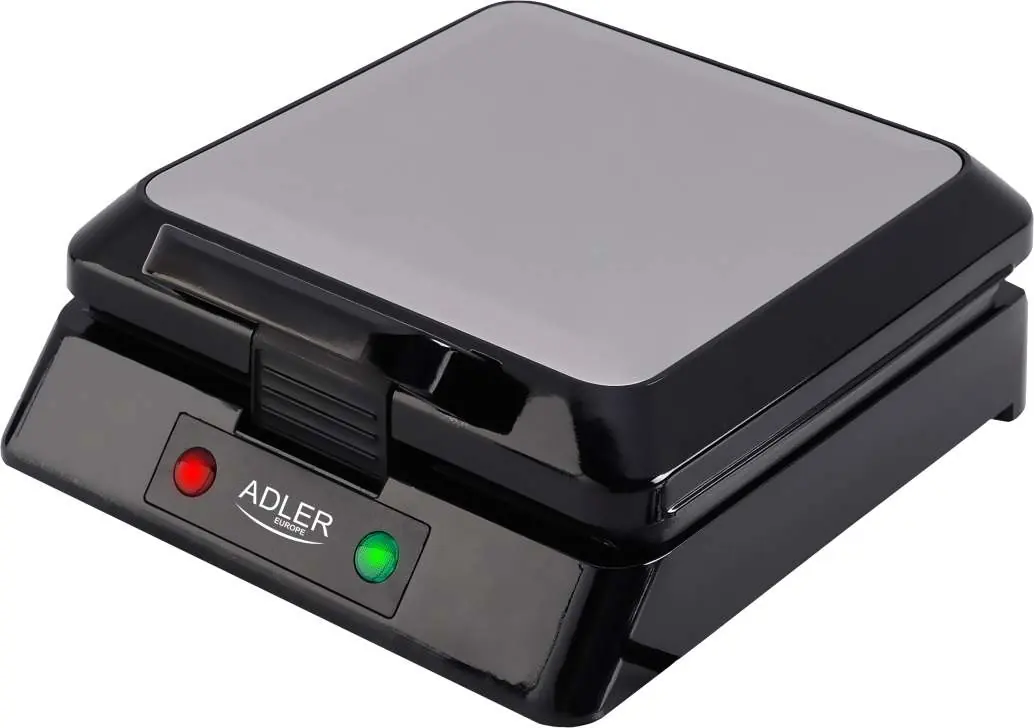
- 1. Lid
- 2. Power indicator (red)
- 3. Ready indicator (green)
- 4. Locking clip
Before First Use
- Remove all packaging, stickers, and accessories from the inside and outside of the device.
- Wipe the baking plates with a damp cloth, then dry with a soft cloth.
- Lightly grease the baking plates with vegetable oil or fat.
- Close the device and connect it to the power supply. The power and ready indicators will light up.
- Leave the device on for a few minutes to eliminate factory odors. The device may emit a small amount of smoke; this is normal.
- Clean the device as described in the Cleaning section.
Operating Instructions
- Connect the closed device to a grounded power outlet. Both indicators (2) and (3) will light up.
- Wait approximately 10 minutes for the device to reach the appropriate temperature. The ready indicator (3) will turn off.
- Open the device completely and place the prepared product on the lower baking plate.
- Close the device and secure it with the locking clip (4). Do not force the lid closed.
- During operation, the thermostat indicator (3) will cycle on and off, maintaining the correct temperature.
- Cooking time is typically 5 to 15 minutes, depending on ingredients and personal preference.
- Open the lid and remove the finished product using a wooden or plastic spatula.
- Close the device to allow the plates to reheat before preparing the next batch.
- After use, unplug the device and allow it to cool down.
Cleaning and Maintenance
- Always unplug the device and allow it to cool completely before cleaning.
- Wipe the baking plates with a damp cloth, then dry with a soft cloth or paper towel.
- Remove stubborn residue by applying a small amount of cooking oil, waiting a few minutes, and gently removing it with a wooden spatula.
- Do not use sharp or abrasive tools, as they can damage the non-stick coating.
- Never immerse the device in water.
Safety Warnings
- Do not use the device with external timers or remote control systems.
- Do not touch hot surfaces; use handles or protective gloves.
- Ensure the power cord is not stretched over open flames or sharp edges.
- The device must cool down completely before storage.
- Do not place flammable materials (paper, cardboard, plastic) inside the device.
Manufacturer information
Adler Europe Group
Practical help
Common problems
Device emits smoke during first use
This is normal; let it run for a few minutes to burn off factory odors.
Food sticking to plates
Ensure plates are lightly greased with vegetable oil or fat before use and avoid using metal utensils.
Before use
- Remove all packaging and stickers
- Wipe plates with a damp cloth
- Lightly grease the plates with oil or fat
- Connect to a grounded power outlet
- Let the device heat up for about 10 minutes
Images and diagrams
- 2. Power indicator (red)
- 3. Ready indicator (green)
- 4. Locking clip
Model compatibility
- Use only on grounded outlets
- Not for use with external timers or remote control systems

Manual page author
David Miller
Documentation analyst
Organizes user manual content into clear summaries, with attention to model details, product context, and everyday usability.