Lighting / Fixtures
Aigostar 12W A60 Bluetooth Mesh Smart Bulb User Guide
Quick setup and troubleshooting guide for Aigostar 12W A60 Bluetooth Mesh smart bulbs. Learn how to connect via Aigo Smart app, Amazon Echo, and manage device configurations.
Table of contents
Quick guide from the manual
This guide provides instructions for setting up and managing Aigostar Bluetooth Mesh smart bulbs. The device can be controlled via the Aigo Smart app, Amazon Echo, or an optional Aigostar remote control. Ensure your device is within range and that you have the necessary app installed before beginning the setup process.
Setup and configuration
To connect your smart bulb, follow these steps:
- Download the Aigo Smart app from the App Store or Google Play.
- Enable Bluetooth on your mobile device.
- Power the bulb on and off repeatedly to enter pairing mode.
- Use the Aigo Smart app to automatically detect and add the device to your network.
- If using Amazon Echo, ensure the Alexa app is installed and the Aigostar skill is enabled.
Control methods
The bulb supports multiple control configurations:
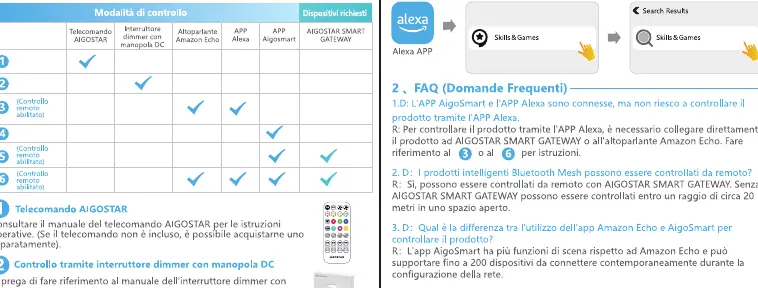
- Aigo Smart App: Direct control via Bluetooth.
- Amazon Echo: Voice control and integration via Alexa.
- Aigostar Gateway: Required for extended range and remote control capabilities.
- Remote Control: Optional physical remote for manual adjustments.
Troubleshooting
If you encounter issues connecting your device:
- Ensure your Amazon Echo and the Alexa app are updated to the latest versions.
- Verify that the bulb is in pairing mode.
- Restart the device or the Amazon Echo if the connection fails.
- If the device is disconnected, move it closer to the Amazon Echo or the Aigostar Gateway.
Safety and maintenance
- The device is designed for indoor use only.
- Always disconnect the power supply before installation.
- Do not attempt to modify or disassemble the structure of the bulb.
Support
For further assistance, you can contact the support team via email at [email protected] or reach out through the platform where the product was purchased.
Manufacturer information
Aigostar
Practical help
Common problems
Device not connecting to Amazon Echo or app
Ensure the Echo device and Alexa app are updated, verify the bulb is in pairing mode, and try restarting the device.
Device disconnected from network
Move the bulb closer to the Amazon Echo or Aigostar Gateway (within 10 meters for optimal performance).
Interference issues
Ensure there are no physical obstacles or magnetic interference between the bulb and the control device.
Before use
- Download the Aigo Smart app
- Ensure Bluetooth is enabled on your smartphone
- Verify the bulb is installed in a compatible indoor socket
- Disconnect power before installation
- Have your Amazon Echo account ready if using voice control
Specs in practice
- Bluetooth Mesh
- A network technology allowing multiple devices to communicate and extend range.
- Aigostar Gateway
- Optional hardware required for remote control and extended connectivity.
- Indoor use only
- The bulb is not weather-resistant and should not be used outdoors.
Images and diagrams
- The manual provides a matrix showing which control methods (Remote, App, Gateway, Echo) are compatible with different device setups.
- Visual flowcharts illustrate the pairing process for both standalone app use and integration with Amazon Echo.
Model compatibility
- Not compatible with Smart Life app.
- Does not require a 2.4GHz Wi-Fi network for direct Bluetooth Mesh operation.
- Supports Amazon Echo devices (e.g., Echo Plus 2nd Gen, Echo Studio, Echo Dot 2nd Gen and newer).

Manual page author
David Miller
Documentation analyst
Organizes user manual content into clear summaries, with attention to model details, product context, and everyday usability.