Industrial / Temperature Controllers
User Manual for AKO 16624 Temperature and Moisture Controller
Quick guide and setup manual for the AKO 16624 temperature and moisture controller. Includes installation, wiring, configuration wizard, parameter settings, and troubleshooting.
Table of contents
Manual images
Click an image to enlargeQuick guide from the manual
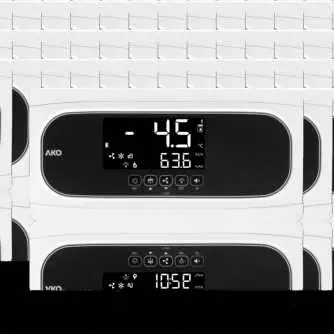
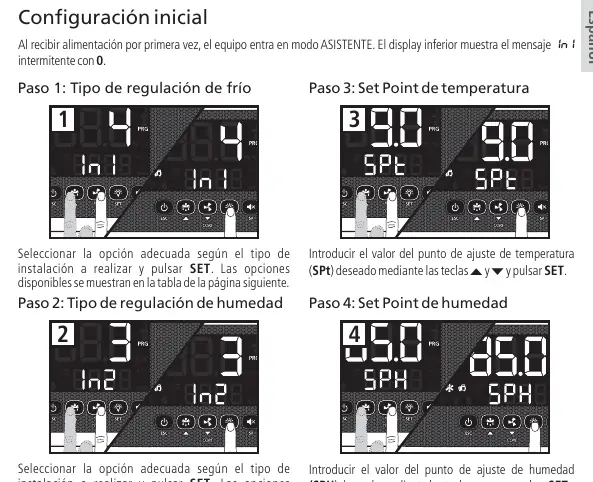
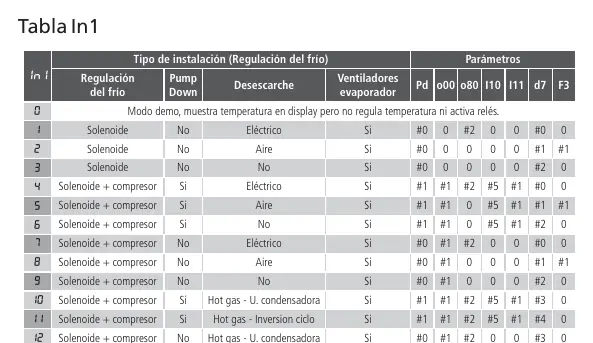
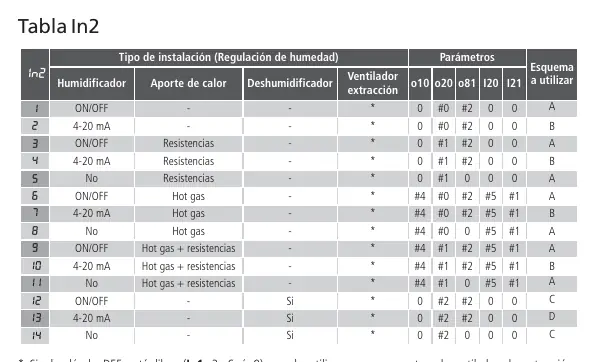
The AKO 16624 is a temperature and moisture controller designed for cold rooms. Upon first power-up, the unit enters the ASSISTANT mode to guide you through the initial setup. The lower display will show the message In1 flashing with 0. Follow the on-screen steps to configure the cold regulation type, moisture regulation type, and set points for temperature and moisture.
Installation and wiring
Safety Warnings:
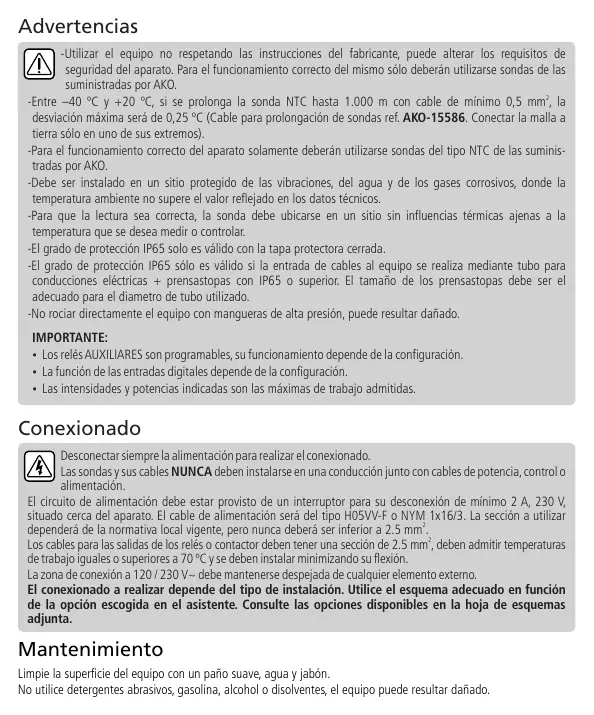
- Always disconnect the power supply before performing any wiring.
- Use only NTC probes supplied by AKO.
- Install in a location protected from vibrations, water, and corrosive gases.
- The IP65 protection degree is only valid with the protection cover closed and when cables enter through a tube with IP65 glands or higher.
- Do not spray the unit directly with high-pressure hoses.
Wiring Requirements:
- Probes and their cables must NEVER be installed in a conduit together with power, control, or power supply cables.
- The power supply circuit must be equipped with at least a 2 A, 230 V switch located near the device.
- Power supply cable: H05VV-F or NYM 1x16/3 (minimum 2.5 mm²).
- Relay output cables: Minimum 2.5 mm², must withstand temperatures of 70 ºC or higher.
Operation and keypad
The keypad allows for direct control and access to programming menus:
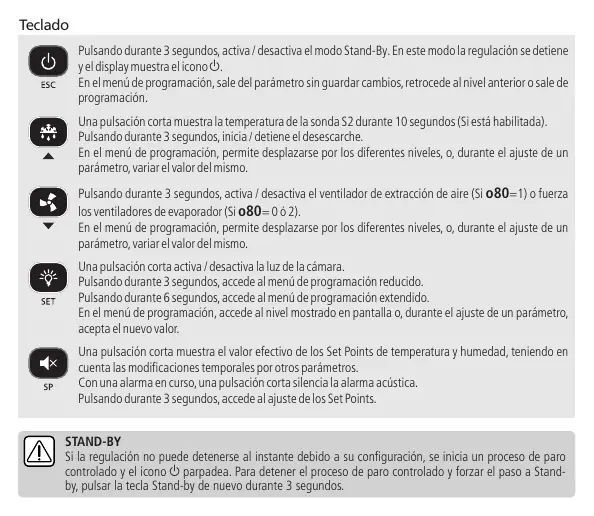
- Stand-By (ESC key): Press for 3 seconds to activate/deactivate.
- Defrost: Press the up arrow key for 3 seconds to start/stop.
- Light: Press the SET key once to toggle the cold room light.
- Set Points: Press the SP key once to view current set points, or hold for 3 seconds to adjust them.
- Alarms: Press the SP key once to mute an active acoustic alarm.
Initial configuration
The configuration wizard (In1/In2) is essential for setting up the controller based on your specific installation. If you need to re-run the wizard, activate Stand-By mode, wait for the regulation to stop completely (indicator light on), and press the following keys in order: Up, Down, SET.
Programming menus
The controller features two programming levels:
- Condensed menu: Press SET for 3 seconds to access frequently used parameters (SPt, C1, SPH, rH01, d0, d1, d4, F3, A1, A2, A21, A22).
- Extended menu: Press SET for 6 seconds to access all parameters.
Note: If a password is set (b10=1 or 2), you must enter the code programmed in PAS to access these menus.
Maintenance
Clean the surface of the unit with a soft cloth, water, and soap. Do not use abrasive detergents, petrol, alcohol, or solvents, as these may damage the unit.
Troubleshooting
The unit displays specific messages for errors or alarms:
- E1/E2/E3: Probe failure (open/crossed circuit or out of limits).
- Ad0: Open door alarm (door open longer than defined in A12).
- AH/AL: Maximum/Minimum temperature alarm.
- KCP: HACCP alarm (temperature reached h1 for longer than h2).
- HCP + PF: HACCP alarm due to power supply failure.
Technical specifications
- Power supply: 100 - 240 V~, 50/60 Hz.
- Probe range: -50.0 ºC to 99.9 ºC.
- Protection: IP65.
- Relay operations: 100,000 operations.
Manufacturer information
AKO Group
Practical help
Common problems
E1/E2/E3 error code
Probe failure. Check for open or crossed circuits or if the temperature is outside the probe limits.
Ad0 alarm
Open door alarm. The door has been open longer than the time defined in parameter A12.
KCP alarm
HACCP alarm. The temperature has reached the value of parameter h1 for a duration longer than h2.
HCP + PF alarm
HACCP alarm due to a power supply failure.
Before use
- Disconnect power supply before wiring.
- Use only AKO-supplied NTC probes.
- Install in a location protected from vibrations, water, and corrosive gases.
- Keep probe cables separate from power/control cables.
- Ensure the power supply circuit has a 2A, 230V switch nearby.
- Verify the configuration wizard (In1/In2) settings match your installation.
Specs in practice
- Power supply
- 100 - 240 V~, 50/60 Hz.
- Protection degree
- IP65 (valid only with protection cover closed).
- Probe temperature range
- -50.0 ºC to 99.9 ºC.
Images and diagrams
- Wiring depends on the installation option selected in the configuration wizard.
- Refer to the diagram sheet included with your device for specific wiring.
Model compatibility
- Only use NTC probes supplied by AKO.
- Some parameters or menus may not be visible depending on the configuration of other parameters.

Manual page author
Emily Carter
User documentation editor
Prepares concise manual descriptions and highlights the most useful setup, operation, and maintenance information for readers.