Power / DC Converters
User Manual for Alpha Power Fuel 6,000mAh Power Bank
Quick guide for the Alpha Power Fuel 6,000mAh power bank. Learn how to charge your devices, understand LED indicators, and follow safety warnings.
Table of contents
Quick guide from the manual
This power bank is designed to charge mobile devices on the go. To charge the power bank, connect a charger to the Type-C input port; the LED screen will display the current power level and flash while charging. When fully charged, the screen will show 100. To charge your mobile device, connect your cable to one of the USB output ports and press the power button once to turn it on. To turn off the power bank, press the button twice.
Product overview
The device features a compact design with the following interface elements:
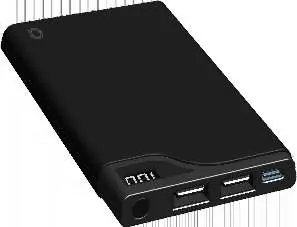
- LED Screen: Displays remaining battery percentage.
- Type-C Input: Port for charging the power bank.
- USB Output 1 & 2: Ports for charging your mobile devices.
- On/Off Button: Used to activate the power bank and check battery status.
Specifications
- Input: Type-C DC 5V/2A
- Output 1: DC 5V/1A
- Output 2: DC 5V/2.1A
- Total Output: DC 5V/2.1A MAX
- Working Temperature: 0°C to 40°C
- Dimensions: 129 x 68 x 12.5mm
- Weight: 178g
Charging instructions
Charging the power bank
Connect a charging cable to the Type-C input port and a power source. The LED screen will show the current power level and continue to flash while charging. Once the screen displays 100, the power bank is fully charged.
Charging your mobile device
- Press the button on the top of the power bank to turn it on.
- Connect the USB end of your charging cable to the power bank and the other end to your mobile device.
- The device will start charging automatically.
- Once fully charged, disconnect the device.
- Press the button twice to turn off the power bank.
Safety warnings
- Do not leave the device unattended while in use.
- Do not expose the device to humidity, liquids, or direct sunlight.
- Keep away from heat sources such as radiators, stoves, or hot cars, as this may cause overheating or explosion.
- Do not damage the casing.
- Do not use in areas with high static electricity.
- Do not attempt to open, disassemble, or repair the device yourself, as this will void the warranty.
- If the device emits an odor, excessive heat, or becomes discolored/distorted, stop using it immediately.
- Dispose of the device at a battery recycling station; do not throw it in domestic waste.
Maintenance and storage
If the power bank is not used for three months or longer, the battery capacity may decrease. It will return to normal capacity after 3-4 charge and discharge cycles. Always store the device in a cool, dry place when not in use.
Warranty
Alpha Comm Enterprises, Inc. provides a one-year limited warranty covering mechanical and electrical problems, excluding issues arising from abuse or tampering. For support, contact 1-888-951-0909 or email [email protected]. For more information, visit quikcell.com/warranty.
Official resources from the manual
Manufacturer information
Alpha Home Appliances
Practical help
Common problems
Device not charging
Ensure the cable is securely connected to both the power bank and the power source. Press the power button to ensure the unit is active.
Reduced battery capacity
If the device has not been used for 3 months or longer, perform 3-4 full charge and discharge cycles to restore capacity.
Device overheating or emitting odor
Stop using the device immediately. Do not attempt to repair it yourself. Contact support.
Before use
- Ensure the power bank is charged before first use.
- Verify you are using a compatible USB charging cable.
- Check that the ambient temperature is between 0°C and 40°C.
- Ensure the device is not damaged or distorted.
Specs in practice
- Type-C Input (5V/2A)
- The power required to charge the power bank itself. Using a 2A charger will provide the fastest recharge time.
- USB Output 1 (5V/1A)
- Standard charging speed, suitable for smaller devices or accessories.
- USB Output 2 (5V/2.1A)
- Higher power output, suitable for faster charging of smartphones and larger devices.
Images and diagrams
- The LED screen provides a digital readout of the remaining battery percentage.
- The Type-C port is dedicated to charging the power bank.
- The two USB ports allow for simultaneous charging of two devices, up to a total of 2.1A.
Model compatibility
- Compatible with various mobile phones.
- Not suitable for domestic waste disposal; must be recycled at a battery recycling station.

Manual page author
Emily Carter
User documentation editor
Prepares concise manual descriptions and highlights the most useful setup, operation, and maintenance information for readers.