Tools / Measuring Tools
User Guide for AMETEK Cyclops L Portable Pyrometer
Comprehensive user guide for the AMETEK Cyclops L series portable pyrometers. Includes setup, operation modes, menu navigation, optical adjustments, and maintenance instructions for models 100L, 160L, 390L, and 055L.
Table of contents
Manual images
Click an image to enlargeImportant Information
The AMETEK Cyclops L series is a range of high-precision portable infrared thermometers. This guide applies to the Cyclops 100L, 160L, 390L, and 055L models. Always read the safety warnings before use, particularly regarding looking at the sun through the instrument, which can cause severe eye damage.
Thermometer Description
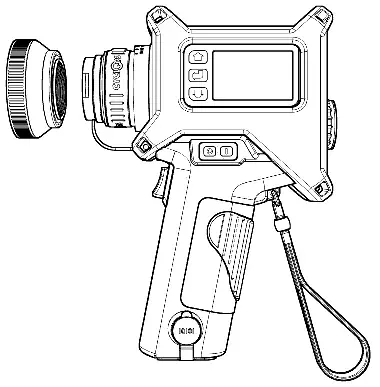
The instrument features an LCD display panel, keypad, optical focusing ring (except 055L), protective window, and trigger. It includes Bluetooth and USB connectivity for data logging and configuration.
Power Supply
The thermometer is powered by a 9V PP3 battery or via USB connection. A small internal lithium cell maintains the clock settings during battery changes. To change the battery, switch the unit off, slide the cover on the top surface, and ensure terminals are correctly aligned.
Operation Modes
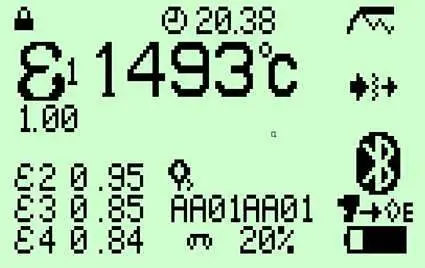
The Cyclops L operates in three main modes: Measure Mode, Route Mode, and Operator Emissivity Mode. Measure Mode displays peak, continuous, average, and valley temperatures simultaneously. Route Mode allows for pre-defined measurement tours. Operator Emissivity Mode simplifies operation by locking out the menu and providing pre-selected emissivity values.
Optics and Focusing
The Cyclops L features a precision reflex optical system. For 100L, 160L, and 390L models, the focus is variable from 1m to infinity. The 055L model has a fixed focus at 5m. Accessories such as close-up lenses and neutral density filters are available for specific measurement requirements.
Menu Navigation
Access the menu by pressing the Enter key. Use the scroll keys to navigate icons and select sub-options. Key parameters include Emissivity, Trigger Mode, Alarms, Units, Backlight, Sounder, and Window Compensation.
Trigger Operation
Trigger operation determines how measurements are captured. Options include Classic, Burst, Latched, and Route. In Classic mode, all four temperature types are stored when the trigger is released. Burst mode is ideal for monitoring rapid temperature changes.
Maintenance
Keep the lens assembly, eyepiece, and display panel clean using a soft lens cloth. Regularly check the instrument for damage. In the event of a fault, do not attempt on-site repair; contact AMETEK Land.
Manufacturer information
AMETEK, Inc.
Practical help
Common problems
Instrument fails to turn on
Reset by pressing the On and Off switches simultaneously.
Memory 100% full
Clear the internal memory using the Erase icon in the menu.
Display inverted (white on black)
Indicates lost calibration data; return to AMETEK Land for repair.
Before use
- Check battery status
- Ensure lens is clean
- Set correct date and time
- Select appropriate emissivity for target material
- Focus the eyepiece to your eyesight
Specs in practice
- Trigger Modes
- Classic, Burst, Latched, or Route modes determine how measurements are captured and stored.
- Window Compensation
- Adjustment for radiant energy loss when measuring through viewing ports or windows.
Images and diagrams
- Fig 3-1: Thermometer components and controls
- Fig 7-7: Menu structure overview
- Fig 9-1: Complex measurement setup with viewing window
Model compatibility
- Cyclops 055L is fixed focus (5m) and does not have an Optical Focus Ring.
- Averaged temperature measurement is not available on Cyclops 055L.
- Burst and Latched modes are not available on Cyclops 055L.

Manual page author
David Miller
Documentation analyst
Organizes user manual content into clear summaries, with attention to model details, product context, and everyday usability.