Tools / Measuring Tools
Bosch BLAZE Laser Measure
Quick start guide for the Bosch BLAZE laser measure series. Learn how to use button functions, navigate the home screen, adjust tool settings, and connect to the MeasureOn app for efficient project documentation.
Table of contents
Manual images
Click an image to enlargeQuick Start Guide
This guide provides essential information for operating the Bosch BLAZE laser measure series. The BLAZE series includes models GLM165-22, GLM165-25G, GLM165-27C, GLM165-27CG, and GLM165-27CGL. Please note that specific features, such as haptic feedback or Bluetooth connectivity, vary by model. Refer to the compatibility chart in the full manual to verify which functions are supported by your specific device.
Button Functions
The device is operated using the following buttons:
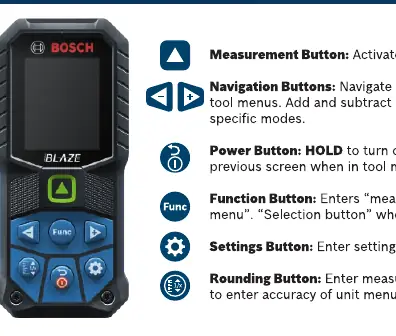
- Measurement Button: Activates the laser for measurements.
- Navigation Buttons: Used to navigate left and right in tool menus and to add/subtract measurements in specific modes.
- Power Button: Turns the device on/off. Press to return to the previous screen when in the tool menu.
- Function Button: Opens the measurement selection menu.
- Settings Button: Opens the tool settings menu.
- Rounding Button: Opens the measurement unit menu. Hold for 3 seconds to enter the accuracy/unit menu.
Home Screen Overview
The home screen displays critical information for your measurements:
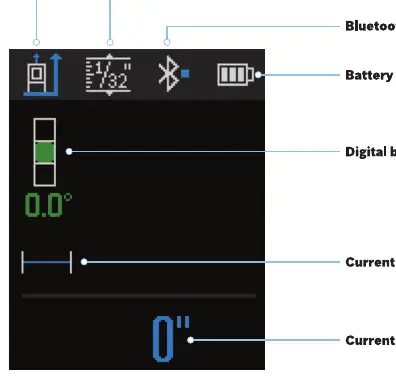
- Measuring reference point: Indicates where the measurement is taken from.
- Selected rounding denominator: Shows the current precision setting.
- Bluetooth connectivity: Indicates if the device is connected to the app.
- Battery life: Shows remaining power.
- Digital bubble level: Assists in keeping the device level.
- Current measurement mode: Displays the active measurement function.
- Current measurement: Shows the latest reading.
Tool Settings
To access and modify tool settings:
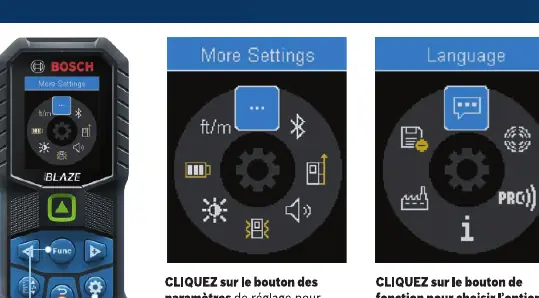
- Press the Settings Button to enter the settings menu.
- Use the Function Button to select the More Settings option for additional configurations.
- Use the Navigation Buttons to scroll through options.
MeasureOn App Connectivity
You can use the Bosch MeasureOn app to document measurements and create floor plans:
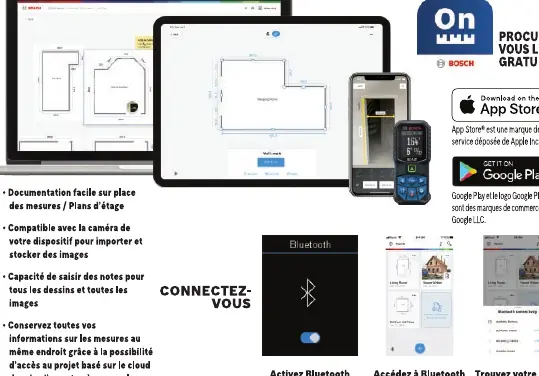
- Download the app from the Apple App Store or Google Play Store.
- Enable Bluetooth on your laser measure.
- Access Bluetooth settings within the MeasureOn app to pair your device.
- The app allows for easy on-site documentation, camera integration for images, and cloud-based project storage.
Manufacturer information
Bosch
Practical help
Common problems
Need to change measurement units (e.g., to meters or feet).
Hold the Rounding button for 3 seconds to enter the unit and accuracy menu.
Cannot find specific measurement functions.
Press the Function button to open the measurement selection menu and use navigation buttons to scroll through available options.
App not connecting.
Ensure Bluetooth is enabled on the laser measure and that you are accessing the Bluetooth menu within the MeasureOn app.
Before use
- Check the battery level on the home screen.
- Verify the current measurement mode is appropriate for your task.
- Ensure the correct reference point is selected.
- Check if your specific model supports the desired feature (e.g., Bluetooth) using the compatibility chart.
Model compatibility
- Features like Haptic Feedback, Connectivity, and specific measurement modes are model-dependent.
- The GLM165-27C, GLM165-27CG, and GLM165-27CGL models support Bluetooth connectivity.
- Refer to the compatibility chart in the manual to confirm if your model supports specific functions like 'Indirect height' or 'Wall surface area'.

Manual page author
David Miller
Documentation analyst
Organizes user manual content into clear summaries, with attention to model details, product context, and everyday usability.