Home Appliances / Food Warmers
User Manual for Anko 15W Wireless Charging Pad EPB-20610-B
Quick guide for the Anko 15W Wireless Charging Pad (EPB-20610-B). Learn how to set up, understand indicator lights, and follow safety guidelines for efficient wireless charging.
Quick answers from the manual
Quick answer
- To use the Anko 15W Wireless Charging Pad, connect it to a power source using the provided USB cable. Place your wireless charging-enabled device on the pad. The green light indicates standby, charging, or fully charged status. A flashing red light indicates a foreign object is detected. p. 1
Key actions
- Connect the charging cable to the pad. p. 1
- Place device on the charging pad. p. 1
First start
- Connect the USB cable to the charging pad and a power source. p. 1
Show 3 more answers Show less
Problems and fixes
Indicator light flashes red
A foreign object is detected on the charging area. Remove the object.
p. 1Technical specifications
| Parameter | Value | Meaning | Pages |
|---|---|---|---|
| Input | 5V/2A, 9V/2A, 12V/2A | Power input requirements | p. 1 |
| Max Output | 15W | Maximum wireless charging power | p. 1 |
Where to find it in the PDF
- User Manual p. 1
Table of contents
Quick guide from the manual
This document provides instructions for the Anko 15W Wireless Charging Pad (EPB-20610-B). To achieve maximum wireless charging output, it is recommended to use a 24W wall charger. Ensure the charging area is free of foreign objects to prevent charging interruptions.
Device layout
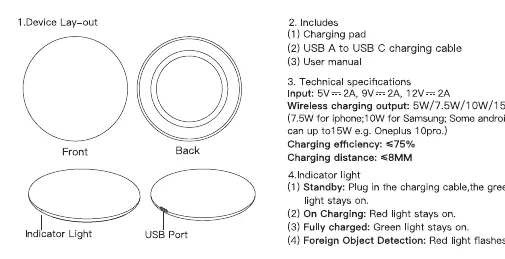
The device consists of a charging pad with a front and back side, an indicator light, and a USB port for power input.
Operating instructions
- Connect the charging cable to the charging pad. The indicator light will turn green.
- Place your wireless charging-enabled device on the charging plate to start charging.
- To stop charging, simply remove the device from the charging area.
- If a foreign object is detected on the charging area, the indicator light will flash red. The charging function will stop until the foreign object is removed.
Indicator light meanings
- Standby: Green light stays on.
- Charging: Green light stays on.
- Fully charged: Green light stays on.
- Foreign Object Detection: Red light flashes.
Technical specifications
- Input: 5V/2A, 9V/2A, 12V/2A
- Wireless charging output: 5W/7.5W/10W/15W MAX
- Charging efficiency: ≤75%
- Charging distance: ≤8mm
Safety precautions
- Do not disassemble the device or throw it into fire.
- Avoid using the charger in severely hot, humid, or corrosive environments.
- Keep the device at least 30cm away from medical devices (e.g., pacemakers, implantable cochlear) to avoid interference.
- Do not place magnetic strips or chip cards (ID cards, credit cards) near the device.
- Remove phone cases if they interfere with the charging performance.
Manufacturer information
Anko
Practical help
Common problems
Indicator light flashes red
A foreign object is detected on the charging area. Remove the object to resume charging.
Slow or no charging
Ensure you are using a 24W wall charger for maximum output. Remove any thick phone cases or foreign objects.
Before use
- Ensure you have a 24W wall charger for optimal performance.
- Check that the charging area is free of foreign objects.
- Remove magnetic cards or strips from the phone area.
- Ensure the device is compatible with wireless charging.
Show more Show less
Specs in practice
- Charging distance
- The charger can charge through cases up to 8mm thick.
- Charging efficiency
- The energy transfer rate is 75% or less.
Images and diagrams
- The device features a front and back view, an indicator light, and a USB port for power input.
Model compatibility
- Keep at least 30cm away from medical devices like pacemakers.
- Not compatible with magnetic strips or chip cards.

Manual page author
Emily Carter
User documentation editor