Electronics / Speakers & Soundbars
User Manual for anko 20YX02 Bluetooth Speaker
Quick guide for the anko 20YX02 Bluetooth Speaker. Learn how to pair via Bluetooth, use TWS mode, charge the device, handle calls, and troubleshoot common connection or power issues.
Quick answers from the manual
Quick answer
- The anko 20YX02 is a portable Bluetooth speaker. It supports TWS pairing for stereo sound, wired connections via audio cable, and hands-free calling. p. 1
Key actions
- Power on p. 1
- TWS Pairing p. 1
First start
- Charge the speaker fully before first use. p. 1
Show 3 more answers Show less
Problems and fixes
Speaker cannot power on
Charge the device for 30 minutes.
p. 1
Cannot search Bluetooth Speaker
Ensure speaker is in pairing mode, delete pairing list on phone, and search again.
p. 1Technical specifications
| Parameter | Value | Meaning | Pages |
|---|---|---|---|
| Input Rating | 5V 800mA | Power input requirement | p. 1 |
| Working temperature | 0 - 45°C | Operating temperature range | p. 1 |
Where to find it in the PDF
- Product Guide p. 1
Table of contents
Manual images
Click an image to enlargeQuick guide from the manual
The anko 20YX02 is a portable Bluetooth speaker. Before first use, it is recommended to fully charge the device. The speaker supports Bluetooth pairing, TWS (True Wireless Stereo) for connecting two speakers, and wired audio connections. It also features built-in controls for music playback and phone calls.
What's in the box
- Bluetooth speaker
- 1.0m Audio cable
- 30cm USB charging cable
- User manual
Power on and off
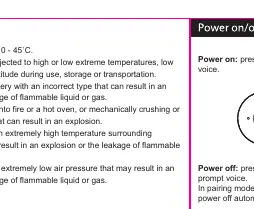
- Power on: Press and hold the power button for 3 seconds until the prompt voice is heard.
- Power off: Press and hold the power button for 5 seconds until the prompt voice is heard.
- Auto-off: The speaker will power off automatically if in pairing mode but not connected for more than 5 minutes.
Bluetooth pairing
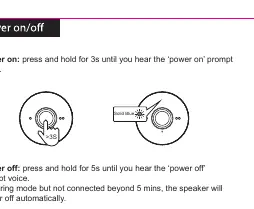
- Power on the speaker; the Blue LED will flash, indicating pairing mode.
- Ensure Bluetooth is enabled on your audio device.
- Select "anko BT speaker" from the list on your device.
- Once connected, you will hear a "Connected" prompt, and the Blue LED will flash every 5 seconds.
- The speaker will automatically search and reconnect to the last paired device.
TWS function
You can connect two speakers for stereo sound:
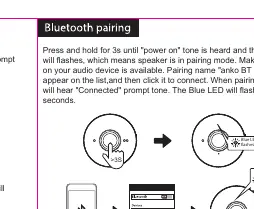
- Power on both speakers.
- Ensure both are in pairing mode.
- Single click any one of the two speakers.
- A "Du" voice will confirm they are connected to each other. The master speaker's Blue LED will stay on.
Music and call controls
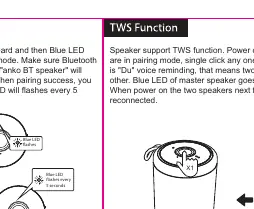
- Play/Pause: Single click.
- Previous/Next song: Press and hold.
- Volume adjustment: Single click.
- Answer/Hang up call: Single click.
- Reject call: Press and hold for 1 second.
Wired connection
If Bluetooth is not available, you can connect the speaker directly to your audio device using the provided audio cable.
Charging
The speaker has a built-in lithium-ion battery. Plug the micro USB cable into the speaker and the standard USB connector into a power source. The Red LED remains on during charging and turns off when fully charged.
Troubleshooting
- Speaker cannot power on: Charge the device for 30 minutes.
- Cannot search Bluetooth speaker: Ensure the speaker is in pairing mode (Blue LED flashing), delete the pairing list on your phone, and search again.
- No sound: Increase volume on both the speaker and the connected device. Check if the speaker is connected to earpiece mode.
- Speaker disconnects: Check battery level or ensure the speaker is within the 10m communication range.
Safety warnings
- Working temperature: 0 - 45°C.
- Do not expose the battery to extreme temperatures, low air pressure at high altitude, or mechanical damage.
- Do not dispose of the battery in fire or a hot oven.
Manufacturer information
Anko
Practical help
Common problems
Speaker will not power on
Battery may be drained. Charge the device for at least 30 minutes.
Cannot find Bluetooth speaker on phone
Ensure the speaker is in pairing mode (Blue LED flashing). Delete the old pairing list on your phone and search again.
No sound during music playback
Increase the volume on both the speaker and your smartphone. Ensure the speaker is not disconnected.
Speaker disconnects frequently
Check if the battery is low or if the speaker is beyond the 10m communication range.
Before use
- Fully charge the speaker before first use.
- Ensure the charging cable is not damaged.
- Verify Bluetooth is enabled on your audio device.
- Check that the speaker is in pairing mode (Blue LED flashing).
Show more Show less
Specs in practice
- Working temperature
- 0 - 45°C
- Communication range
- Up to 10 meters
- Input Rating
- 5V 800mA
Images and diagrams
- The manual provides visual guides for button operations (Play/Pause, Volume, Call handling).
- Diagrams illustrate the TWS pairing process between two speakers.
- Charging instructions show the correct connection of the micro USB cable.
Model compatibility
- Compatible with Bluetooth-enabled devices.
- Supports wired connection via 3.5mm audio cable.

Manual page author
David Miller
Documentation analyst