Lighting / Fixtures
DMX Profile Specification for Aputure STORM 1000c & 80c
A comprehensive DMX profile guide for the Aputure STORM 1000c and 80c LED lights, detailing channel assignments, control modes, and effect parameters.
Table of contents
Manual images
Click an image to enlargeQuick guide from the manual
This document provides the DMX profile specifications for the Aputure STORM 1000c and 80c fixtures running on Aputure OS II. It is intended for lighting technicians and operators to configure DMX control for these lights. The manual outlines three main sets of DMX profiles: Basic DMX Profiles, Control Channel DMX Profiles, and Color Space DMX Profiles.
DMX Profile Overview
The fixtures support various DMX profiles, ranging from simple 8-bit configurations to advanced 16-bit profiles with integrated effects and color space control. Profiles labeled +Control include three additional channels: Strobe, Control, and Fan, which allow for advanced remote management of the fixture.
Control Channel Functions
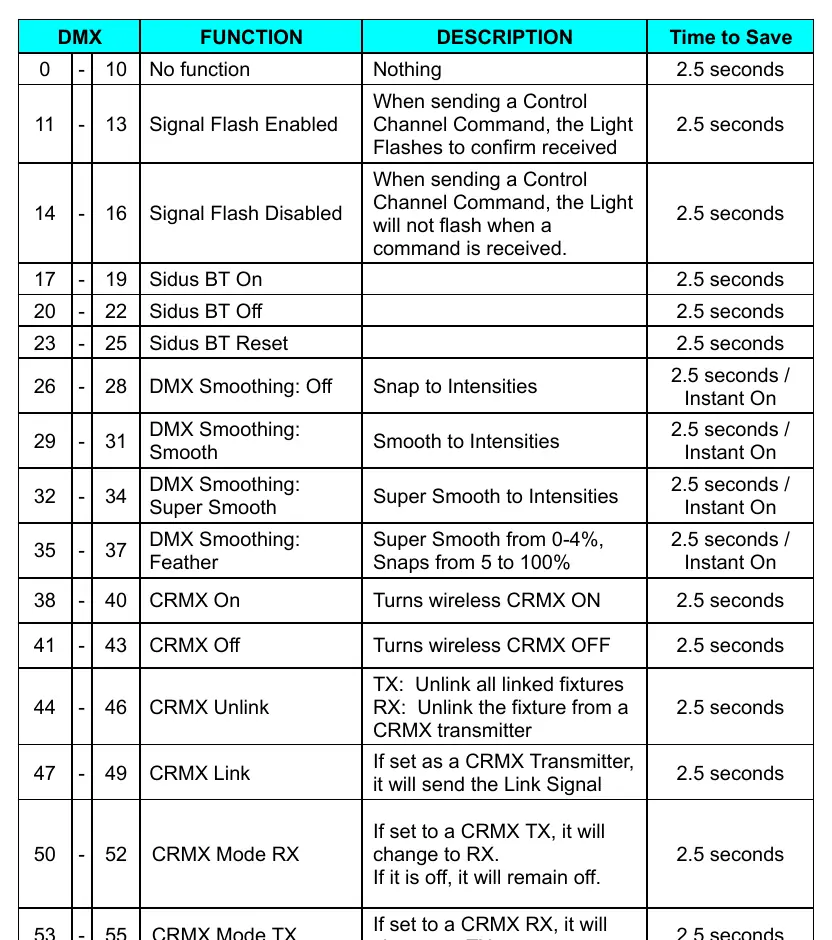
The Control Channel is a powerful tool for remote fixture management. To execute a command, assign the specified DMX value to the Control Channel for 2.5 seconds, then reset it to 0. The fixture will provide a red confirmation flash upon successful execution. Key functions include:
- Strobe Channel: Enables strobe effects in any color configuration.
- Control Channel: Allows remote execution of settings like DMX smoothing, CRMX linking, and RDM toggling.
- Fan Channel: Provides direct control over fan speed or behavior. Note that the fixture's system settings must be set to DMX Controlled for this to function.
No Effect Ranges
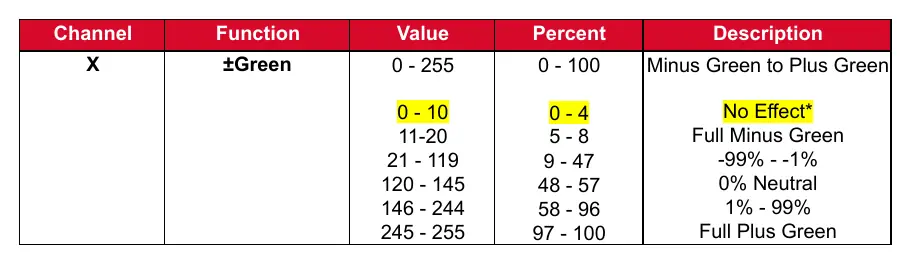
In some DMX profiles, you may encounter a No Effect range at the beginning of a channel (typically 0-10). This is designed for slider boards to ensure that when a slider is at 0, no unintended effects are triggered. It is recommended not to patch these ranges into your lighting console.
FX and Color Space Profiles
The manual provides detailed charts for various built-in effects (FX), such as Club Lights, Paparazzi, Lightning, TV, Candle, Fire, Strobe, Explosion, Faulty Bulb, and Pulsing. These profiles allow for precise control over effect parameters like speed, frequency, and color combinations. Additionally, Color Space profiles are available for advanced color management, allowing users to select specific color spaces via DMX.
Manufacturer information
Aputure
Practical help
Common problems
Confirmation flash is distracting during operation
Disable the Signal Confirmation flash by setting the Control Channel to Value 15, then back to 0.
Fan noise is too loud during recording
Use the Fan Channel to set the fan to a specific speed or 'Silent' mode, or adjust the fan behavior via the Control Channel.
Slider at 0 causes unexpected light behavior
Avoid patching the 'No Effect' range (typically 0-10) into your lighting console to prevent idle changes.
Before use
- Ensure the fixture is set to the correct DMX profile in the menu.
- Verify the DMX address on the fixture matches the console settings.
- Check that the Fan mode is set to 'DMX Controlled' in the system settings if you intend to control the fan via DMX.
- Ensure the DMX cable is properly connected and terminated if necessary.
Specs in practice
- Strobe Channel
- Enables strobe effects in any available color configuration.
- Control Channel
- Allows remote execution of fixture settings (e.g., DMX smoothing, CRMX) via predefined DMX values.
Images and diagrams
- The manual contains extensive tables for each DMX profile, detailing channel functions, values, and percentages.
Model compatibility
- Designed for Aputure OS II fixtures.

Manual page author
David Miller
Documentation analyst
Organizes user manual content into clear summaries, with attention to model details, product context, and everyday usability.