Home Appliances / Small Kitchen Appliances
User Manual for Ariete 2-Slice Toaster Mod. 157
Quick guide for the Ariete 2-Slice Toaster (Mod. 157). Includes safety instructions, operating steps, cleaning procedures, and maintenance tips.
PDF source: italiano · summary: English
Quick answers from the manual
Quick answer
- The Ariete 2-Slice Toaster (Mod. 157) is a domestic appliance for toasting bread. It features adjustable browning levels, a stop function, and a removable crumb tray. p. 1
Key actions
- To toast bread, insert slices into the racks, plug in the unit, and lower the lever until it locks. p. 1
- To clean, unplug the unit, let it cool, and wipe the racks and crumb tray with a damp cloth. p. 1
First start
- Run the appliance for a few minutes while empty to remove the 'new' odor and smoke from the heating elements. p. 1
Show 2 more answers Show less
Problems and fixes
Lever does not lock
Check if the appliance is plugged into the power outlet.
p. 1Where to find it in the PDF
- Safety and Instructions p. 1
Table of contents
Quick guide from the manual
This toaster is designed for domestic use only. Before using the appliance for the first time, it is advisable to leave it on for a few minutes to remove the "new" odor and smoke caused by the heating elements. If you are toasting multiple batches of bread, allow the toaster to cool for at least one minute between each cycle.
Description of parts
- A: Racks
- B: Crumb tray
- C: On lever
- D: Toast degree setting dial
- E: Function stop button
Instructions for use
- Insert the slices of bread into the racks (A) and place them into the slots of the toaster.
- Plug the appliance into the mains power.
- Lower the on lever (C) until it locks in place. Note: If the appliance is not plugged in, the lever will not lock.
- Adjust the toasting degree using the dial (D).
- After the racks are ejected automatically, check the browning level. If the toast is not cooked enough, select a higher setting; if it is too dark, select a lower setting.
- To interrupt the toasting process at any time, press the stop button (E).
- To switch off the appliance, press the stop button (E) and unplug it from the mains.
Cleaning and maintenance
Important: Only clean the appliance after unplugging it from the mains and allowing it to cool down completely.
- Clean the racks (A) and crumb tray (B) after each use by wiping them with a damp cloth.
- Clean the exterior of the appliance with a damp cloth. Do not use abrasive detergents as they may damage the surface.
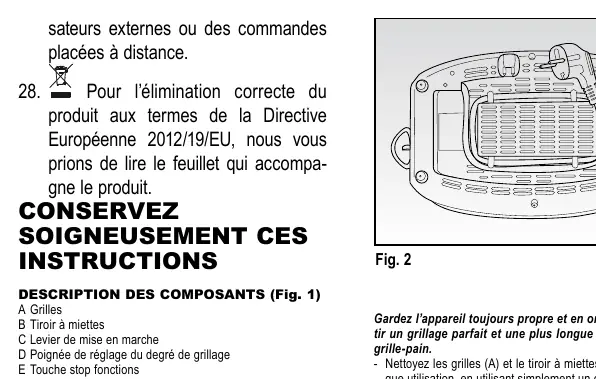
- Store the appliance by winding the power cord into the storage compartment (Fig. 2).
- It is strictly prohibited to disassemble the appliance or attempt to intervene inside it.
- Never use metal or sharp utensils to clean the inside of the toaster.
Important safety notes
- Do not use slices of bread that are too thinly cut or broken.
- Do not insert foods that may drip during cooking, as this can cause fires and make cleaning difficult.
- Do not force large food items into the toaster.
- Never insert forks or other utensils inside the toaster to remove toast, as this could damage the heating elements and cause electric shock.
- Keep the appliance away from flammable liquids, curtains, or plastic parts that are not heat-resistant.
- Do not leave the appliance unattended while connected to the power supply.
Manufacturer information
Ariete
Practical help
Common problems
Bread is not toasted enough
Select a higher toasting degree on the dial (D).
Bread is too dark
Select a lower toasting degree on the dial (D).
Lever does not lock
Ensure the appliance is plugged into the power outlet.
Before use
- Ensure the voltage on the rating plate corresponds to your mains electricity.
- Place the appliance on a flat, stable surface.
- Run the toaster empty for a few minutes to eliminate the 'new' odor.
- Ensure hands are dry before touching the appliance or plug.
Show more Show less
Specs in practice
- Toast degree dial (D)
- Adjusts the browning level of the bread.
- Stop button (E)
- Interrupts the toasting process at any time.
Images and diagrams
- Fig. 1 illustrates the main components: racks, crumb tray, lever, dial, and stop button.
- Fig. 2 shows how to store the power cord in the base compartment.
Model compatibility
- Designed for domestic use only.
- Not suitable for commercial or industrial purposes.

Manual page author
Michael Turner
Technical manual editor