Home Appliances / Vacuum Cleaners
User Manual for Ariete 1389A Coffee Maker
Quick guide and user manual for the Ariete 1389A coffee maker. Includes setup, brewing instructions for coffee and cappuccino, cleaning, descaling, and troubleshooting.
Table of contents
Quick guide from the manual
This manual provides instructions for the Ariete 1389A coffee maker. Key operations include filling the water tank, preheating the filter holder, and ensuring the boiler reaches the correct temperature (indicated by the light N) before brewing. Always use the machine on a stable surface and never leave it unattended while connected to power.
Description of the appliance
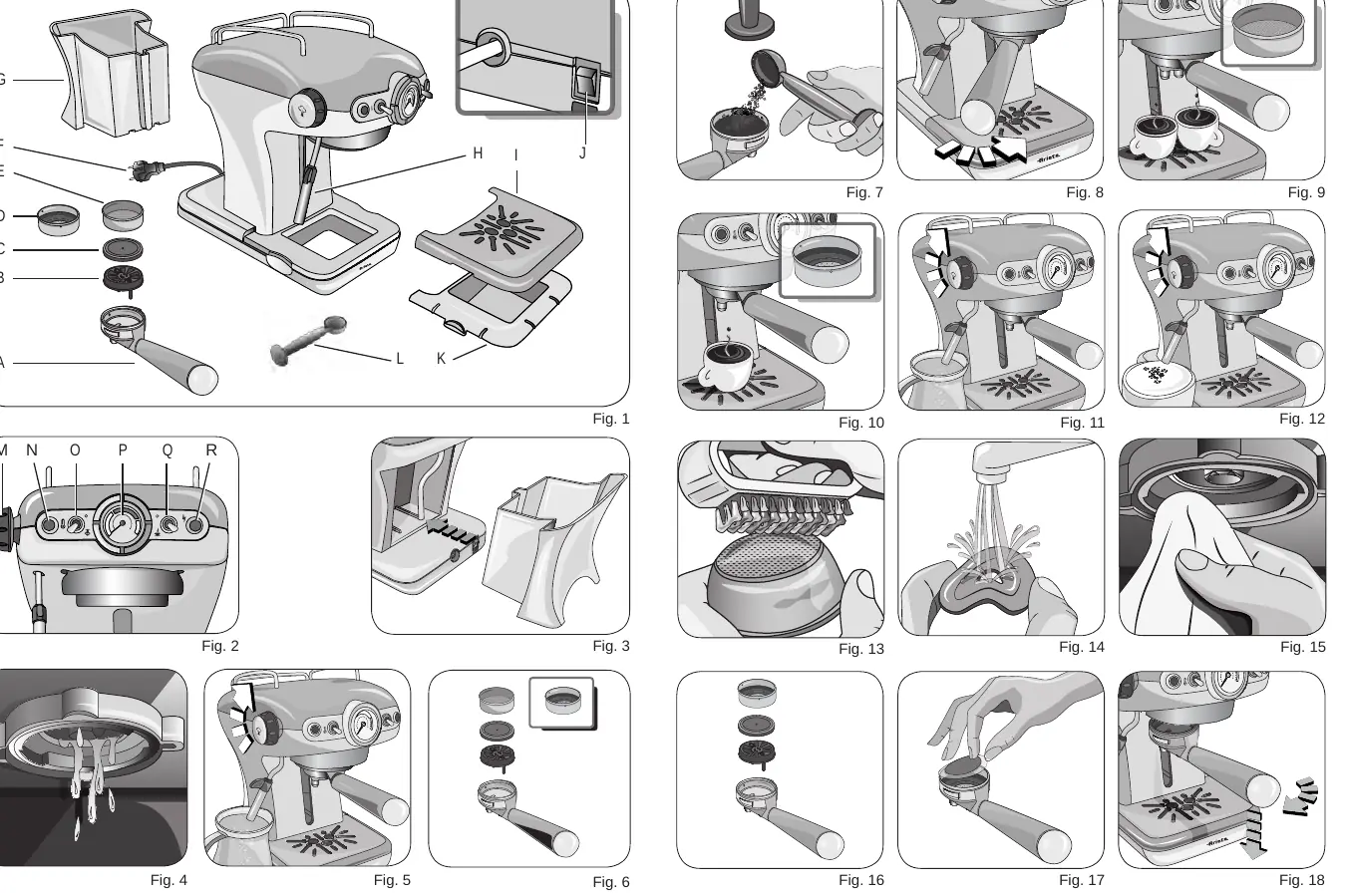
The machine features a removable water tank (G), a filter holder (A) with a perforated silicone disc (C), and a Maxi Cappuccino device (H) for steam and hot water. It includes a boiler temperature thermometer (P) and various switches for coffee (Q) and steam (O) functions.
First start-up
Before first use, wash the water tank and fill it with fresh, cool water (max 1 liter). Ensure the suction tube is inside the tank. Plug in the machine and press the On/Off button (J). It is recommended to let at least one cup of water pass through the hydraulic circuit before brewing the first coffee.
How to make coffee
With powder coffee: Insert the dripper (B), silicone disc (C), and filter (D or E) into the filter holder (A). Dose the coffee and press lightly with the provided presser. Tighten the filter holder securely into the machine. Wait for the temperature light (N) to turn on, then set the switch (Q) to the coffee position. Stop by returning the switch to the upper position.
With pods: Use the 1-cup/pod filter (D). Place the pod in the filter, center it, and insert the filter holder into the machine. Tighten securely.
How to make cappuccino
Set the switch (O) to the steam position and wait for the light (N) to turn on. Place a glass under the Maxi Cappuccino device (H) and turn the steam knob (M) to release initial water, followed by steam. Close the knob, place a milk container under the device, and immerse the wand into the milk. Open the steam knob again to froth the milk. After use, dispense steam for a few seconds to clear the outlet.
Cleaning and maintenance
Regular cleaning is essential for machine longevity. Never wash components in a dishwasher. Clean the coffee filters every 3 months using Ariete COFFEE CLEAN detergent tabs or a simple dishwasher detergent tab. Clean the silicone disc (C) and the filter holder seat regularly to prevent sediment buildup. The Maxi Cappuccino device (H) should be unscrewed and washed under running water after each use.
Descaling
If the machine's performance is compromised due to hard water, use the Ariete NOCAL descaling product (citric acid-based) following the instructions on the product packaging.
Troubleshooting
If the machine does not supply water or steam, check the water level and ensure the steam wand is not clogged. If coffee leaks from the filter holder, ensure it is tightened properly and that the filter is not overfilled. If coffee is too watery or cold, use a finer grind or ensure the machine is fully heated.
Manufacturer information
Ariete
Practical help
Common problems
Coffee not dispensing or dispensing too slowly
Check if filter holes are clogged, the coffee grind is too fine, or the coffee is too heavily pressed.
Coffee leaking from filter edges
Check if too much coffee was used, the filter holder is not tightened properly, or the seal is dirty.
No steam
Check water level in the tank or if the steam exit hole on the dispenser wand is clogged.
Before use
- Check that the mains voltage matches the label on the machine.
- Place the machine on a flat, stable surface.
- Wash the water tank before first use.
- Fill the tank with fresh, cool water (max 1L).
- Ensure the suction tube is correctly positioned inside the tank.
Images and diagrams
- Fig 1: Overview of components including filter holder, tank, and steam wand.
- Fig 6: Correct assembly of the filter holder components.
- Fig 12: Proper positioning for frothing milk with the Maxi Cappuccino device.
- Fig 13-15: Cleaning procedures for the filter and filter holder seat.
Model compatibility
- Use only E.S.E. standard pods.

Manual page author
Emily Carter
User documentation editor
Prepares concise manual descriptions and highlights the most useful setup, operation, and maintenance information for readers.