Lighting / Fixtures
User Manual for Artika Europa 10 LED Flush Mount Light 10FM-EUR
Quick guide for the Artika Europa 10 LED Flush Mount Light (10FM-EUR). Includes installation steps, wiring instructions, remote control functions, and safety warnings.
Table of contents
Manual images
Click an image to enlargeQuick guide from the manual
The Artika Europa 10 LED Flush Mount Light is designed for indoor residential use. Before beginning installation, ensure the main electrical supply is turned off at the fuse box or circuit breaker. The manufacturer recommends installation by a certified electrician to comply with local building and electrical codes.
Installation
Follow these steps to install your light fixture:
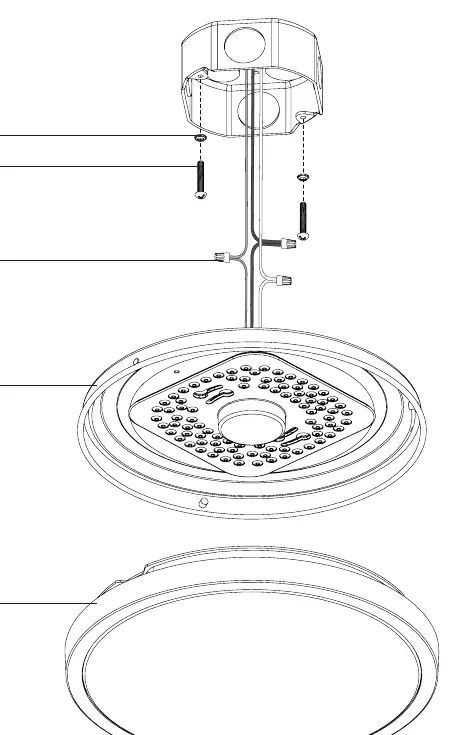
- Preparation: Ensure the power is off. Identify all parts (A, B, C, D, E).
- Mounting: Secure the mounting base to the junction box using the provided screws (B) and washers (A).
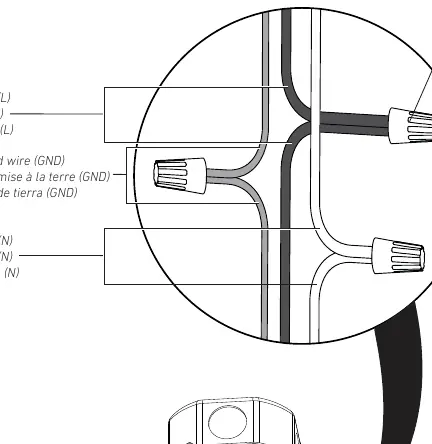
- Wiring: Connect the wires from the fixture to the house supply wires using the wire connectors (C). Match the colors: Black (L) to Black (L), White (N) to White (N), and Ground (GND) to Ground (GND).
- Securing: Attach the light fixture base (D) to the mounting bracket.
- Final Assembly: Attach the light cover (E) to the base (D).
Remote Control Functions
The remote control allows for the following adjustments:
- 1: Turn on and off light.
- 2: Increase light intensity.
- 3: Decrease light color temperature.
- 4: Night mode (reduces light color temperature and intensity).
- 5: Increase light color temperature.
- 6: Decrease light intensity.
- 7: Quick adjustment of light intensity.
- 8: Quick adjustment of light color temperature.
Safety and Warranty
This product is for indoor use only. Failure to follow installation instructions may void the warranty. Artika For Living Inc. offers a three-year limited warranty on manufacturing defects for residential use. The warranty does not cover improper installation, misuse, or normal wear and tear.
Contact Information
For customer service, contact Artika For Living Inc. at 1-866-661-9606 or [email protected]. Office hours are Monday to Friday, 9 am - 5 pm EST.
Manufacturer information
Artika
Practical help
Common problems
Light does not turn on
Check if the circuit breaker is on and ensure all wiring connections are secure and correct.
Radio or TV interference
Reorient or relocate the receiving antenna, increase separation between the equipment and the receiver, or connect the equipment to a different circuit.
Before use
- Turn off the main electrical supply at the fuse box or circuit breaker.
- Verify that the installation location is indoors.
- Ensure you have all necessary components (A, B, C, D, E).
- Consult a certified electrician if you are unsure about local electrical codes.
Images and diagrams
- Step 1: Shows the mounting hardware (A, B) and the base (D) to be attached to the junction box.
- Step 3: Illustrates the correct wiring connections using wire nuts (C) for Black, White, and Ground wires.
- Step 5: Shows the final step of attaching the light cover (E) to the base (D).
Model compatibility
- Indoor use only.
- Residential use only.
- Complies with FCC Part 15 rules for Class B digital devices.

Manual page author
Emily Carter
User documentation editor
Prepares concise manual descriptions and highlights the most useful setup, operation, and maintenance information for readers.