Home Appliances / Humidifiers & Diffusers
User Manual for Asakuki 100-DF016 Essential Oil Diffuser
Quick start guide and user manual for the Asakuki 100-DF016 Essential Oil Diffuser. Learn how to set up, operate, clean, and troubleshoot your device.
Table of contents
Manual images
Click an image to enlargeQuick guide from the manual
This guide provides essential information for operating your Asakuki 100-DF016 Essential Oil Diffuser. Ensure you read the safety warnings, specifically regarding the cleaning schedule and water usage, to prevent health risks from biological organisms.
Accessories
The package includes the following items:
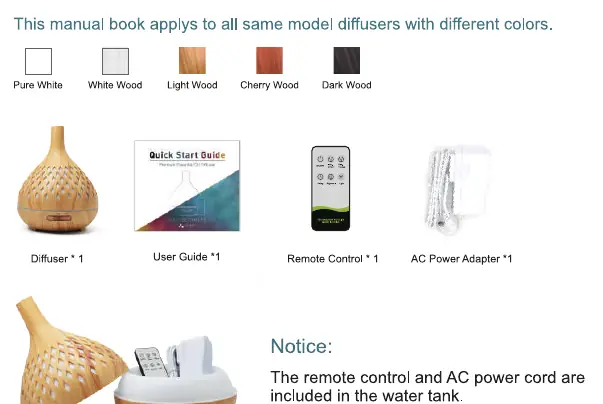
- Diffuser unit
- Remote control
- AC Power adapter
- User guide
Note: The remote control and AC power cord are packed inside the water tank.
Using the diffuser
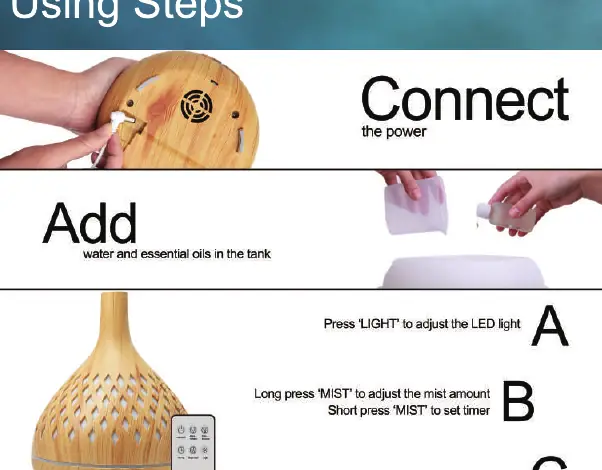
- Connect: Plug the power adapter into the base of the unit.
- Add: Fill the tank with water and add essential oils. Do not exceed the max line.
- Operate: Use the buttons on the unit or the remote control to adjust mist and light settings.
Remote control guide
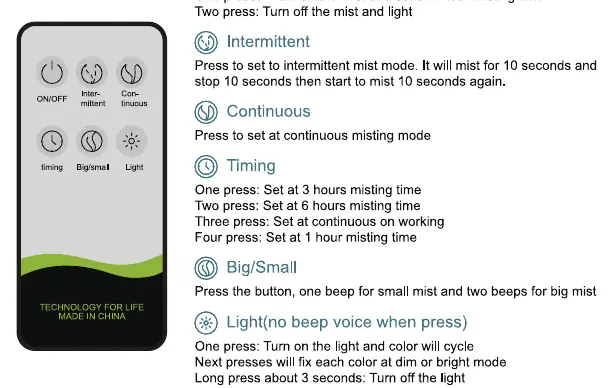
- ON/OFF: One press turns on mist (1-hour timer); two presses turn off mist and light.
- Intermittent: Mists for 10 seconds, stops for 10 seconds.
- Continuous: Sets to continuous misting mode.
- Timing: Cycles through 3h, 6h, continuous, and 1h settings.
- Big/Small: Adjusts mist density (one beep for small, two beeps for big).
- Light: Turns on light and cycles colors. Long press (3 seconds) to turn off light.
Button control guide
The unit features two main buttons on the front:
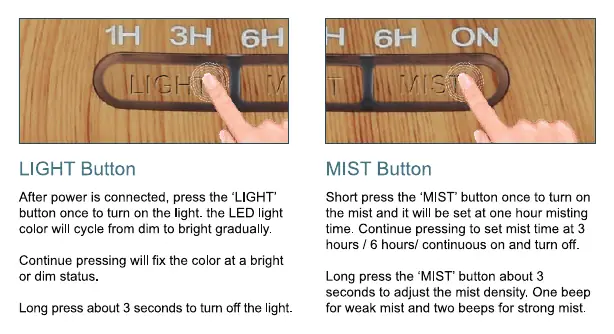
- LIGHT Button: Press once to turn on the light and cycle colors. Continue pressing to fix a specific color or brightness. Long press for 3 seconds to turn off.
- MIST Button: Short press to turn on and set timer (1h, 3h, 6h, continuous). Long press for 3 seconds to adjust mist density (one beep for weak, two beeps for strong).
Cleaning and maintenance
Clean the water tank every 3 days to prevent bacterial growth.
- Unplug the unit and pour out remaining water from the 'DRAIN SIDE'.
- Add 2-3 drops of vinegar to 100ml of warm water (up to 70C).
- Leave for 5 minutes, shake gently, and pour out.
- Wipe with a dry soft cloth.
- If not in use for a long time, keep the unit clean and dry.
Troubleshooting
- Will not switch on/off: Check if there is enough water in the tank and ensure the power cord is connected properly.
- No mist or abnormal mist: Ensure water level is correct (not over max line). Clean the ultrasonic plate and check the air intake on the underside of the base for dust.
- Water leakage: Ensure the cover is set properly on the base. High humidity or low temperatures may cause condensation.
Specifications
- Dimensions: 165 x 198 mm
- Weight: Approx 435g
- Power: 10W (Input: AC100-240V 50/60Hz, Output: DC24V 500mA)
- Tank Capacity: 400ml
- Working Frequency: 2.4MHz
- Materials: PP/ABS/PC
DIY essential oil blends
The manual suggests several oil combinations for different effects, such as 'Good Night Sleep' (Lavender + Orange), 'Goodbye Mold' (Clove + Grapefruit), 'Brain Booster' (Basil + Geranium + Orange), and 'Anti Allergy' (Geranium + Lavender + Oregano).
Manufacturer information
Asakuki
Practical help
Common problems
Unit will not switch on/off
Check if there is enough water in the tank and ensure the power cord is connected properly.
No mist or abnormal mist
Check water level (do not exceed max line), clean the ultrasonic plate, and ensure the air intake on the base is not clogged with dust.
Water leakage
Ensure the cover is set properly on the base. If the environment is cold or humid, mist may condense into water droplets.
Before use
- Unpack the remote control and power adapter from the water tank
- Place the diffuser on a flat surface
- Fill the tank with water up to the max line
- Add essential oils
- Ensure the cover is securely placed on the base
Specs in practice
- Tank Capacity
- 400ml
- Working Frequency
- 2.4MHz
Images and diagrams
- Remote control button functions
- Manual button control (Light and Mist)
- Cleaning process
Model compatibility
- Use pure natural essential oils only

Manual page author
Michael Turner
Technical manual editor
Reviews PDF manuals for structure, safety notes, and practical product details so readers can find the right information quickly.