Computers / PC Components
Pro 4 Wireless Stereo Headset
Quick guide for the Pro 4 Wireless Stereo Headset. Learn how to pair, control playback, charge, and troubleshoot your TWS earbuds.
Table of contents
Quick Start Guide
The Pro 4 Wireless Stereo Headset is a TWS (True Wireless Stereo) device. To begin, ensure the charging case is charged. Open the lid of the charging case to turn on the earbuds, then take them out to initiate pairing mode.
Operation and Pairing
Follow these steps to connect your headset to your mobile device:
- Power On/Off: Long press the multifunction key for 3 seconds to turn the device on or off.
- Pairing: Open the Bluetooth settings on your mobile phone, search for the device name (BluetoothName), and click to connect.
- Connection: The red and blue lights will flash alternately when in pairing mode. Once successfully connected, the lights will turn off.
Touch Controls
Use the multifunction key on the earbuds to control your media and calls:
- Play/Pause: Single click.
- Next Song: Double click the left earbud.
- Last Song: Double click the right earbud.
- Answer Call: Click the button when receiving a call.
- Refuse Call: Long press the button.
- Siri/Voice Assistant: Press and hold for 3 seconds.
Charging
The charging box provides power to the earbuds. When charging the earbuds, the red light on the charging box will stay on. Once the earbuds are fully charged, the indicator light will turn off. Ensure the charging box has sufficient power to charge the earbuds.
Specifications
- Bluetooth Version: V5.0+EDR
- Supported Protocols: A2DP/HFP/HSP/AVRCP
- Frequency: 2.4GHz
- Transmission Distance: 10-15 meters
- Battery Capacity: 30mAh (earbuds), 260mAh (charging box)
- Standby Time: 40 hours
- Play/Talk Time: 2-3 hours
Precautions
- Store the earbuds in a dry and ventilated environment to avoid oil, water, and dust.
- Avoid using organic solvents or harsh chemicals to clean the device.
- Keep the earbuds and your phone within 10 meters for a stable connection.
- If the earbuds fail to connect or pair, ensure they have sufficient power.
Practical help
Common problems
Earbuds not connecting to phone
Ensure the earbuds are within 10 meters of the phone and that Bluetooth is enabled on your device.
Earbuds not charging
Ensure the charging case has sufficient power and the earbuds are seated correctly in the case.
Before use
- Charge the charging case fully before first use.
- Ensure Bluetooth is enabled on your mobile device.
- Keep the earbuds and phone within 10 meters for a stable connection.
Specs in practice
- Bluetooth V5.0+EDR
- Provides a stable wireless connection with improved data transfer rates.
- 260mAh Charging Box
- The capacity of the case battery, used to recharge the earbuds on the go.
- 10-15m Range
- The maximum distance between the earbuds and the connected device for stable audio.
Images and diagrams
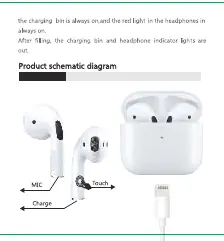
- The product schematic identifies the touch control area, the microphone, and the charging pins.
- The charging indicator light is located on the charging box.
Model compatibility
- Supports standard Bluetooth protocols: A2DP, HFP, HSP, AVRCP.

Manual page author
David Miller
Documentation analyst
Organizes user manual content into clear summaries, with attention to model details, product context, and everyday usability.