Computers / Laptops
ASUS Phone ASUS_AI2401_H User Guide
Quick guide for the ASUS_AI2401_H smartphone, covering device features, wireless charging, safety precautions, and warranty information.
Table of contents
Manual images
Click an image to enlargeQuick guide
This guide provides essential information for the ASUS_AI2401_H smartphone, including device layout, wireless charging, and safety guidelines. For the complete E-Manual and more detailed information, refer to the official ASUS support website.
Device features
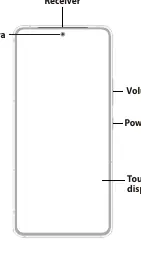
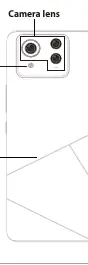
The device features a touch screen display with a front camera and receiver at the top. The right side houses the volume and power keys. The bottom edge contains the USB Type-C port, microphone, Nano SIM card slot, speaker, eject hole, and audio jack. The rear of the device features the camera lens and flash lens.
Wireless charging
You can charge your ASUS Phone wirelessly using a Qi-certified wireless charger. Follow these steps:
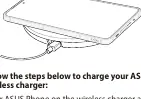
- Place your ASUS Phone on the wireless charger according to the charger's instructions. Ensure the wireless charging coils on the back of the phone are in contact with the charger.
- When charging starts, the wireless charging icon will appear on the screen.
- When charging is complete, remove your phone from the wireless charging stand or pad.
Important: Remove any covers, cases, or accessories before wireless charging. Do not place conductive materials (metal parts, magnets) or RFID cards (credit cards, key cards) between the phone and the charger to avoid burns or damage.
Safety information
To prevent hearing damage, do not listen at high volume levels for long periods. Use the device in an environment with ambient temperatures between 0 °C and 35 °C. Do not disassemble the device or its accessories; if service is required, return the unit to an authorized service center. The device is equipped with a non-detachable Li-polymer battery. Do not attempt to remove or replace the battery yourself, as this will void the warranty and may cause serious harm.
Warranty and support
The warranty period applies for the same period as the legal warranty regulated by the local government. Accessories delivered with the product are not covered under the warranty. Before requesting warranty service, back up all data and remove personal information, as ASUS may delete data during the service process. For more information, visit the ASUS support website.
Manufacturer information
ASUSTeK Computer Inc.
Practical help
Common problems
Charging is slow or stops
Using the phone during charging may slow or stop the process to protect the battery. Certain apps may also affect charging functionality.
Wireless charging not working
Ensure the wireless charging coils on the back of the phone are in contact with the charger. Remove any cases or accessories.
Battery overheating
Ensure the device is placed correctly on the wireless charger and that no conductive materials are between the phone and the charger.
Before use
- Read all safety information and operating instructions.
- Ensure the device is used in an environment with ambient temperatures between 0 °C and 35 °C.
- Remove any covers, cases, or accessories before wireless charging.
Specs in practice
- Input Voltage
- AC 100V - 240V (wall outlet to adapter).
- Output Voltage
- +5V-20V 3.25A, 65W (adapter to device).
- Operating Temperature
- 0 °C to 35 °C (32 °F to 95 °F).
Images and diagrams
- Front features: Receiver, Front camera, Volume key, Power key, Touch screen display.
- Bottom features: USB Type-C port, Microphone, Nano SIM card slot, Speaker, Eject hole, Audio jack.
- Rear features: Camera lens, Flash lens, Back cover.
Model compatibility
- Requires a Qi-certified wireless charger.

Manual page author
Emily Carter
User documentation editor
Prepares concise manual descriptions and highlights the most useful setup, operation, and maintenance information for readers.