Electronics / Monitors
ASUS Phone (AI2401_H) User Guide
Official user guide for the ASUS Phone (Model: AI2401_H), covering device features, wireless charging instructions, safety information, battery maintenance, and warranty details.
Table of contents
Manual images
Jump to the sectionProduct Overview
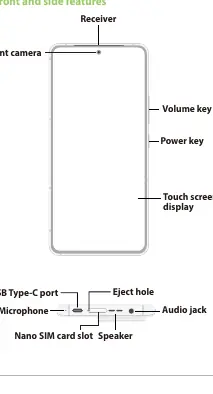
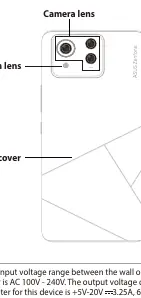
The ASUS Phone (Model: AI2401_H) is a high-quality mobile device. The front features a touch screen display, front camera, and receiver. The side includes volume and power keys. The bottom edge houses the USB Type-C port, microphone, speaker, audio jack, and a Nano SIM card slot. The rear features a camera lens and flash.
Wireless Charging
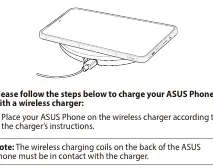
You can charge your ASUS Phone wirelessly using a Qi-certified charger. Ensure the wireless charging coils on the back of the phone are in contact with the charger. Remove any cases or accessories before charging. Do not place conductive materials (metal, magnets) or RFID cards (credit/transport cards) between the phone and the charger to avoid damage or overheating.
Safety Information
To prevent hearing damage, avoid listening at high volume levels for long periods. Use the device in environments with ambient temperatures between 0°C and 35°C. Do not disassemble the device or its accessories; repairs should only be performed by authorized service centers.
Battery Maintenance
The device is equipped with a non-detachable Li-polymer battery. For optimal performance, keep the ambient temperature between +5°C and +35°C. Do not attempt to remove, disassemble, bend, crush, puncture, or short-circuit the battery. Keep it away from water, liquids, and metal objects. Dispose of used batteries according to local regulations and do not throw them in household waste or fire.
Troubleshooting and Support
For detailed information and the complete E-Manual, visit the official ASUS support website. If the device requires service, contact an authorized service center. Unauthorized disassembly voids the warranty and poses risks of electric shock or fire.
Proper Disposal
Do not dispose of this product or its battery in municipal waste. The crossed-out wheeled bin symbol indicates that the product and its battery should be recycled according to local regulations for electronic equipment.
Manufacturer information
ASUSTeK Computer Inc.

Manual page author
Emily Carter
User documentation editor
Prepares concise manual descriptions and highlights the most useful setup, operation, and maintenance information for readers.