Power / Batteries Chargers
ASUS TUF Gaming Gold Fully Modular Power Supply Unit User Guide
Comprehensive user guide for the ASUS TUF Gaming Gold series power supply units, covering installation, safety precautions, and technical specifications.
Table of contents
Product Overview
The ASUS TUF Gaming Power Supply Unit (PSU) is designed for high-performance computer systems. This unit features a fully modular cable design, allowing for cleaner cable management and improved airflow within your PC chassis. The unit includes a 0dB fan button, which allows the fan to remain stationary under low loads for silent operation, or spin continuously when the button is pressed to disable the 0dB function.
Safety Information
DANGER: The power supply unit contains high-voltage components. Never attempt to open the PSU casing, as this is extremely dangerous and will immediately void your warranty. There are no user-serviceable parts inside.
- Do not insert any objects into the PSU ventilation areas.
- Ensure the fan and ventilation areas are free from obstructions to maintain proper airflow.
- Use only the modular cables bundled with the product.
- Operate the unit within the specified environment: 0°C to 40°C temperature and 20% to 80% relative humidity.
- This unit is intended for internal computer integration only and is not suitable for outdoor or external use.
Installation Guide
Before installing or removing any cables, ensure your computer system is completely powered off and disconnected from the wall outlet.
- Secure the PSU into your chassis using the provided mounting screws.
- Connect the necessary modular cables to the PSU.
- Connect the power cables to your motherboard and peripheral devices. Ensure the 24-pin main connector, 4+4 pin CPU connector, and any required PCI-E or SATA connectors are firmly seated.
- Connect the power cord to the PSU and plug it into a power source.
- Flip the power switch to the I position to turn on the unit.
Maintenance and Troubleshooting
The PSU requires no internal maintenance. If you encounter power issues, verify that all cable connections are secure and that the power switch is in the correct position. If the system fails to power on, check your motherboard manual to ensure all power connectors are correctly placed. Failure to follow these instructions or any safety guidelines will void all manufacturer warranties.
Manufacturer information
ASUSTeK Computer Inc.
Practical help
Common problems
System does not power on
Ensure the power switch is in the 'I' position and all cables are securely connected to the motherboard and PSU.
Fan is not spinning
Check if the 0dB function is active. Press the 0dB fan button to disable silent mode if you want the fan to spin at all times.
Before use
- Ensure the system is powered off.
- Unplug all power cables from the system and devices.
- Verify the chassis manual for mounting instructions.
- Ensure the environment is between 0°C and 40°C.
- Check that all modular cables are the ones bundled with the unit.
Specs in practice
- 0dB Fan Button
- Allows the fan to stop spinning under low loads for silent operation.
- Operating Temperature
- The safe range (0°C to 40°C) for the PSU to function correctly.
Images and diagrams
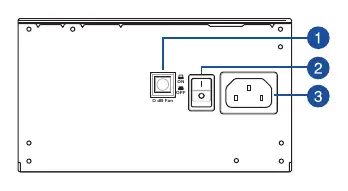
- 1: 0dB Fan button to toggle silent mode.
- 2: Power switch to turn the unit on (I) or off (O).
- 3: Power connector for the AC power cord.
Model compatibility
- Power connectors may vary between different PSU models.
- Refer to your motherboard manual for specific connector locations.
- Only use the modular cables provided with the unit.

Manual page author
Emily Carter
User documentation editor
Prepares concise manual descriptions and highlights the most useful setup, operation, and maintenance information for readers.