Power / Batteries & Chargers
User Manual for Aukey Basix Pro 10000mAh Wireless Charging Power Bank
Comprehensive user guide for the Aukey Basix Pro 10000mAh Wireless Charging Power Bank (PB-WL02). Learn how to use wireless and wired charging, understand LED indicators, and follow safety guidelines.
Table of contents
Manual images
Click an image to enlargeQuick Guide
The Aukey Basix Pro 10000mAh Wireless Charging Power Bank (PB-WL02) allows you to charge devices wirelessly or via cable. To start wireless charging, place your Qi-compatible device on the center of the power bank and press the power button once. For wired charging, connect your device to the USB-C or USB-A port using the appropriate cable.
Product Overview
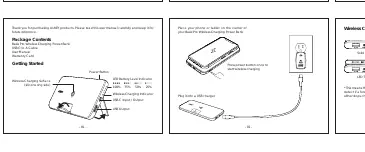
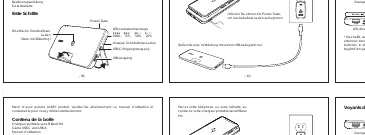
The device features a wireless charging surface (indicated by a silicone ring), a power button, an LED battery level indicator, and a wireless charging status indicator. It includes one USB-C port (Input/Output) and one USB-A port (Output).
Wireless Charging
To charge wirelessly:
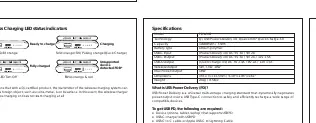
- Place your phone or tablet on the center of the wireless charging surface.
- Press the power button once to initiate charging.
- The wireless charging indicator will show the status: solid orange for ready, pulsing orange for charging, and blinking orange/red if an unsupported device or foreign object (FOD) is detected.
Wired Charging
To charge via cable:
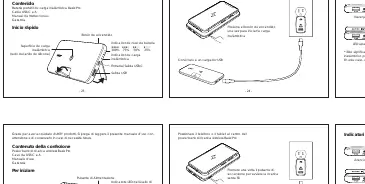
- Connect the included USB-C to A cable to your device's charging port.
- Connect the other end to the USB-C or USB-A output port on the power bank.
- Disconnect your device once fully charged.
Simultaneous Charging & Limitations
- Fast Charging: When two ports (including wireless charging) are used simultaneously, fast charging mode (9V/12V) is automatically disabled, and the unit defaults to 5V output.
- Simultaneous Output: The power bank supports charging more than two devices at once. If the total output exceeds 18W, over-current protection may trigger, turning off the output.
- Pass-through Charging: The device supports charging and discharging at the same time, but this is limited to 5V output (no fast charge).
Safety & Maintenance
- Keep the power bank away from liquids and extreme heat.
- Recharge the PB-WL02 at least once every 3 months to maintain battery health.
- Dispose of the battery according to local environmental laws.
Specifications
- Model: PB-WL02
- Capacity: 10000mAh / 37Wh
- Wireless Output: 5W, 7.5W, 10W
- USB-C Input/Output: Power Delivery 3.0 (DC 5V 3A / 9V 2A)
- USB-A Output: Quick Charge 3.0 (DC 5V 2.4A / 9V 2A / 12V 1.5A)
- Max Power Output: 18W
Manufacturer information
AUKEY
Practical help
Common problems
Wireless charging does not start or stops.
Ensure the device is centered on the power bank. Check for foreign objects (metal, coins) on the surface. The power bank will stop charging if a foreign object is detected.
Fast charging is not working.
Fast charging (9V/12V) is disabled when multiple devices are charging simultaneously. The unit defaults to 5V output in this scenario.
Power bank shuts down unexpectedly.
If the total output power exceeds 18W, the over-current protection may trigger to protect the device. This is normal operation.
Before use
- Charge the power bank fully before first use.
- Ensure your device is Qi-compatible for wireless charging.
- Use a USB-C PD charger to recharge the power bank efficiently.
- Keep the wireless charging surface free of metal objects.
Specs in practice
- Wireless Output
- Supports 5W, 7.5W, and 10W charging speeds depending on the device.
- USB-C PD 3.0
- Supports high-speed input and output for compatible devices.
Images and diagrams
- Wireless Charging Surface: The side with the silicone ring.
- LED Battery Level Indicator: Shows remaining charge (25%, 50%, 75%, 100%).
- Ports: USB-C (In/Out) and USB-A (Out).
Model compatibility
- Wireless charging requires Qi-certified devices.
- USB-C PD requires a PD-compatible charger and cable.

Manual page author
David Miller
Documentation analyst
Organizes user manual content into clear summaries, with attention to model details, product context, and everyday usability.