Power / Batteries & Chargers
User Manual for Aukey PB-Y22 10000mAh Power Bank
Quick guide for the Aukey PB-Y22 10000mAh Power Bank. Learn how to charge your devices, use the low-current mode, understand LED indicators, and view technical specifications.
Table of contents
Quick Guide
The Aukey PB-Y22 is a 10000mAh universal power bank featuring Power Delivery 2.0 and Qualcomm Quick Charge 3.0 technology. It is designed to charge a wide range of devices efficiently. Before first use, ensure the power bank is fully charged.
Product Diagram
The power bank features the following components:
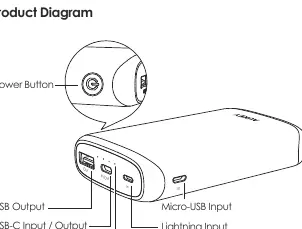
- Power Button: Used to check battery level and toggle Low-Current Charging Mode.
- LED Battery Level Indicator: Shows remaining charge (4 LEDs = 100%, 3 = 75%, 2 = 50%, 1 = 25%).
- USB Output: Standard USB-A port.
- USB-C Input/Output: Supports Power Delivery 2.0.
- Micro-USB Input: For charging the power bank.
- Lightning Input: For charging the power bank.
Specifications
Key technical parameters:
- Capacity: 10000mAh / 37Wh
- Battery Type: Lithium polymer
- Total Power Output: 18W
- USB-C Input (PD 2.0): DC 5V 3A, 9V 2A
- USB-C Output (PD 2.0): DC 5V 3A, 9V 2A, 12V 1.5A
- USB Output (QC 3.0): DC 5V-6.5V 3A, 6.5V-9V 2A, 9V-12V 1.5A
Charging the Power Bank
- Connect the included USB-A to C cable, a Micro-USB cable, or a Lightning cable to a USB charger or charging port.
- Connect the other end to the corresponding input port (USB-C, Micro-USB, or Lightning) on the power bank.
- Unplug the power bank once it is fully charged.
Charging Your Device
- Connect your charging cable to your device's charging port.
- Connect the other end to a USB output port on the PB-Y22.
- Unplug your device when fully charged.
- To check the remaining battery level, press the power button.
Low-Current Charging Mode
This mode is customized for low-current devices (below 60mA), such as fitness trackers or wireless headphones, which may not charge in standard mode.
- Activate/Deactivate: Double-press the power button. The LED indicator lights will flash sequentially while in this mode.
- Automatic Switch: The power bank automatically switches back to standard charging mode after 2 hours.
- Note: Extra charging in this mode will not harm your device's battery.
Product Care & Use
- Keep the power bank away from liquids and extreme heat.
- Do not charge your devices while the power bank is recharging.
- Recharge the PB-Y22 at least once every 3 months.
- The PB-Y22 does not support simultaneous power input from Micro-USB, Lightning, and USB-C ports.
Warranty & Customer Support
For support or warranty claims, contact the Aukey support team via email. Please include your Amazon order number and product model number (PB-Y22). Support emails are available for US, EU, CA, and JP regions.
Manufacturer information
AUKEY
Practical help
Common problems
Device not charging in standard mode
Try switching to Low-Current Charging Mode by double-pressing the power button, especially for low-powered devices like fitness trackers.
Power bank not charging
Ensure you are not attempting to use multiple input ports (Micro-USB, Lightning, and USB-C) simultaneously, as this is not supported.
Before use
- Fully charge the power bank before first use.
- Ensure you have the correct cable (USB-A to C, Micro-USB, or Lightning).
- Check if your device supports USB PD or Quick Charge 3.0 for optimal charging speeds.
Specs in practice
- Total Power Output
- 18W, the maximum power the unit can deliver to connected devices.
- Low-Current Mode
- A specialized mode for devices drawing less than 60mA.
Images and diagrams
- The power bank has a power button on the side.
- The front panel contains a USB-A output, a USB-C input/output, a Micro-USB input, and a Lightning input.
- LED indicators show the battery level in 25% increments.
Model compatibility
- USB PD requires a compatible device, a USB-C charger with USB PD, and a USB-C to C cable.
- Quick Charge 3.0 is backward compatible with Quick Charge 2.0/1.0 devices.

Manual page author
Emily Carter
User documentation editor
Prepares concise manual descriptions and highlights the most useful setup, operation, and maintenance information for readers.