Power / Batteries & Chargers
AUKEY 10-Port USB 3.0 Hub CB-H6
Quick guide for the AUKEY 10-Port USB 3.0 Hub (CB-H6). Includes setup instructions, technical specifications, and support contact information.
Table of contents
Quick guide from the manual
This document provides essential information for the AUKEY CB-H6 10-Port USB 3.0 Hub. Ensure you have all components before use and contact the appropriate support team based on your region if you encounter issues.
Package Contents
- 10-Port USB 3.0 Hub
- 1m / 3.3ft USB 3.0 Cable
- Power Adapter
- User Manual
- Warranty Card
Product Diagram
The hub features the following connection points:
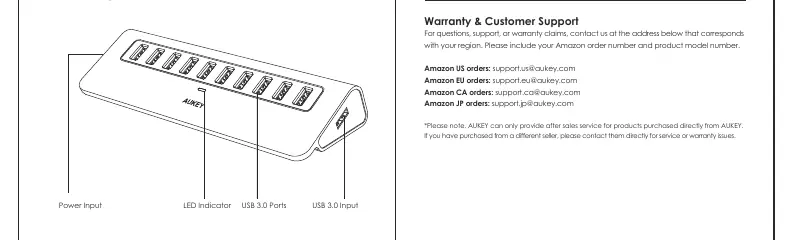
- Power Input: Connect the included power adapter here to provide power to the hub.
- USB 3.0 Input: Connect the USB 3.0 cable here to link the hub to your computer.
- USB 3.0 Ports: Connect your USB devices to these ports for data transfer.
- LED Indicator: Illuminates when the hub is powered on.
Specifications
- Interface: USB 3.0
- Max Power Output: 5V 900mA
- Max Data Transfer Speed: 5Gbps
- Material: Aluminum Alloy
- Cable Length: 1m / 3.3ft
- Dimensions: 174 x 62 x 33mm
- Weight: 193g
Warranty & Customer Support
For support or warranty claims, contact the team corresponding to your region. Please include your Amazon order number and product model number (CB-H6).
Support Contacts:
- Amazon US: [email protected]
- Amazon EU: [email protected]
- Amazon CA: [email protected]
- Amazon JP: [email protected]
Note: AUKEY only provides after-sales service for products purchased directly from AUKEY. If purchased from a different seller, please contact them directly.
Manufacturer information
AUKEY
Practical help
Common problems
Device not recognized or functioning
Ensure the power adapter is connected to a power outlet and the USB cable is securely connected to both the hub and your computer.
Warranty or service issues
If purchased from a third-party seller, contact that seller directly. AUKEY only provides service for products purchased directly from AUKEY.
Before use
- Verify all package contents are present.
- Connect the power adapter to the Power Input port.
- Connect the USB 3.0 cable to the USB 3.0 Input port.
- Connect the other end of the USB cable to your computer.
- Check the LED indicator to confirm the hub is powered.
Specs in practice
- Max Data Transfer Speed
- 5Gbps is the theoretical maximum speed for USB 3.0 connections.
- Max Power Output
- 5V 900mA is the standard power output per port for USB 3.0.
Images and diagrams
- Power Input: Port for the external power adapter.
- USB 3.0 Input: Port for the data cable connecting to the host computer.
- USB 3.0 Ports: 10 ports for connecting peripherals.
- LED Indicator: Visual confirmation of power status.
Model compatibility
- Designed for USB 3.0 interface.
- Requires external power adapter (included) for operation.

Manual page author
Emily Carter
User documentation editor
Prepares concise manual descriptions and highlights the most useful setup, operation, and maintenance information for readers.