Wearables / Watches
User Guide for Timex SSQ Digital Reissue Watch
A comprehensive user guide for the Timex SSQ Digital Reissue watch. Includes instructions for setting the time and date, important battery safety warnings, and warranty information.
Table of contents
Quick Guide: Setting Time and Date
The Timex SSQ Digital Reissue uses two side buttons, A and B, to navigate and adjust settings.
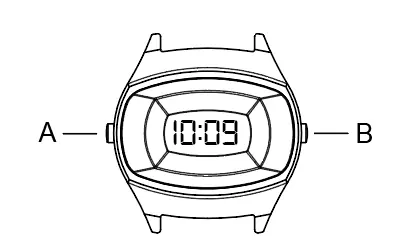
Setting the Date
- Press the A button twice to enter the date setting mode.
- The number on the left represents the Month. Press the B button to set the correct Month.
- Press the A button to confirm and move to the Day setting.
- Press the B button to set the correct Day.
- Press the A button to finish and return to time setting mode.
Setting the Time
- In time mode, press the A button four times until the Hour digits flash.
- Press the B button to set the correct Hour.
- Press the A button to switch to Minutes.
- Press the B button to set the correct Minutes.
- Press the A button to finish setting.
Important Battery Safety
This product contains a button cell or coin battery. Ingestion can cause severe internal chemical burns in as little as 2 hours, leading to death or serious injury.
- Keep out of reach of children: Always ensure the battery compartment is securely closed. If it does not close securely, stop using the product and remove the batteries.
- Battery Type: CR1620 (Lithium metal, 3.0 V).
- Handling: Do not force discharge, recharge, disassemble, or heat above 158°F (70°C).
- Disposal: Recycle or dispose of used batteries according to local regulations. Do not incinerate.
Battery Replacement
The battery is not intended to be replaced by the consumer. Please take the watch to a jeweler or other professional for battery replacement.
Warranty
Extended warranty is available in the U.S. for an additional 4 years from the date of purchase for $5. Payment can be made by calling 1-800-448-4639 during normal business hours.
Manufacturer information
Timex Group USA, Inc.
Practical help
Common problems
Battery compartment does not close securely
Stop using the product immediately, remove the batteries, and keep them away from children.
Battery replacement
The battery is not user-replaceable. Take the watch to a jeweler or professional.
Before use
- Ensure the battery is installed with correct polarity (+ and -).
- Do not mix old and new batteries.
- Do not mix different brands or types of batteries (e.g., alkaline, carbon zinc).
- Ensure the battery compartment is securely closed before use.
Show more Show less
Specs in practice
- Battery Type
- CR1620 (Lithium metal, 3.0 V)
- Water Resistance
- 50 Meters
Images and diagrams
- Button A: Used for entering setting mode and cycling through settings.
- Button B: Used for adjusting the selected value (Month, Day, Hour, Minute).
Model compatibility
- Non-rechargeable batteries are not to be recharged.

Manual page author
Michael Turner
Technical manual editor