HVAC / Parking Heaters
User Manual for Aussie Traveller 12V 2kW Diesel Heater
Quick guide for the Aussie Traveller 12V 2kW Diesel Heater. Learn how to operate the OLED panel, set heating modes, troubleshoot faults, and perform maintenance.
Table of contents
Manual images
Click an image to enlargeQuick guide from the manual
The Aussie Traveller 12V 2kW Diesel Heater is a compact heating solution for caravans and RVs, featuring automatic altitude adjustment up to 5000m. Important: The heater does not shut off immediately when turned off. It requires 3–5 minutes to cool down and slow down to protect the fan motor; this is normal operation.
OLED Panel Operation
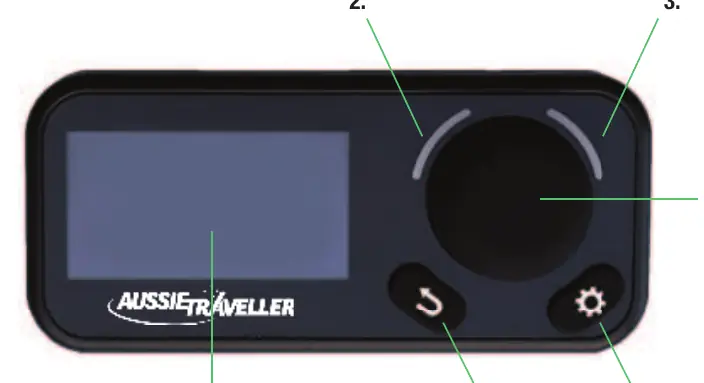
The control panel features an OLED screen, LED indicators, a rotary knob (for selection and confirmation), a settings button, and a back button.
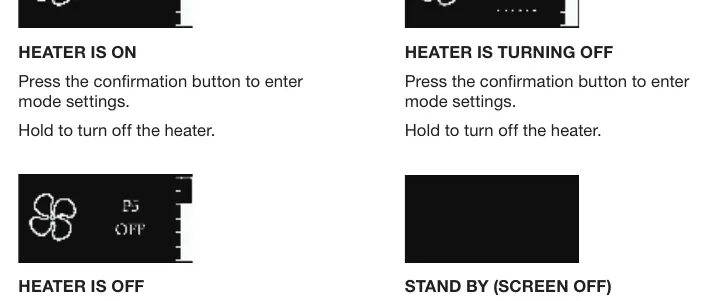
- Press: Less than 2.5 seconds.
- Hold: More than 2.5 seconds.
Operation Modes
- Variable Heat Mode: Adjust heat output from P1 (minimum) to P7 (maximum).
- Thermostat Mode: Set target room temperature between 5°C and 35°C.
- Ventilation Mode: Fan-only operation, adjustable from P1 to P7.
Settings
Access settings by pressing the settings button. Use the rotary knob to navigate and the confirmation button to select.
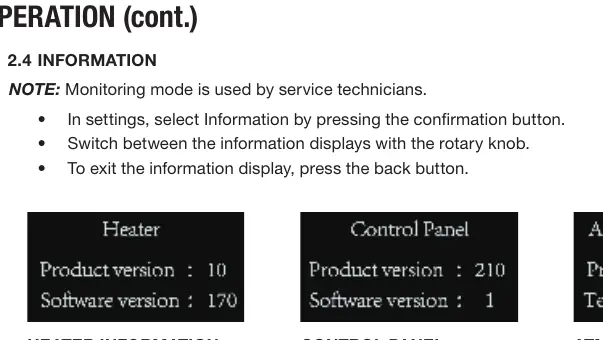
- Language: Change display language.
- Bluetooth: Toggle Bluetooth on/off (not available on all models).
- Sound: Toggle button sounds on/off.
- Information: View product version, software version, atmospheric pressure, and run time (for service technicians).
- Fuel Priming: Used to prime the heater with fuel for up to 90 seconds.
- Factory Reset: Restores all settings to original factory defaults.
Communication and Faults
If the panel fails to communicate with the heater, check the communication cable first. If a fault occurs, the heater enters a 'fault lock' state.
- Fault Code: The panel will display a fault code and description (e.g., Fault 31: Undervoltage).
- Clearing Faults: Hold the confirmation button to exit the lock state. Wait for the heater to completely turn off before restarting.
Maintenance
Regular maintenance ensures a long service life:
- Run the heater for at least 10 minutes every month to prevent mechanical part malfunction.
- Check air inlet and outlet for pollution or foreign matter.
- Inspect the combustion air inlet and exhaust pipe for damage or clogs.
- Check fuel lines for leaks and ensure all electrical terminals are secure.
- After 10 years, the heat exchanger, overheat sensor, and exhaust should be replaced by a professional.
Practical help
Common problems
Heater does not shut off immediately
This is normal. It takes 3-5 minutes to cool down and protect the fan motor.
No Connection / Disconnect state
Check the communication cable between the panel and the heater.
Fault 31
Undervoltage. Check power supply.
Heater locked after fault
Hold the confirmation button to exit the lock state. Wait for the heater to fully shut down before restarting.
Before use
- Check air inlet and outlet for obstructions.
- Ensure fuel lines are free of leaks.
- Verify all electrical terminals are secure.
- Prime the fuel line if the system has been drained.
- Ensure the heater is installed in a suitable location.
Images and diagrams
- OLED Panel: 1. Screen, 2-3. LED indicators, 4. Rotary knob/confirmation button, 5. Settings button, 6. Back button.
Model compatibility
- Bluetooth functionality is not available on all models.

Manual page author
David Miller
Documentation analyst
Organizes user manual content into clear summaries, with attention to model details, product context, and everyday usability.