Lighting / Fixtures
User Manual for Avide LED Strip 12-24V 144W 4-Zone Dimmer Controller
Quick guide for the Avide 4-zone LED strip dimmer. Learn how to wire the controller, pair it with your remote, and set up your 12V or 24V lighting system.
Table of contents
Manual images
Click an image to enlargeQuick Guide
The Avide 4-zone LED strip dimmer is designed to control single-color LED strips. It operates on 12V or 24V systems with a maximum power capacity of 144W. The device requires a compatible 4-zone remote control (not included) and must be paired before use.
Product Description
This 2.4G radio frequency dimmer allows you to switch lights on/off, adjust brightness, and manage lighting modes. It supports up to 4 zones, requiring at least one receiver per zone. A single controller can be paired with up to two remote controls.
Wiring and Installation
The controller should be installed between the power supply and the LED strip. Ensure the power is disconnected before starting the installation.
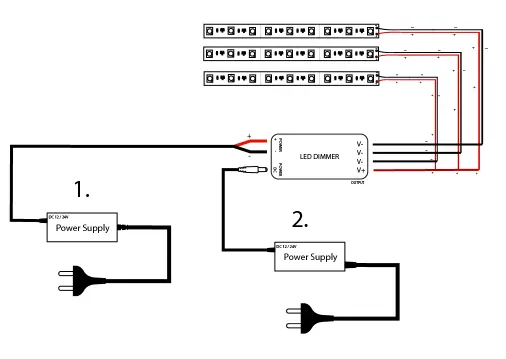
- LED Strip Connection: Connect the positive (+) wire of the LED strip to the V+ terminal on the controller. Connect the negative (-) wires to the corresponding V- terminals. You can connect up to 3 LED strips simultaneously.
- Power Supply Connection: Connect the power supply to the POWER2 input if it has a DC jack. If not, use the POWER1 input terminals (Red = POWER1+, Black = POWER1-).
Pairing and Unpairing
The receiver must be paired with the remote control to function.
- Pairing: Within 5 seconds of powering on the device, press and hold the desired group ON button on the remote for 2 seconds. The LED strip will flash 3 times if successful.
- Unpairing: Within 5 seconds of powering on the device, press and hold the desired group OFF button on the remote for 2 seconds. The LED strip will flash 9 times if successful.
Technical Specifications
- Input Voltage: 12-24V
- Max Power: 144W
- Operating Temperature: -20 to +40 °C
- IP Rating: IP20
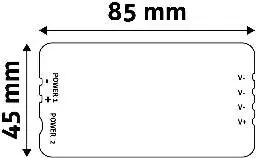
- Dimensions: 85mm x 45mm x 22mm
Safety and Compatibility
Important: Ensure that your LED strip and power supply match the voltage of the system (12V or 24V). Using a 12V power supply with a 24V strip or vice versa is not permitted. This device is compatible with ABLS12V12DIMM-RFC-4Z-C and ABLS12V12DIMM-RFC-4Z SET products.
Manufacturer information
Avide Lighting
Practical help
Common problems
Pairing fails
Ensure you are within 5 seconds of powering on the device and hold the button for 2 seconds. If it fails, try again.
LEDs not lighting up
Verify that the power supply voltage matches the LED strip voltage (12V or 24V) and check that all wiring connections are secure.
Before use
- Verify your LED strip and power supply are both 12V or both 24V.
- Ensure the power supply is disconnected before wiring.
- Check that the total power of the LED strips does not exceed 144W.
- Ensure you have a compatible 4-zone remote control.
Images and diagrams
- The wiring diagram illustrates how to connect the power supply to the controller and the LED strips to the output terminals.
Model compatibility
- Compatible with ABLS12V12DIMM-RFC-4Z-C and ABLS12V12DIMM-RFC-4Z SET.

Manual page author
David Miller
Documentation analyst
Organizes user manual content into clear summaries, with attention to model details, product context, and everyday usability.