Lighting / Controllers & Dimmers
User Manual for Avide 4-Zone RF Touch Panel Dimmer
Quick guide for the Avide 4-Zone RF Touch Panel Dimmer. Learn how to pair, unpair, and operate your remote control with step-by-step instructions.
Table of contents
Manual images
Click an image to enlargeQuick guide from the manual
This document provides instructions for the Avide 4-Zone RF Touch Panel Dimmer. This device allows for the simultaneous control of up to 4 zones of LED strips. Please note that the remote control requires at least one, and up to four, controller units (not included in the package) to function.
Remote Control Functions
The touch panel features the following controls:
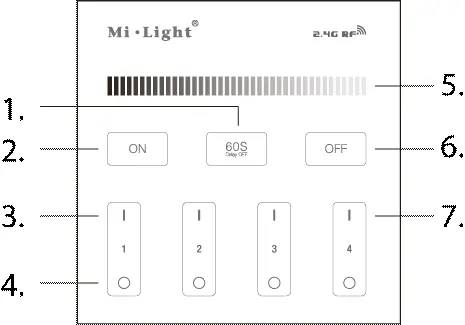
- 1. 60s Delay Off: Activates a 60-second delay before turning off.
- 2. Master ON: Turns on all zones.
- 3. Zone ON (1-4): Turns on the specific zone.
- 4. Zone OFF (1-4): Turns off the specific zone.
- 5. Brightness Slider: Adjusts the brightness level.
- 6. Master OFF: Turns off all zones.
- 7. Zone Pairing: Used for pairing specific zones.
Wiring and Installation
Important: Ensure correct wiring during installation. Connect the brown wire to the (L) terminal and the blue wire to the (N) terminal. After connecting to the power supply, the remote must be paired with the controller unit(s) for the system to operate.
Pairing and Unpairing
The remote control is only compatible with the ABLS12VDIMM-RFC-4Z controller.
Pairing
- Connect the device to power.
- Within 5 seconds of powering on, press the ON button of the desired zone 3 times briefly.
- The LED strip will flash 3 times if the pairing is successful. If it does not flash, disconnect from the power and try again.
Unpairing
- Connect the device to power.
- Within 5 seconds of powering on, press the ON button of the zone you wish to unpair 5 times briefly.
- The LED strip will flash 9 times if the unpairing is successful. If it does not flash, disconnect from the power and try again.
Technical Specifications
- Voltage Range: 180-240V
- Operating Temperature: -20 to +40 °C
- IP Rating: IP20
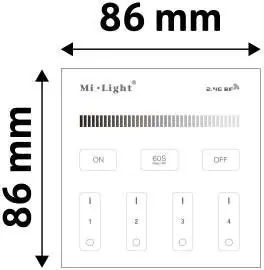
- Dimensions: 86mm x 86mm
Manufacturer information
Avide Lighting
Practical help
Common problems
The remote control does not operate the LED strip.
Ensure the remote is paired with the controller. If pairing fails, disconnect the power and repeat the pairing procedure within 5 seconds of powering on.
Pairing or unpairing is unsuccessful.
Ensure you are performing the button presses within 5 seconds of connecting the device to the power supply. If it fails, disconnect the power and try again.
Before use
- Verify that you have the compatible controller unit (ABLS12VDIMM-RFC-4Z).
- Ensure the brown wire is connected to (L) and the blue wire to (N).
- Confirm the power supply is within the 180-240V range.
- Ensure the installation environment is within the -20 to +40 °C temperature range.
Images and diagrams
- The touch panel layout includes a brightness slider at the top, master ON/OFF buttons, a 60s delay button, and individual zone control buttons (1-4).
Model compatibility
- The remote control is only compatible with the ABLS12VDIMM-RFC-4Z controller unit.

Manual page author
Michael Turner
Technical manual editor
Reviews PDF manuals for structure, safety notes, and practical product details so readers can find the right information quickly.