Electronics / AV Splitters
User Manual for AVSL 122.417UK HDMI to Scart Converter
Quick guide for the AVSL 122.417UK HDMI to Scart Converter. Learn how to connect your devices, configure the region switch, troubleshoot common issues, and understand technical specifications.
Table of contents
Manual images
Click an image to enlargeQuick guide from the manual
The AVSL 122.417UK is a USB-powered converter designed to bridge modern high-definition HDMI devices with older analogue Scart displays. This guide covers the essential setup, operation, and troubleshooting steps to ensure proper functionality.
In the box
- HDMI to Scart Converter
- USB Power Lead (DV5V 1A)
- User guide
Connection instructions
Follow these steps to connect your devices:
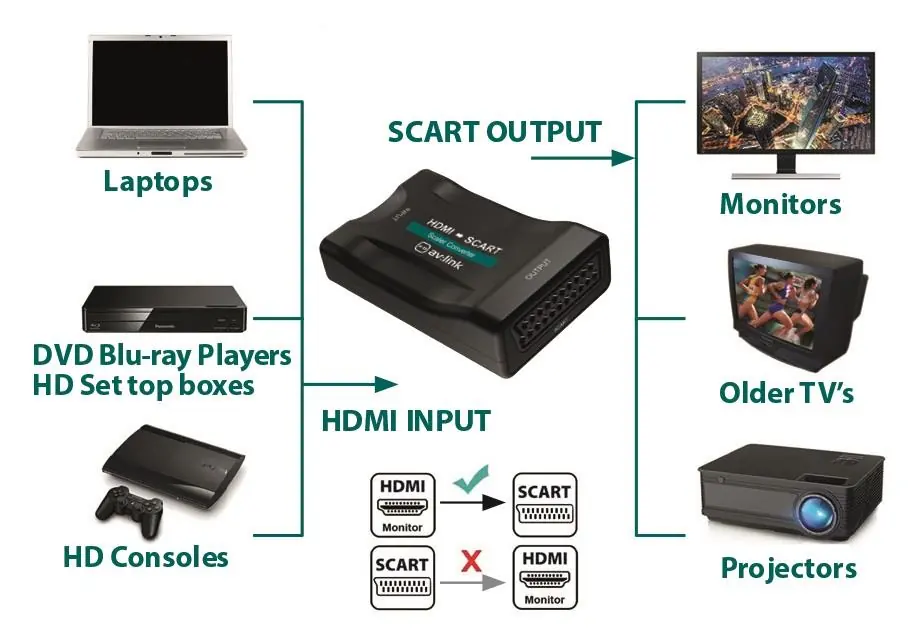
- HDMI Input: Connect one end of an HDMI cable to your source device (e.g., Blu-Ray player, laptop, console) and the other end to the HDMI input port on the converter. Ensure the HDMI cable length does not exceed 7 meters.
- Scart Output: Connect one end of a Scart cable to the output port of the converter and the other end to the input port of your display device (e.g., older TV). Ensure the Scart cable length does not exceed 8 meters.
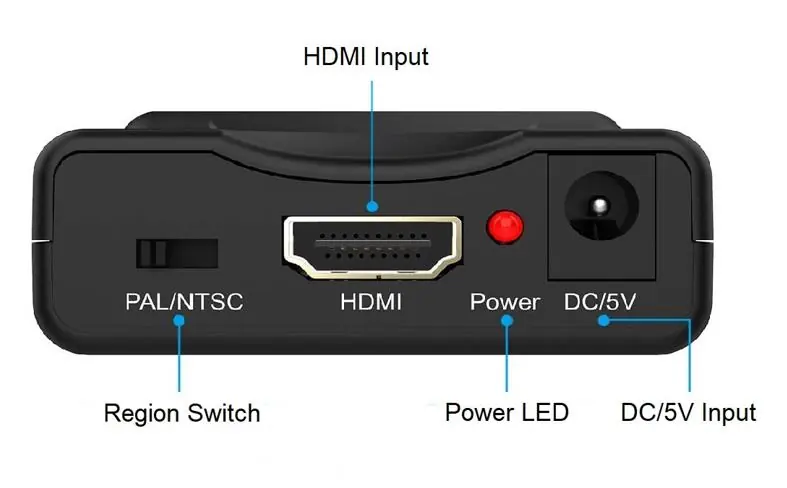
- Power: Connect the supplied USB power lead to the DC/5V jack on the converter and the USB end to a compatible 1A power supply. Switch on the power.
Operation
Once powered, the red Power LED should illuminate, indicating the device is receiving sufficient power. You must select the correct region using the switch on the converter: set to PAL for UK and EU regions, or NTSC for US content.
Troubleshooting
- Power LED doesn't illuminate: Ensure the USB power lead is correctly connected and that you are using a suitable 1A power supply that is switched on.
- No sound or poor sound quality: Check that both Scart and HDMI leads are firmly connected to the converter and your devices. Verify that the display device volume is not muted or turned down. Ensure cables are of good quality.
- No images or poor image quality: Ensure the source device is powered on and the Scart lead is connected correctly. Check that the display device resolution is compatible with the converter's output and reduce if necessary.
Safety warnings
- For electrical safety, never immerse the device in water or expose it to damp conditions.
- Do not subject the device to excessive force.
- Do not use the device if it appears damaged.
- Do not attempt to repair or disassemble the unit, as this will invalidate your warranty.
Technical specifications
- Input: HDMI (up to 1080p @ 60Hz)
- Output: Scart (PAL/NTSC)
- Max. Bandwidth: 300MHz
- Max. Baud Rate: 10.2Gbps
- Max. Cable Length: HDMI Input <= 7m; Scart output <= 8m
- Power Input: DC/5V 1A
- Dimensions: 88.5 x 57.5 x 25mm
- Weight: 60g
Practical help
Common problems
Power LED does not light up
Ensure the USB power lead is securely connected and the power supply provides 1A.
No sound or poor sound quality
Check cable connections, ensure cables are high quality, and verify the display volume is not muted.
No image or poor image quality
Verify the source device is on, the Scart cable is secure, and the display resolution is compatible.
Before use
- Ensure you have a 5V 1A power supply available.
- Verify your HDMI cable is no longer than 7 meters.
- Verify your Scart cable is no longer than 8 meters.
- Set the region switch to PAL (UK/EU) or NTSC (US) before use.
Specs in practice
- Max. cable length
- HDMI input must be 7m or less; Scart output must be 8m or less for optimal signal.
- Region Switch
- Adjusts the output signal format between PAL and NTSC based on your region.
Images and diagrams
- The connection diagram illustrates that the converter accepts HDMI input from sources like laptops or consoles and outputs to displays like older TVs or projectors via Scart.
- The diagram explicitly shows that the converter does not support Scart-to-HDMI conversion.
Model compatibility
- Designed for HDMI to Scart conversion only.
- Supports resolutions up to 1080p @ 60Hz.

Manual page author
Michael Turner
Technical manual editor
Reviews PDF manuals for structure, safety notes, and practical product details so readers can find the right information quickly.