Electronics / AV Splitters
User Manual for AVSL 128.850UK 4K HDMI Matrix 4x4
Quick guide for the AVSL 128.850UK 4K HDMI Matrix 4x4. Includes connection instructions, EDID management settings, technical specifications, and setup diagrams.
Table of contents
Manual images
Click an image to enlargeQuick guide from the manual
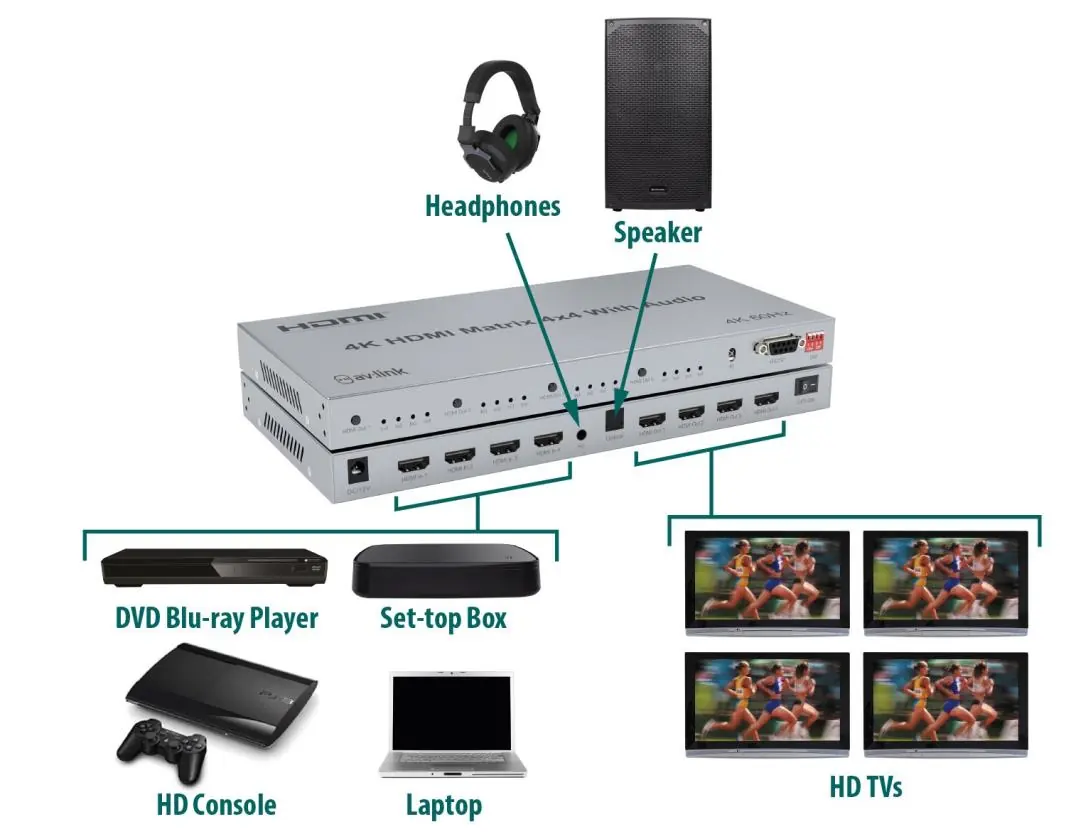
The AVSL 128.850UK is a 4K HDMI matrix designed to switch between 4 source devices and 4 display outputs. It supports high-resolution video up to 4K@60Hz and allows for audio extraction from HDMI output #1 via SPDIF or 3.5mm stereo jacks. The unit can be controlled via front panel buttons or the included IR remote.
In the box
- HDMI Matrix 4x2
- IR Remote Control
- 12V DC Power Adaptor
- User Manual
Connection instructions
Follow these steps to set up your matrix:
- Source Devices: Connect up to 4 source devices to the HDMI inputs (7). Use HDMI cables up to 15m for 4K@30Hz/FHD or 5m for 4K@60Hz.
- Display Devices: Connect up to 4 display devices to the HDMI outputs (10). Use HDMI cables up to 15m for 4K@30Hz/FHD or 5m for 4K@60Hz.
- Power: Connect the supplied 12V power adaptor to the matrix (6) and plug it into a mains outlet.
- Audio Extraction: To channel audio from HDMI output #1 to a separate sound system or headphones, use the digital SPDIF (9) or analogue 3.5mm jacks (8) on the back of the unit.
- Operation: Use the HDMI output selection buttons (1) on the front panel or the IR remote to switch between sources. The current selection is displayed on the LED indicators (2).
EDID management settings
Use the EDID dip switches (5) to configure resolution and audio settings. Note: EDID switch upward = 0, EDID switch downwards = 1.
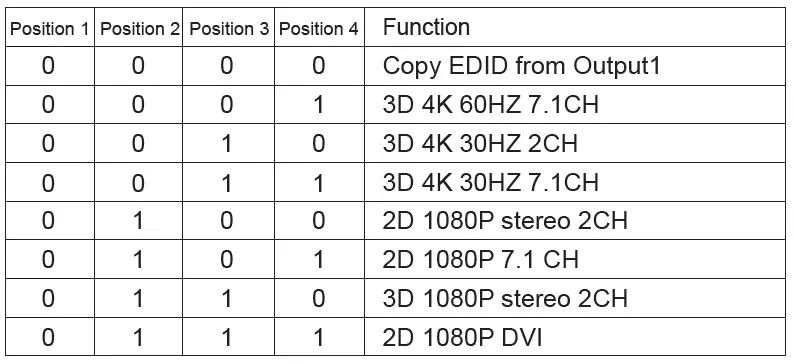
- 0000: Copy EDID from Output 1
- 0001: 3D 4K 60Hz 7.1CH
- 0010: 3D 4K 30Hz 2CH
- 0011: 3D 4K 30Hz 7.1CH
- 0100: 2D 1080P stereo 2CH
- 0101: 2D 1080P 7.1 CH
- 0110: 3D 1080P stereo 2CH
- 0111: 2D 1080P DVI
Technical specifications
- Video resolution: Up to 3840 x 2160 @ 60Hz
- HDCP version: 2.2
- Audio format: DTS-HD/Dolby-trueHD/LPCM7.1/DTS/Dolby-AC3/DSD
- Max. baud rate: 18Gbps
- Operating temp range: -15C to +55C
- Power adaptor: Input AC 100-240V, Output DC12V/1A
Safety warnings
- Do not immerse the device in water or expose it to damp conditions.
- Do not use the device if it is damaged.
- Only use the power supply provided by the manufacturer.
- Disconnect the power supply when not in use for long periods.
- Do not attempt to repair or take apart the device, as this will invalidate the warranty.
Practical help
Common problems
No 4K resolution or signal issues
Ensure you are using 4K certified cables. Check cable lengths: max 15m for 4K@30Hz/FHD or 5m for 4K@60Hz.
No audio on external sound system
Audio extraction via SPDIF or 3.5mm jack is only supported for HDMI output #1.
Before use
- Verify you have 4K certified HDMI cables for 4K setups.
- Ensure cable lengths do not exceed 15m (4K@30Hz/FHD) or 5m (4K@60Hz).
- Connect the 12V power adapter.
- Identify your source devices and display devices.
Specs in practice
- Max. baud rate
- 18Gbps - determines the maximum data throughput for high-resolution video.
- HDCP version
- 2.2 - required for protected 4K content.
- Transmission distance
- Maximum cable length supported before signal degradation.
Images and diagrams
- Front panel includes HDMI output selection buttons, LED indicators, IR sensor, RS232 port, and EDID dip switches.
- Rear panel includes DC power input, 4 HDMI inputs, 3.5mm/Optical audio outputs, 4 HDMI outputs, and power switch.
Model compatibility
- Audio extraction (SPDIF/3.5mm) is only available for HDMI output #1.
- Compatible with 4K digital TV boxes.

Manual page author
David Miller
Documentation analyst
Organizes user manual content into clear summaries, with attention to model details, product context, and everyday usability.