Electronics / AV Converters
User Manual for AV Link 128.514UK 4K HDMI Digital Audio Extractor
Quick guide for the AV Link 128.514UK 4K HDMI Digital Audio Extractor. Learn how to connect your devices, set audio output modes, and troubleshoot signal issues.
Table of contents
Manual images
Click an image to enlargeQuick guide from the manual
The AV Link 128.514UK is a USB-powered device designed to extract digital optical or analogue audio from an HDMI source signal. It is ideal for connecting devices like games consoles, Blu-Ray players, or TV boxes to sound systems that lack direct HDMI audio outputs. The device supports 4K video resolution and offers three distinct audio output modes to ensure compatibility with various soundbars, amplifiers, and surround systems.
In the Box
- HDMI audio extractor
- 5V DC USB power lead
- User Manual
Technical Specifications
- Input connections: HDMI (4K)
- Output connections: HDMI (4K), Optical (Toslink), 3.5mm (Stereo)
- Video resolution: Up to 3840 x 2160 @ 30Hz
- HDMI version: 1.4b
- HDCP version: 1.4
- Audio output: Stereo, DSD, and HD (HBR)
- Power input: DC/5V (micro USB)
- Dimensions: 60 x 58 x 22mm
- Weight: 102g
Connection Instructions
Follow these steps to set up your audio extractor:
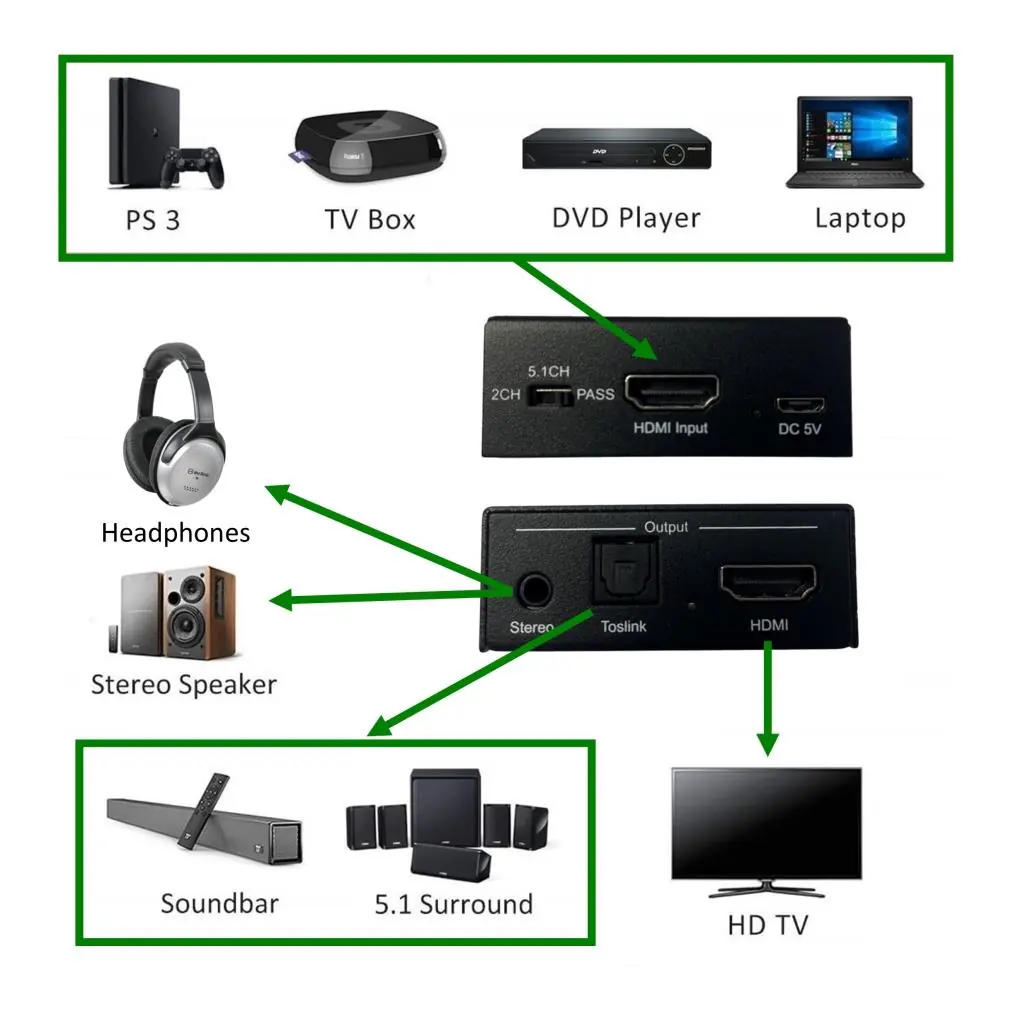
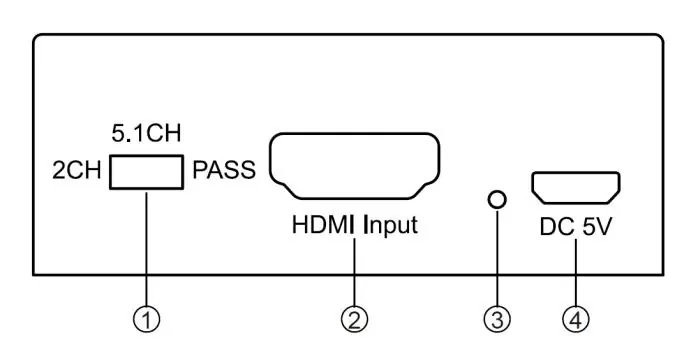
- Connect an HDMI lead from your source device (e.g., games console, DVD player) to the HDMI input port on the back of the unit.
- Connect a second HDMI lead from the output port on the front of the unit to your display device (TV, monitor, or projector).
- Connect the supplied 5V DC USB power lead to a suitable USB power supply.
- Connect an optical (Toslink) cable to the Toslink output on the front of the unit and your digital audio source device (soundbar, amplifier, or surround system).
- For optional 3.5mm stereo output, connect headphones or a compatible audio device to the stereo audio port on the front of the unit.
- Switch on the power. A red LED on the back of the unit should illuminate.
Audio Selection Modes
Use the audio selection switch on the back of the unit to choose the desired output:
- 2CH: Maximum audio output via HDMI/Toslink is 2-channel stereo.
- 5.1CH: Maximum audio output via HDMI/Toslink is 5.1 channel surround (DSD and HBR).
- PASS: The unit reads the audio EDID information directly from the connected display device and outputs the highest compatible audio format supported by that device.
If the connection is successful and devices are compatible, a blue LED on the front of the unit will illuminate.
Safety and Maintenance
- Never immerse the device in water or expose it to damp conditions.
- Do not subject the unit to excessive force.
- Only use the power supply recommended by the manufacturer.
- Disconnect the unit from the power supply when not in use for long periods.
- Do not attempt to repair or disassemble the device, as this will invalidate your warranty.
Practical help
Common problems
No audio or signal issues
Check all HDMI and audio cable connections. Ensure the display device is compatible with the audio format selected.
Unit not powering on
Ensure the 5V DC USB power lead is securely connected to a suitable USB power source.
Before use
- Ensure you have a HDMI source device (e.g., games console, Blu-Ray player).
- Verify you have a display device (TV, monitor, or projector).
- Check that you have the required audio cables (Toslink or 3.5mm stereo).
- Confirm the USB power supply provides 5V DC.
Images and diagrams
- The back panel contains the audio selection switch (2CH/5.1CH/PASS), HDMI input, and DC 5V power input.
- The front panel contains the 3.5mm stereo output, Toslink optical output, and HDMI output.
Model compatibility
- Supports 4K resolution up to 3840 x 2160 @ 30Hz.
- Requires a 5V DC USB power supply.

Manual page author
David Miller
Documentation analyst
Organizes user manual content into clear summaries, with attention to model details, product context, and everyday usability.