Baby / Activity Centers
User Manual for Baby Einstein Earl's Sound Explorer Bluetooth Soother 12395-NA
Quick guide for the Baby Einstein Earl's Sound Explorer Bluetooth Soother (12395-NA). Learn how to charge, pair via Bluetooth, use sound and light modes, and troubleshoot common issues.
Table of contents
Manual images
Click an image to enlargeQuick Guide from the Manual
The Baby Einstein Earl's Sound Explorer is a Bluetooth-enabled soother designed for day-to-night use. Before first use, charge the unit for approximately 3 hours. To pair with a device, hold the power button to turn it on; a flashing blue light indicates pairing mode. If the unit becomes unresponsive, you can reset it by holding the power button for 8 seconds.
Safety Warnings
- Strangulation Hazard: Keep the charging cable away from children.
- Not a Toy: This product and its accessories are not toys. Never allow a child to play with the unit, charging cable, or wall adapter.
- Liquid Exposure: Do not expose the charging port, cable, or unit to liquid, moisture, or humidity.
- Modifications: Do not attempt to open or modify the unit; it contains no serviceable parts.
- Epilepsy Warning: This product produces flashes that may trigger epilepsy in sensitized individuals.
Charging the Device
The unit contains a non-replaceable rechargeable lithium-ion polymer battery. Charge the device before first use.
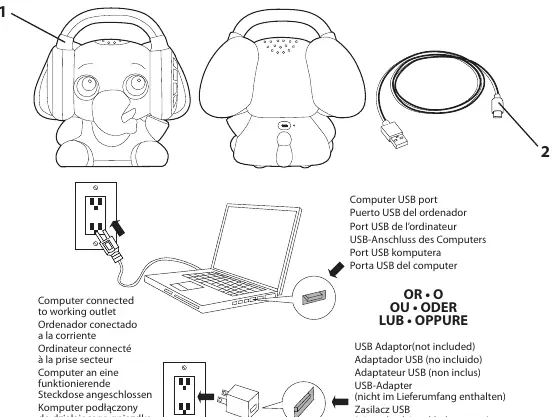
- Connect the provided Type C USB plug to the charging port on the side of the unit.
- Connect the USB A plug to a 5V/1A (5W) USB A wall adapter (not included).
- Indicator Light: The light glows solid red while charging and turns OFF when fully charged.
- For optimal battery life, charge the unit at least every three months.
Bluetooth Pairing
To connect the soother to your smartphone or tablet:
- Press and hold the power button to turn the unit ON.
- A blue light will flash quickly, indicating it is in pairing mode.
- Enable Bluetooth on your device, locate, and select "Earl's Sound Explorer" in your Bluetooth menu.
- A tone will sound when pairing is complete.
If the connection is lost (out of range, approx. 30 feet), the blue light will flash. The unit will turn off after 5 minutes without a Bluetooth connection.
Controls and Settings
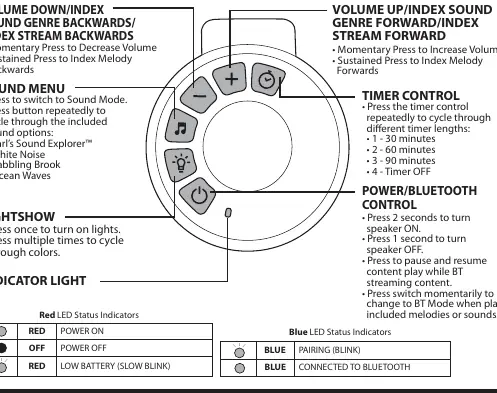
- Power/Bluetooth: Hold 2 seconds to turn ON, 1 second to turn OFF. Press to pause/resume streaming. Press momentarily to switch to Bluetooth mode.
- Sound Menu: Press to switch to Sound Mode. Press repeatedly to cycle through options: Earl's Sound Explorer, White Noise, Babbling Brook, Ocean Waves.
- Lightshow: Press once to turn on lights. Press multiple times to cycle through colors.
- Timer Control: Press repeatedly to cycle through timer lengths: 30, 60, 90 minutes, or Timer OFF.
- Volume: Use the + and - buttons to adjust volume. Hold buttons to index melodies forward or backward.
Troubleshooting
- Unit doesn't respond (no power): Ensure the unit is fully charged.
- Unit doesn't respond (frozen): Press and hold the power button for 8 seconds to reset the unit.
- Trouble pairing: If the unit does not connect, ensure it is not already paired with another device. Delete "Earl's Sound Explorer" from your device's Bluetooth settings and attempt to re-pair.
Care and Maintenance
- Ensure the unit is unplugged before cleaning.
- Wipe clean with a slightly damp cloth. Do not immerse in water.
- Store in a dry location away from heat sources and direct sunlight.
- Storage temperature range: 23°F to 95°F (-5°C to 35°C).
Manufacturer information
Baby Einstein
Practical help
Common problems
Unit does not respond (no power)
Ensure the unit is fully charged using the provided cable and a 5V/1A adapter.
Unit is frozen or unresponsive
Press and hold the power button for 8 seconds to perform a hard reset.
Cannot pair with Bluetooth device
Delete 'Earl's Sound Explorer' from your device's Bluetooth list, turn off Bluetooth on previously paired devices, and try pairing again.
Before use
- Charge the unit for 3 hours before first use.
- Ensure you have a 5V/1A USB A wall adapter (not included).
- Keep the charging cable away from children.
- Read all safety instructions before assembly.
Specs in practice
- Charging Time
- Approximately 3 hours for a full charge.
- Connection Range
- Approximately 30 feet (9.2 meters) for Bluetooth connectivity.
Images and diagrams
- The charging port is located on the side of the unit.
- Red LED: Solid while charging, OFF when fully charged.
- Blue LED: Flashing during pairing, solid when connected.
Model compatibility
- Requires a 5V/1A USB A wall adapter (not included).
- Bluetooth 5.1 +EDR connectivity.

Manual page author
Michael Turner
Technical manual editor
Reviews PDF manuals for structure, safety notes, and practical product details so readers can find the right information quickly.