Home Appliances / Commercial Kitchen Equipment
User Manual for Bartscher MDI Waffle Maker Series
Quick guide for the Bartscher MDI series waffle makers (370270-370275). Includes setup, operation, temperature/time settings, cleaning, and troubleshooting.
Quick answers from the manual
Quick answer
- The Bartscher MDI series waffle makers are professional appliances featuring electronic temperature control (50-300°C), a timer (0-9:30 min), and a digital display. They require preheating and greasing before the first use. p. 11, 17, 18
Key actions
- First use heating p. 18
- Cleaning the device p. 24
First start
- Clean the device, install the drip tray, heat empty for 1 hour at 180-200°C, and grease the plates. p. 18, 19
Problems and fixes
Device does not heat
Check temperature setting or contact technical service if the heater is damaged.
p. 25Technical specifications
| Parameter | Value | Meaning | Pages |
|---|---|---|---|
| Power | 1.8 kW | Power consumption | p. 11 |
| Temperature Range | 50 - 300 °C | Operating temperature | p. 11 |
Where to find it in the PDF
- Specifications p. 11, 12, 13, 14
- Operation p. 16, 17, 18, 19
- Cleaning p. 21, 22, 24
Table of contents
Manual images
Click an image to enlargeImportant Information
This manual covers the Bartscher MDI series waffle makers, including models 370270, 370271, 370272, 370273, 370274, and 370275. These professional appliances are designed for baking various waffle shapes. Proper installation, operation, and regular cleaning are essential for safe and efficient use.
Installation and Setup
- Unpacking: Remove all packaging materials and transport safety devices. Keep packaging away from children.
- Placement: Place the device on a flat, stable, heat-resistant, and dry surface with good ventilation. Maintain a minimum distance of 20 cm from walls and flammable objects.
- Electrical Connection: Ensure the local power supply matches the device specifications. Connect to a dedicated power outlet. Do not use extension cords or external timers.
- First Use: Before the first use, clean the device according to the cleaning instructions. Install the drip tray. Heat the device empty for approximately 1 hour at 180°C – 200°C. Grease the baking plates with vegetable oil 3-4 times.
Operation
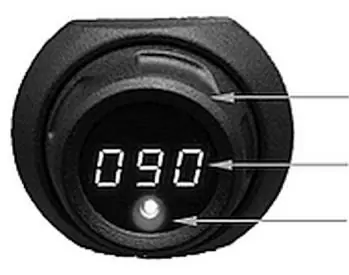
The waffle maker is operated using two push-knobs with integrated digital displays for time and temperature.
Temperature and Time Settings
- Temperature: Press the temperature knob briefly, then turn it to set the desired temperature (50°C – 300°C). Press again to save. The red indicator light stays on during heating and turns off when the set temperature is reached.
- Time: Press the timer knob briefly, then turn it to set the time (0 – 9:30 minutes). Press again to start the countdown. An acoustic signal sounds when the time elapses.
Waffle Preparation
- Preheat the device to the desired temperature (optimal 200°C – 250°C).
- Grease the lower baking plate with a little vegetable oil.
- Pour the prepared batter onto the center of the lower plate and spread evenly.
- Close the upper plate using the handle.
- Bake for approximately 2–3 minutes depending on the desired browning.
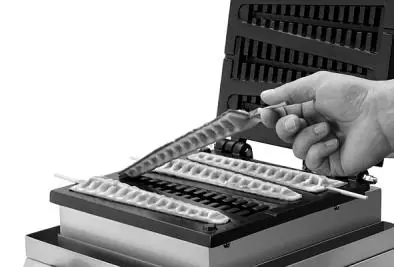
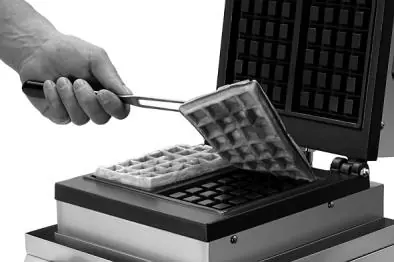
- Remove the finished waffle using a wooden or plastic spatula or heat-resistant tongs.
Cleaning and Maintenance
- Daily Cleaning: Clean the device daily. Remove baking residues while the plates are still warm using a wooden spatula or brush.
- Deep Cleaning: Once cooled, remove and clean the drip tray with warm water and mild detergent. Clean the baking plates with a soft, damp cloth.
- Important: Never immerse the device in water or other liquids. Do not use abrasive or caustic cleaning agents. Do not use sharp or metal objects for cleaning.
Troubleshooting
If the device does not function correctly, check the following:
- Display is blank: Check the power supply, cable, and fuse.
- Device does not heat: Ensure the temperature is set correctly. If it still fails to heat, contact technical service.
- Waffle is raw on top: Ensure you are using enough batter and that the upper plate has not been left open for too long.
Manufacturer information
Bartscher GmbH
Practical help
Common problems
Digital display shows no value
Check if the power source is active, the cable is undamaged, and the fuse is intact.
Device is on but does not heat
Verify that the temperature is set. If it still does not heat, the heating element may be damaged; contact technical service.
Waffle is raw on the top side
Use more batter to ensure contact with the upper plate, check leavening agent, or avoid leaving the lid open for too long.
Before use
- Clean the device thoroughly
- Install the drip tray around the lower plate
- Heat the device empty for 1 hour at 180-200°C
- Grease the baking plates with vegetable oil 3-4 times
Specs in practice
- Temperature Range
- 50°C to 300°C, adjustable in 1°C steps.
- Power Connection
- 1.8 kW / 230 V / 50-60 Hz.
Images and diagrams
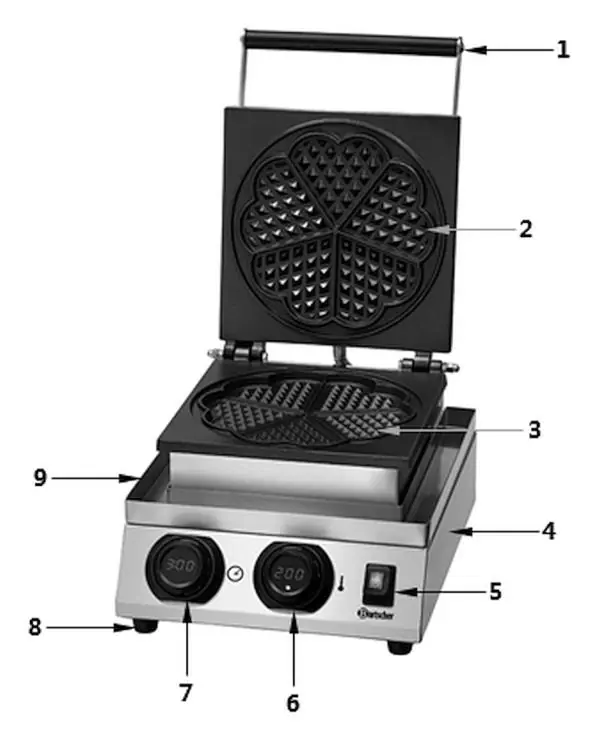
- 2: Upper baking plate
- 3: Lower baking plate
- 5: On/Off switch with green indicator
- 6: Temperature control knob
- 7: Timer control knob
Model compatibility
- The device is intended for baking waffles only.
- Do not use external timers or remote controls.

Manual page author
Emily Carter
User documentation editor
Prepares concise manual descriptions and highlights the most useful setup, operation, and maintenance information for readers.