Power / Power Banks
User Manual for Baseus Swan 2-in-1 Wireless Magnetic Charging Bracket 20W
Quick guide for the Baseus Swan 2-in-1 Wireless Magnetic Charging Bracket 20W. Learn how to set up, use, and troubleshoot your magnetic charger for optimal performance.
Quick answers from the manual
Quick answer
- Connect the charger to a 24W+ QC/PD adapter, then place your magnetic-compatible phone on the charging center. The white light indicates active charging. p. 1
Key actions
- Connect power and align phone p. 1
First start
- Plug into a 24W+ adapter and place the phone on the center. p. 1
Problems and fixes
Flashing indicator light
Check for foreign objects or misalignment.
p. 1Technical specifications
| Parameter | Value | Meaning | Pages |
|---|---|---|---|
| Input | 9V/2A, 12V/2A | Power input requirements | p. 1 |
| Output | 10W | Maximum wireless charging power | p. 1 |
Where to find it in the PDF
- Product Manual p. 1
Table of contents
Quick Guide
To use the Baseus Swan 2-in-1 Wireless Magnetic Charging Bracket, connect it to a power adapter (24W or higher QC/PD recommended) using the provided cable. Place your magnetic-compatible device on the charging center. The LED indicator will light up to confirm charging.
Product Overview
Packing List
- Wireless charger
- Type-C data cable
- User manual
- Warranty card
Usage Instructions
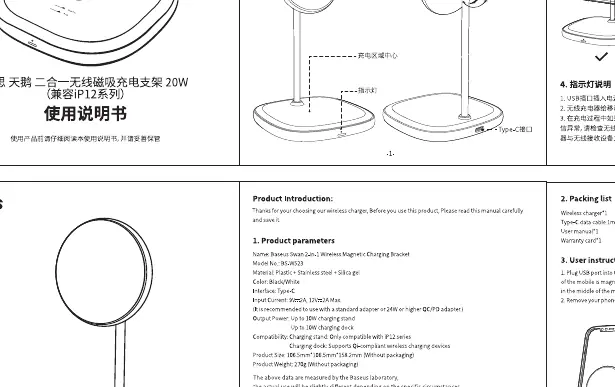
- Connect the wireless charger to the USB port of a power adapter. The white indicator light will turn on.
- Place your mobile device with magnetic suction on the emission area of the wireless charger. Ensure the receiving area is aligned with the center of the charger.
- The indicator light will flash if there is a foreign object or misalignment.
- Remove your phone once charging is completed.
Safety Guidelines
- The operating temperature range is 0°C to 35°C.
- Do not disassemble, modify, or repair the charger yourself.
- Keep the charger away from water or other liquids.
- Do not place magnetic stripe cards (like bank cards) near the charger to avoid damage.
- Ensure no metal objects are between the phone and the charger.
Technical Specifications
- Model: BS-W503
- Input: 9V/2A, 12V/2A
- Output: 10W (Max)
- Compatibility: Compatible with iPhone 12 series and later magnetic devices.
Manufacturer information
Baseus
Practical help
Common problems
Indicator light flashing
Check for foreign objects between the phone and charger, or ensure the phone is properly aligned with the charging center.
Slow charging
Ensure you are using a 24W or higher QC/PD power adapter.
Before use
- Use a 24W or higher QC/PD power adapter
- Ensure the device is magnetic-compatible
- Check that no metal objects are on the charging surface
Images and diagrams
- The diagram shows the charging center, LED indicator, and the 20-degree angle adjustment mechanism.
Model compatibility
- Designed for magnetic-compatible devices (e.g., iPhone 12 series and later).

Manual page author
Michael Turner
Technical manual editor
Reviews PDF manuals for structure, safety notes, and practical product details so readers can find the right information quickly.