General / Other Manuals
User Manual for Be Cool 121cm Tower Fan
Quick guide for the Be Cool 121cm Tower Fan, covering assembly, remote control operation, speed settings, modes, and maintenance.
Table of contents
Manual images
Jump to the sectionQuick guide from the manual
This document provides essential instructions for the safe installation and operation of the Be Cool 121cm Tower Fan. Key safety requirements include using the device only in dry indoor environments, ensuring it is placed on a stable surface, and never blocking the air inlet or outlet. Always switch off and unplug the device before cleaning or moving it.
Assembly
The fan requires basic assembly before first use:
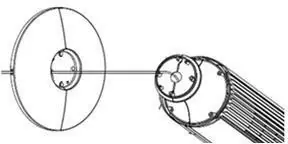
- Join the two components of the stand together while pulling the power cable through the center. Press the parts together until they click into place.
- Place the stand onto the fan housing and carefully pull the power cable through the opening in the stand.
- Unscrew the locking nut from the fan housing counterclockwise.
- Feed the power cable through the center hole of the two semi-circular base parts.
- Insert the fan housing into the center hole of the base, press the two base halves together, and ensure the four holes between them are tightly closed.
- Secure the base to the fan housing by reattaching and tightening the locking nut clockwise.
Note: It is normal for the fan to sway slightly on its base; this is a safety feature to prevent tipping.
Operation
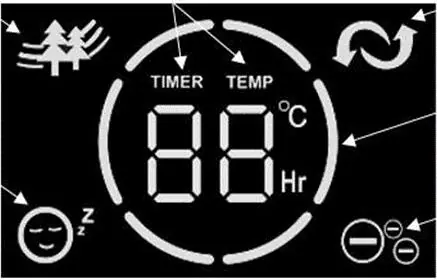
The fan can be controlled via the buttons on the top control panel or the included remote control. Upon connecting to power and switching the unit on, the display will show the current room temperature.

- Power: Use the POWER button to turn the fan on or off.
- Speed: Press the SPEED button repeatedly to cycle through three speed levels (low, medium, high).
- Modes: Use the MODE button to select between Nature Mode (simulates natural wind) and Sleep Mode (gradually reduces speed over time to save energy).
- Timer: Press the TIMER button to set an automatic switch-off time between 1 and 12 hours.
- Oscillation: Press the OSC button to start or stop the horizontal rotation.
- Ioniser: Use the ION button on the remote control to activate the ioniser function for air purification.
Maintenance
Before cleaning, ensure the fan is switched off and unplugged. Use a soft cloth for cleaning; if necessary, use warm soapy water. Do not use solvents, abrasive cleaners, or hard brushes, as these can damage the plastic housing. Never submerge the fan in water or allow liquid to enter the motor housing. Store the device in a cool, dry place when not in use.
Manufacturer information
Be Cool
Practical help
Common problems
Fan sways on its base
This is normal and serves as an anti-tipping feature; it is not a defect.
Remote control not working
Ensure the plastic battery protection strip has been removed and the CR2025 battery is inserted with correct polarity.
Display turns off automatically
In Sleep Mode, the display automatically turns off after approximately 20 seconds.
Before use
- Check that the mains voltage matches the rating plate.
- Ensure the electrical socket is not defective or loose.
- Verify the device is placed on a stable, level surface.
- Remove all packaging materials.
- Ensure the air inlet and outlet are not blocked.
Specs in practice
- Protection class
- Class II appliance.
Images and diagrams
- The display shows current settings including timer, temperature, speed level, and active modes (Nature, Sleep, Ioniser, Oscillation).
- The base assembly involves joining two semi-circular parts and securing them to the fan housing with a locking nut.
Model compatibility
- Intended for private use only; not suitable for commercial use.
- Do not use in rooms where gas, oil, or sulphur are present.
- Do not use in wet rooms or near water sources like bathtubs or swimming pools.

Manual page author
Emily Carter
User documentation editor
Prepares concise manual descriptions and highlights the most useful setup, operation, and maintenance information for readers.