Health / Personal Care
User Manual for Beautural 1-MR05US01 Professional Manicure and Pedicure Kit
Quick guide for the Beautural 1-MR05US01 Professional Manicure and Pedicure Kit. Learn how to use attachments, adjust speed, maintain the device, and follow safety instructions.
Table of contents
Quick Guide from the Manual
The Beautural Professional Manicure & Pedicure Kit is designed for both household and commercial use. For safety and longevity, do not use the device for longer than 15 minutes at a time; allow it to cool for 15 minutes before restarting. Ensure your hands are dry before handling the device and never use it while bathing or showering. For hygiene reasons, this kit should be used on one individual only.
Product Description
The device consists of the following main components:
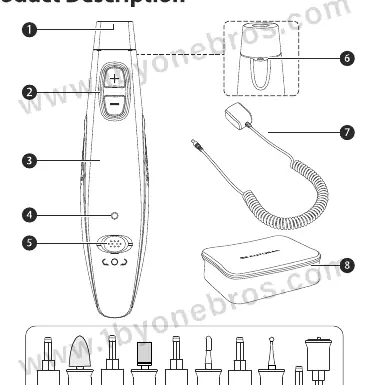
- 1. Attachment Port: Where the bits are inserted.
- 2. Speed Buttons (+/-): Adjusts the rotation speed.
- 3. Handle: The main body of the device.
- 4. LED Rotation Direction Indicator: Red for anti-clockwise, Green for clockwise.
- 5. On/Off/Direction switch: Controls power and rotation direction.
- 6. LED Light: Illuminates the work area.
- 7. Power Adapter: Connects the device to power.
- 8. Carrying Bag: For storage.
The kit includes 10 attachments (A-J): Hardened Skin Remover, Sapphire Cone Bit, Felt Cone Bit, Mandrel Bit & Sanding Band, Flat Top Tapered Bit, Round Top Safety Bit, Needle Shape Bit, Ball Shape Bit, Fine Disk Bit, and Coarse Disk Bit.
Operation Instructions
- Ensure the device is switched off (switch in the middle position) before plugging it into power.
- Push the desired attachment into the attachment port until it clicks into place.
- Slide the On/Off/Direction switch to the desired direction.
- Use the plus (+) and minus (-) buttons to select the rotation speed. The device starts at speed 8 when first plugged in.
Using Attachments
- Hardened Skin Remover (A): For thick calluses on soles and heels.
- Sapphire Cone Bit (B): For removing dead skin or thick calluses.
- Felt Cone Bit (C): For smoothing and polishing nail surfaces.
- Mandrel Bit & Sanding Band (D): For removing dead skin, calluses, and acrylic nails. Sanding bands are single-use.
- Flat Top Tapered Bit (E): For shaping the cuticle area.
- Round Top Safety Bit (F): For basic cuticle exfoliation and nail surface work.
- Needle Shape Bit (G): For nail carving and corner filing.
- Ball Shape Bit (H): For cuticle exfoliation.
- Fine/Coarse Disk Bit (I/J): For grinding and shortening nails.
Maintenance and Care
Always unplug the device before cleaning. Clean attachments with a slightly moistened cloth; you may use mild soap or alcohol for hygiene. Do not drop the device, do not use chemical detergents, and never immerse the device in water or other liquids.
Specifications
- Model: 1-MR05US01, HC-383
- Supply Input: 100-240V~; 50/60Hz 0.5A
- Supply Output: 30V 0.25A; 7.5W
- Rotation Speed: 2000~4600rpm
Manufacturer information
Beautural
Practical help
Common problems
Device stops working during use
The device has a 15-minute usage limit. Let it cool for 15 minutes before restarting to protect the motor.
Attachment is not working or feels loose
Ensure the attachment is pushed firmly into the attachment port until you hear a click.
Skin irritation or pain
Do not exert heavy pressure. Use gentle wiping force and do not remove too much skin, as this may cause calluses to grow back harder.
Before use
- Check package contents for all 10 attachments.
- Ensure hands are dry before handling the device.
- Check the device for any signs of damage before use.
- Ensure the device is switched off before plugging into power.
Specs in practice
- Rotation Speed
- Adjustable between 2000 and 4600 rpm for different nail care needs.
- Memory Function
- The device remembers the last speed setting used when switched off and on again.
- Power Output
- 30V 0.25A; 7.5W power supply.
Images and diagrams
- The device features a central On/Off/Direction switch and speed control buttons (+/-) on the handle.
- The LED indicator shows rotation direction: Red for anti-clockwise, Green for clockwise.
Model compatibility
- Intended for household and commercial use.
- Not for use by children under 8 without supervision.
- For hygiene reasons, use on one individual only.

Manual page author
Emily Carter
User documentation editor
Prepares concise manual descriptions and highlights the most useful setup, operation, and maintenance information for readers.