Home Appliances / Cleaning Tools
User Manual for Beautural Mini Heat Press Machine 1-JU51US01
Quick guide for the Beautural Mini Heat Press Machine 1-JU51US01. Includes operating instructions, temperature settings, material compatibility, and safety guidelines.
Table of contents
Manual images
Click an image to enlargeQuick Guide from the Manual
The Beautural Mini Heat Press Machine is designed for heat transfer applications. Before use, ensure your fabric and base materials are completely dry. Always use a firm, flat, heat-resistant surface. For hollow objects like shoes or hats, place a form or folded towel inside to create a firm pressing surface. Avoid using flimsy ironing boards.
Product Description
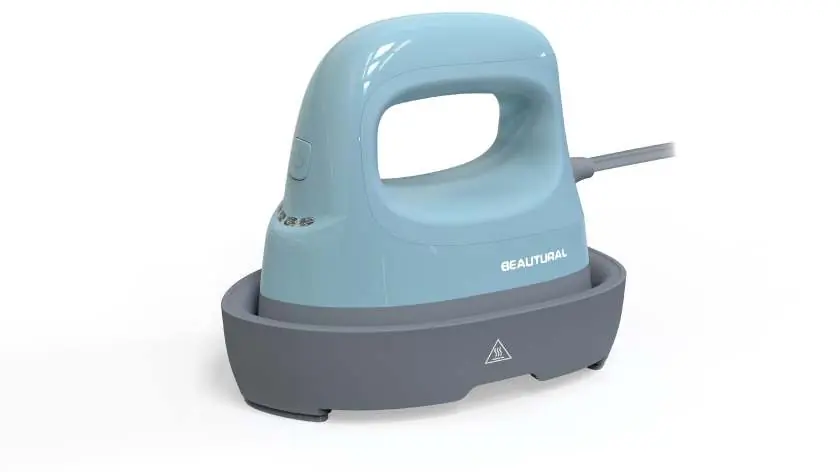
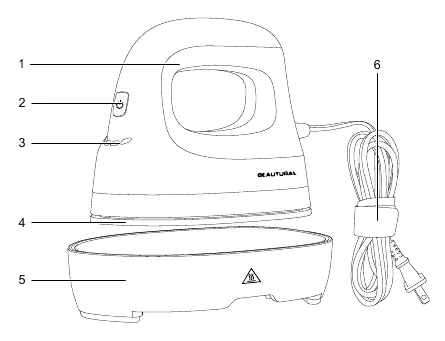
The device consists of a handle, power/temperature button, heating indicator lights, heating plate, safety base, and a power cord with an elastic velcro strap. A storage bag is also included.
Operating Instructions
Powering On and Setting Temperature
- Plug the machine into an outlet.
- Press the power button once to turn the machine ON and set it to Level 1.
- Press the power button again to cycle through the four heat settings:
- Level 1: 285°F
- Level 2: 315°F
- Level 3: 345°F
- Level 4: 375°F
- The LED lights will fade in and out while heating/cooling. Once the device reaches the target temperature, the lights will turn green and steady, and a beep will sound.
- Long press the power button to turn the machine off.
Heat Transfer Process
- Preheat: Place your base material on a heat-resistant mat and preheat the area to remove wrinkles and moisture.
- Position: Place the pattern with the shiny side (clear liner) facing up. Secure with heat-resistant tape if using sublimation paper or infusible ink sheets.
- Apply Heat: Move the unit continuously across the pattern until the timer reaches zero. Ensure the heating plate extends approximately 0.5" (13 mm) beyond the edges of the pattern.
- Finish: For iron-on transfers, peel the liner slowly after removing the PTFE teflon sheet. For sublimation/infusible ink, let the project cool before removing the transfer paper.
Cleaning and Storage
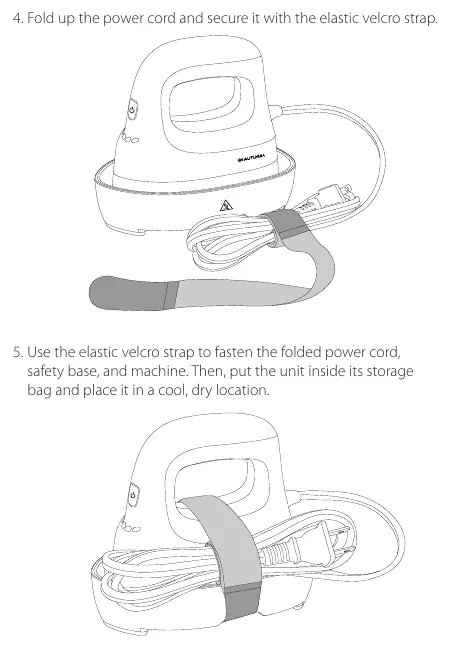
Ensure the machine is turned off, unplugged, and placed on its safety base to cool for about 2 hours. Wipe the heating plate and outer surface with a soft cloth dampened with water and mild detergent. Never use heavy-duty cleaners, vinegar, or abrasive scouring pads. Fold the power cord and secure it with the elastic velcro strap before storing in the provided bag.
Safety Information
- For household use only.
- Do not immerse in water or other liquids.
- Do not touch the heating plate during operation.
- Keep out of reach of children.
- Do not leave the machine unattended while connected or on the safety base.
- The machine will automatically shut off after 15 minutes of inactivity.
Manufacturer information
Beautural
Practical help
Common problems
Pattern not attached properly
Repeat the heat pressing process.
Liner is difficult to peel
Heat press for a few more seconds.
Device shuts off unexpectedly
The device has an auto-shutoff feature after 15 minutes of inactivity. Pick up the device to resume heating.
Before use
- Ensure fabric and base materials are completely dry.
- Use a firm, flat, heat-resistant surface.
- Avoid using flimsy ironing boards.
- For hollow objects (shoes/hats), use a form or folded towel inside.
- Check fabric manufacturer's label for care recommendations.
Specs in practice
- Rated Voltage
- 120V 60Hz
Images and diagrams
- The device features a power/temperature button, heating indicator lights, and a safety base.
- The power cord includes an elastic velcro strap for secure storage.
Model compatibility
- Pattern sizes should not exceed 2x the size of the heating plate.
- It is recommended to use a PTFE teflon sheet under the heating plate, especially at Level 3 or higher.

Manual page author
Michael Turner
Technical manual editor
Reviews PDF manuals for structure, safety notes, and practical product details so readers can find the right information quickly.