Lighting / Fixtures
User Manual for BEGA 12136PK27 Ceiling and Wall Luminaire
Quick guide for the BEGA 12136PK27 ceiling and wall luminaire. Includes installation instructions, motion sensor configuration, LED unit replacement, and technical specifications.
Table of contents
Manual images
Click an image to enlargeQuick guide from the manual
The BEGA 12136PK27 is an indoor ceiling and wall luminaire featuring an integrated HF motion sensor, impact-resistant synthetic diffuser, and metal housing. This guide covers essential installation steps, sensor configuration, and maintenance.
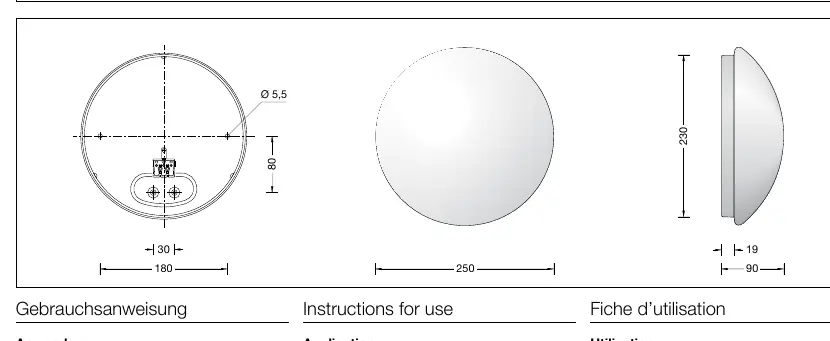
Product description
The luminaire is designed for indoor use where soft and uniform light distribution is required. It features a bayonet closure for the diffuser, an integrated HF motion sensor (max range 10m), and is rated IK08 for impact resistance.
Safety
Installation and commissioning must be performed by a qualified electrician in accordance with national safety regulations. The manufacturer is not liable for damage caused by improper use or installation.
Installation
Important: Use the enclosed gaskets during installation to ensure proper sealing. Avoid touching the LED light output surface during installation.
- Pass the mains supply cable through the grommet into the luminaire housing.
- Fix the luminaire housing to the mounting surface using suitable fixing material.
- Dismantle the mains supply cable approx. 60 mm.
- Make the earth and electrical connections to the terminals.
- Place the synthetic diffuser onto the housing, ensuring cam pins fit into the notches.
- Screw in the diffuser by turning it clockwise to secure it.
To remove the diffuser, turn it counter-clockwise.
Motion sensor configuration
The built-in HF motion sensor operates at 5.8 GHz. Settings are adjusted via DIP switches located on the sensor module.
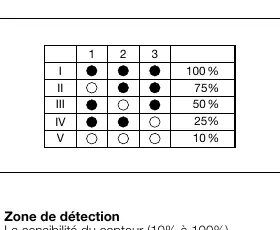
Detection range (Sensitivity)
Adjust sensitivity (10% to 100%) using DIP switches 1-3. Note that reducing sensitivity also reduces the detection range.
Dwell time
Set the light switch-on time (5s to 30min) after presence detection using DIP switches 1-4.
Daylight threshold
Set the sensor level according to ambient lighting using DIP switches 1-4. If the ambient brightness exceeds the set threshold, the light will not switch on. To deactivate the daylight sensor, set it to "Presence detection only" mode.
Maintenance and LED replacement
The LED unit can be replaced by qualified persons using standard tools. Disconnect from the main supply before starting. Unscrew the synthetic diffuser, disassemble the old LED unit, install the new one, and re-secure the diffuser.
Technical data
- Operating Voltage: 220-240 V, 50/60 Hz
- Connected Wattage: 8.2 W (Module), 10.5 W (Luminaire)
- Impact Strength: IK08
- Protection Class: I
- Ambient Temperature: max 40°C
Manufacturer information
BEGA
Practical help
Common problems
Light does not switch on
Check if the ambient brightness exceeds the set daylight threshold. If so, the sensor prevents the light from turning on.
Sensor triggered incorrectly
Ensure the installation distance between two luminaires with HF motion sensors is more than 2 meters.
Diffuser is difficult to remove
Ensure you are turning the diffuser counter-clockwise to release it from the bayonet closure.
Before use
- Ensure power is disconnected before starting installation.
- Verify the mounting surface is suitable for the luminaire.
- Ensure a qualified electrician performs the installation.
- Use the enclosed gaskets to maintain the luminaire's integrity.
- Check that the mains cable is stripped to approximately 60 mm.
Specs in practice
- BEGA Thermal Switch
- A safety feature that provides temporary thermal shutdown to protect temperature-sensitive components.
Images and diagrams
- DIP switches 1-3 control the sensitivity/detection range of the motion sensor.
- DIP switches 1-4 control the dwell time (how long the light stays on).
- DIP switches 1-4 control the daylight threshold (at what light level the sensor activates).
Model compatibility
- Optional metal trim rings are available in three finishes (white, palladium, glossy silver) and must be ordered separately.

Manual page author
David Miller
Documentation analyst
Organizes user manual content into clear summaries, with attention to model details, product context, and everyday usability.