Music / Instruments
Behringer XENYX 1002B Premium 10-Input 2-Bus Mixer User Guide
Comprehensive user guide for the Behringer XENYX 1002B 10-input 2-bus mixer, covering setup, controls, operation, and technical specifications.
Table of contents
Manual images
Jump to the sectionProduct Overview
The Behringer XENYX 1002B is a premium 10-input 2-bus mixer designed for versatile audio mixing. It features high-quality XENYX microphone preamps, British-style EQs for precise sound shaping, and the unique capability for optional battery operation, making it suitable for both studio and field recording applications.
Getting Started
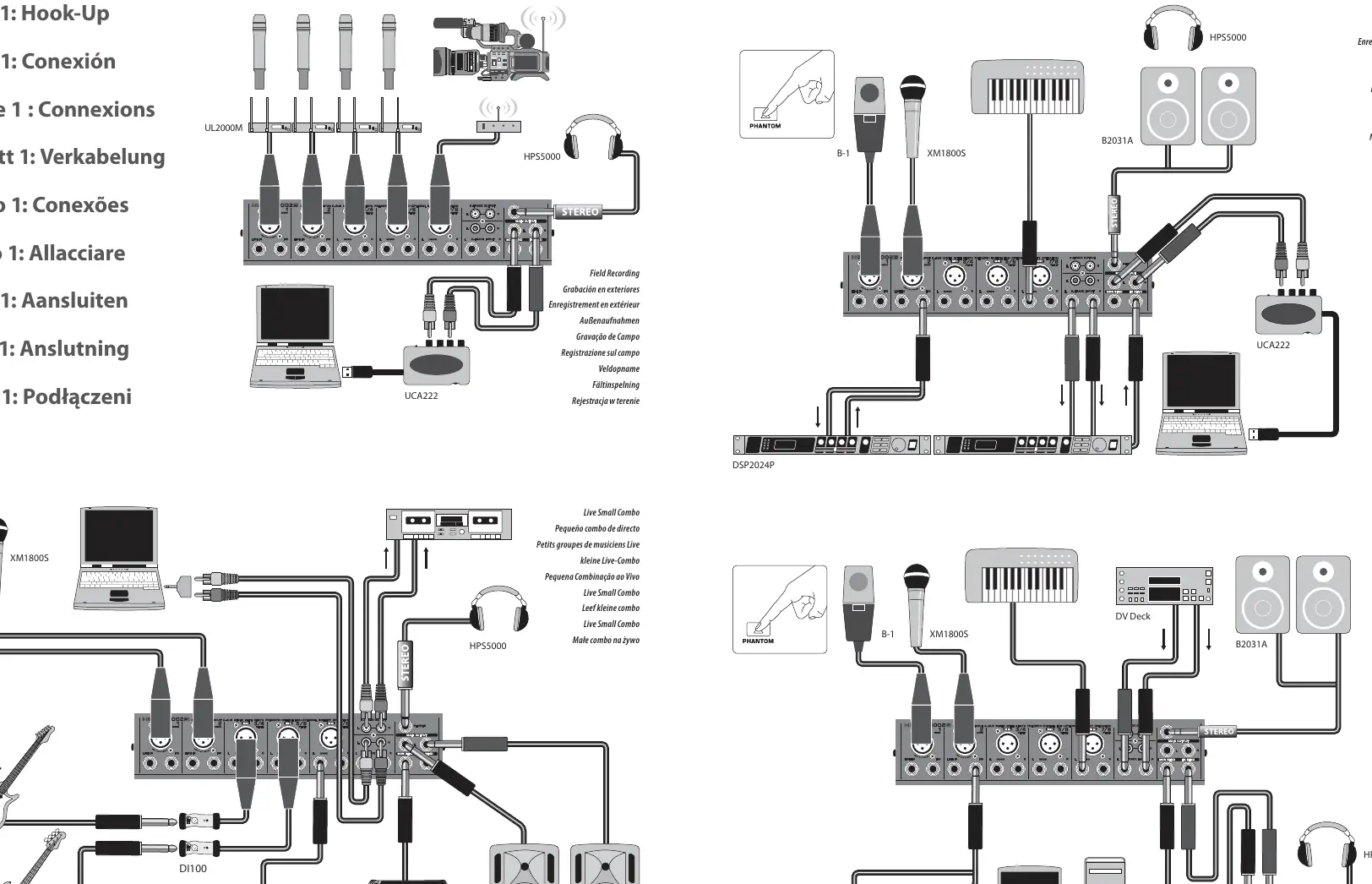
To begin using your mixer, ensure all controls are set to their default positions: EQ and PAN/BAL knobs centered, and all other controls turned down or off. Connect your microphones or instruments to the appropriate channels. For Channel 1, raise the fader to 0 and adjust the GAIN control while singing or playing until the CLIP LED flashes only occasionally. Repeat this process for all other channels being used. Once levels are set, turn on your PA system with the MAIN fader at minimum, then slowly raise it to 0 or your desired level. Finally, adjust the relative levels of your microphones and instruments using the individual CHANNEL faders.
Controls and Operation
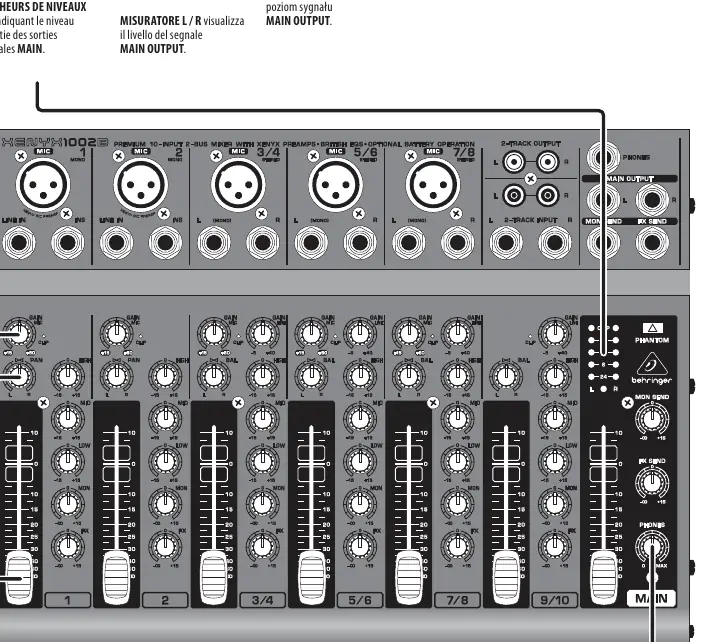
The mixer provides intuitive control over your audio signal. The GAIN knob adjusts the sensitivity of MIC and LINE inputs. The EQ knobs allow for adjustment of LOW, MID, and HIGH frequencies. The PAN/BAL knob determines the channel's position in the stereo field. For effects processing, use the channel FX knob and master FX SEND knob to route signals to an external processor. Similarly, the MON knob and MON SEND jack allow for the creation of an independent monitor mix for performers. The MAIN FADER controls the overall output level of the mixer.
Safety and Maintenance
Always operate the device in accordance with the manufacturer's instructions. Do not expose the mixer to rain, moisture, or heat sources. Ensure the power cord is protected from damage. If the device requires service, refer to qualified personnel only. For disposal, follow local WEEE regulations and do not discard with household waste. Batteries must be disposed of at designated collection points. The unit is suitable for use in tropical and moderate climates up to 45°C.
Manufacturer information
Behringer
Practical help
Common problems
CLIP LED lights up constantly
Reduce the GAIN control for that channel until the LED flashes only occasionally.
No sound from PA system
Ensure the MAIN fader is raised from the minimum position and that all connections are secure.
Distorted signal
Check if the preamp is overloading (CLIP LED) and reduce the GAIN or channel volume.
Before use
- Ensure all controls are set to default (EQ/PAN centered, others off).
- Verify correct mains voltage for your model.
- Check that all cables are high-quality professional grade.
- Ensure the mixer is placed on a stable surface.
- Confirm the PA system is off before connecting the mixer.
- Check that ventilation openings are not blocked.
Specs in practice
- XENYX Mic Preamp
- High-quality, low-noise microphone preamplifiers.
- Phantom Power
- Provides 23V (AC) or 18V (Battery) to XLR inputs for condenser microphones.
- Frequency Response
- The range of frequencies the mixer can accurately reproduce.
Images and diagrams
- Hook-up diagrams show connections for microphones, instruments, computers, and external effects processors.
- Control diagrams illustrate the function of knobs and faders on the mixer surface.
- The signal flow path is indicated by arrows in the hook-up diagrams.
Model compatibility
- Supports optional battery operation for field use.
- Compatible with standard condenser microphones via phantom power.
- Designed for use with professional 1/4 inch TS or TRS cables.

Manual page author
David Miller
Documentation analyst
Organizes user manual content into clear summaries, with attention to model details, product context, and everyday usability.