Home Appliances / Vacuum Cleaners
User Manual for Bissell CleanView XR and PowerLifter Turbo Stick Vacuum
Get the most out of your Bissell CleanView XR and PowerLifter Turbo stick vacuum with this comprehensive user guide. Learn how to assemble, charge, operate, and maintain your vacuum for optimal performance.
Quick answers from the manual
Quick answer
- To operate the vacuum, press the trigger to start in Medium mode. Use the + or - buttons to switch between Standard, Medium, and Turbo modes. Ensure the battery is charged before use and perform regular maintenance by emptying the dirt tank, cleaning the filter, and clearing the brush roll. p. 5, 6, 7
Key actions
- Emptying the dirt tank p. 6
- Cleaning the filter p. 6
- Maintaining the brush roll p. 7
First start
- Charge the vacuum before first use. p. 3
Show 4 more answers Show less
Problems and fixes
Machine won't turn on
Fully charge battery.
p. 8Maintenance and reset
- If error lights are blinking, turn the machine off and allow it to cool before turning it back on. p. 8
Technical specifications
| Parameter | Value | Meaning | Pages |
|---|---|---|---|
| Vacuum storage temperature | 32°F (0°C) - 113°F (45°C) | Recommended ambient temperature range for storage. | p. 2 |
Where to find it in the PDF
- Safety Instructions p. 2
- Assembly p. 3
- Charging p. 4
- Operation p. 5
- Maintenance p. 6, 7
Table of contents
Manual images
Click an image to enlargeQuick Guide from the Manual
This guide provides essential instructions for setting up and maintaining your Bissell CleanView XR or PowerLifter Turbo stick vacuum. Before first use, ensure the battery is fully charged. The vacuum features three power modes: Standard for hard floors, Medium for carpets (default), and Turbo for maximum suction.
Product Overview
The vacuum consists of the following main components:
- Hand Vacuum Assembly
- Power Trigger
- Battery and Battery Release Button
- Dirt Tank and Release Button
- Extension Wand
- Motorized Foot
- Brush Roll
Assembly
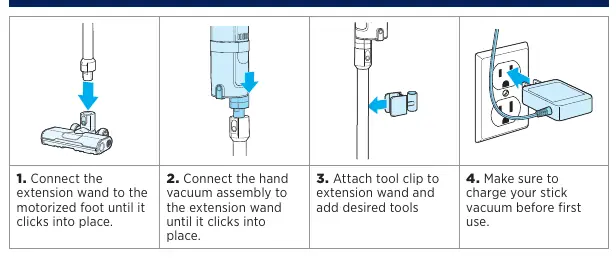
- Connect the extension wand to the motorized foot until it clicks into place.
- Connect the hand vacuum assembly to the extension wand until it clicks into place.
- Attach the tool clip to the extension wand and add desired tools.
- Charge the vacuum before first use.
Charging the Battery
You can charge the battery using the charging station or the wall mount:
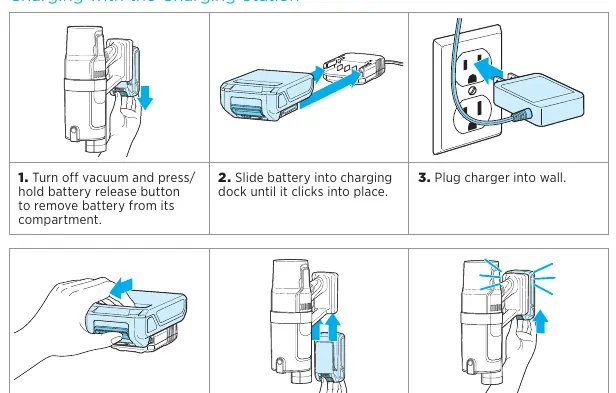
- Charging Station: Turn off the vacuum, remove the battery by pressing the release button, slide it into the charging dock, and plug the charger into the wall.
- Wall Mount: Insert the battery into the wall mount charger until it clicks.
Operating the Vacuum
Press the trigger to start the machine; it defaults to Medium mode. Use the + or - buttons on the screen to adjust the power mode:
- Standard: Quiet operation for hard floors.
- Medium: Balanced power for carpets and area rugs.
- Turbo: Maximum suction power (use sparingly to preserve battery life).
Maintenance
Emptying the Dirt Tank
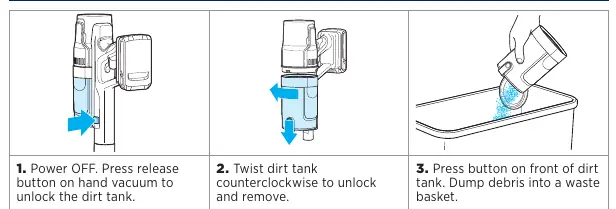
- Power off the vacuum and press the release button on the hand vacuum to unlock the tank.
- Twist the dirt tank counterclockwise to remove it.
- Press the button on the front of the tank to dump debris into a waste basket.
Cleaning & Replacing the Filter
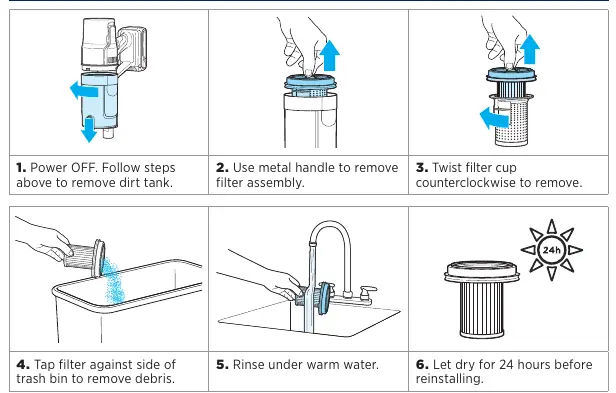
- Remove the dirt tank.
- Use the metal handle to remove the filter assembly.
- Twist the filter cup counterclockwise to remove it.
- Tap the filter against the side of a trash bin to remove debris.
- Rinse under warm water and let dry for 24 hours before reinstalling.
Maintaining the Brush Roll
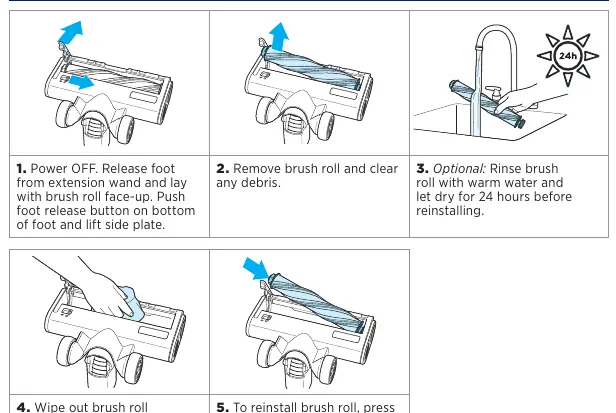
- Power off and release the foot from the extension wand.
- Push the foot release button on the bottom of the foot and lift the side plate.
- Remove the brush roll and clear any debris.
- Optionally, rinse the brush roll with warm water and let dry for 24 hours.
- Wipe the brush roll chamber with a cloth and reinstall.
Manufacturer information
Bissell Inc.
Practical help
Common problems
Machine won't turn on
Battery power is low; fully charge the battery.
Dust discharges from the exhaust
Check if the filter is damaged, incorrectly installed, or dirty. Clean or replace as necessary.
Loss of suction
Check if the filter is clogged or the dirt tank is full. Clean filter or empty tank.
Blinking Error Lights
Turn the machine off and allow it to cool before turning it back on. If the issue persists, contact Bissell Support.
Before use
- Charge the battery fully before the first use.
- Ensure the extension wand is clicked into the motorized foot.
- Ensure the hand vacuum is clicked into the extension wand.
- Verify the filter is installed correctly.
- Ensure the dirt tank is empty and properly attached.
Show more Show less
Specs in practice
- Standard Mode
- Quiet operation, best for hard floors, provides longer runtime.
Images and diagrams
- Assembly steps show the connection sequence of the foot, wand, and hand vacuum.
- Charging diagrams illustrate how to remove the battery and place it in the charging dock or wall mount.
- Maintenance diagrams show the counterclockwise twist required to remove the dirt tank and filter cup.
Model compatibility
- Use only Bissell battery pack 1638019 or 1635764.
- Use only Ten Pao charger CAM811.

Manual page author
David Miller
Documentation analyst